By Daily Carry Lab. Manufacturer documentation checked October 15, 2026 (Pacific).
Research disclosure: This guide uses manufacturer documentation, not hands-on testing. We have not measured reliability, performance or comfort.
Affiliate disclosure: As an Amazon Associate, Daily Carry Lab earns from qualifying purchases. Retailer links may earn a commission at no extra cost to you.
A portable macro pad makes sense when dedicated labelled keys solve a recurring control problem on a computer where you can install the required software. Start by naming six actions you actually need. If you cannot name them, using existing keyboard shortcuts may save both money and bag space.
This guide examines the Elgato Stream Deck Mini, SKU 10GAI9901, rather than ranking unverified generic pads. Its six LCD keys, fixed cable and software model make the tradeoffs clear. We selected it for a small wired workstation, not for claimed time savings, low latency or productivity gains. Daily Carry Lab has not timed any workflow or tested app integrations.
What the exact Mini adds to your travel kit
| Documented feature | Purchase implication | Drawback or check |
|---|---|---|
| Six customisable LCD keys | Labels can identify the actions assigned in the software | Six physical targets; more pages do not add more simultaneous physical keys |
| 84 × 60 × 58 mm; 160 g | Compare both packed space and desk footprint | Published dimensions/weight, not DCL measurements; allow room for the cable |
| Integrated non-detachable USB 2.0 cable, 150 cm | Wired connection is part of the kit | Cannot swap the cable for a shorter detachable one |
| Stream Deck software | Configuration and app actions are software-based | Installation policy and software compatibility matter |
Source: Elgato’s current Mini page, technical specifications explicitly identifying 10GAI9901. Do not copy connector details from a generic Stream Deck comparison into an exact-SKU packing plan.
The SKU-linked Quick Start Guide tells you to install the Stream Deck app and connect Mini directly to a USB port on the PC or Mac, without a USB hub. Its English connection illustration shows a rectangular USB-A plug. The current webpage’s generic system-requirements/comparator fields instead say Type-C. That mismatch is unresolved for a newly ordered unit. Verify the physical cable termination on the exact 10GAI9901 listing/package before choosing an adapter; this guide does not certify that a USB-C-only laptop can connect without one.
Hotkeys, app actions and extra layouts are different
The manufacturer describes hotkeys, app integrations, pages, folders, profiles and sequences of actions. A hotkey assignment and an app-specific plugin solve different problems: the former sends a configured shortcut, while the latter depends on the integration’s supported functions and requirements. Verify the exact action you need in the current software rather than assuming an app logo guarantees every control.
Pages and folders can expose additional layouts behind the six keys. That flexibility has a navigation cost: you may need to change pages to reach an action. Try writing down a fixed first page for the controls you use most often. If a workflow needs more than six immediately visible targets, compare a larger pad only after verifying its own specifications.
| Compatibility layer | What the current documentation says | Question before spending |
|---|---|---|
| Host OS | Current product page lists Windows 11 or newer and macOS 13 or newer | Does your intended host meet the current requirements? |
| App installation | Stream Deck is a free download | Can you install/configure it on a work or borrowed computer? |
| Specific actions/plugins | Current page describes integrations and a Marketplace | Is the action available for your app/version and permitted account? |
| Physical connection | SKU-linked QSG says direct port, no hub; cable is non-detachable | Does the exact unit’s plug match a permitted port? |
An old retailer title still mentioning Windows 10/macOS 10.11 does not override the manufacturer’s current software requirements. This guide does not promise standalone operation on arbitrary computers, mobile OS support or equal plugin behaviour across Windows and Mac.
Budget: test the action list before buying the pad
| Starting point | Cost evidence | Main tradeoff |
|---|---|---|
| Existing keyboard shortcuts | No additional hardware purchase | You need to remember/find the shortcuts |
| Exact Stream Deck Mini | Current hardware checkout total unknown; app download listed free | Fixed cable, six physical keys and software installation |
| Marketplace additions | Page describes free and paid icon packs; individual plugin/content terms need checking | Do not assume every extra, service or integration is included in the hardware price |
Build a list of actions, required software and any paid services before comparing the total. A paid icon pack is cosmetic unless it solves a need you actually have. No spend or subscription is required merely to follow this guide, and no price ceiling or payback period is claimed.
For a travel setup, check that the pad and fixed cable do not crowd the mouse or strain the host port. Keep a keyboard/mouse route to important controls. These are preparation checks; no desk-space or reliability experiment was conducted here. Our travel keyboards guide covers typing input, while USB-C docks address a separate host-port decision. A dock’s ports do not override the Mini QSG’s direct-connection instruction.
Compare Mini first when six labelled physical controls and allowed software solve a specific workflow. Keep existing shortcuts when installation is prohibited, the action list is uncertain, or the cable/connection mismatch remains unresolved for your intended purchase.
A profile backup is only part of a two-computer kit
If Mini will move between home and a permitted work computer, budget time for the software setup as well as the cable. Elgato’s profile backup and restore guide, updated May 19 and checked October 22, 2026, documents exporting all profiles through Settings, Profiles and Backup All. It also warns that restoring a backup replaces existing profiles.
| Before moving the pad | What to establish | Buying consequence |
|---|---|---|
| Preserve the destination computer’s layouts | Save its current profile backup before considering a restore | Avoid treating restore as an additive merge |
| Carry configured actions | Export the source profiles | A file is only one part of the working setup |
| Recreate plugin actions | Check permitted plugin installation on the destination | Hardware ownership alone does not provide the plugin environment |
| Use paid/account-based integrations | Check the individual service and account terms | Include any verified recurring cost; current totals are unknown |
Elgato says exported profiles contain key assignments without copies of the plugins. Missing plugins can produce question-mark keys. Its newer installation prompts apply to profiles created with Stream Deck 6.9 or later; that is not a promise that every older backup repairs itself.
For a travel workflow, rehearse the required actions on the second permitted computer before relying on the pad there. We have not tested backup recovery, Windows-to-Mac equivalence, account sign-in or a managed employer environment. If those checks fail, existing keyboard controls may remain the more practical purchase decision. Do not buy a second Mini merely to solve an unverified software or permission problem.
Six keys can follow the active app, with limits
For a Mini moving between several applications, decide whether changing key meanings automatically is helpful. Elgato’s Smart Profiles guide, checked October 25, 2026, ties the selected profile to the application in the foreground. It lists all Stream Deck models as compatible, but excludes UWP applications.
| Workflow choice | Setup or compatibility check | Drawback |
|---|---|---|
| Different controls in each app | In Stream Deck settings, select Profiles, the layout and its Application | The focused app determines the layout |
| Rehearse automatic switching | Minimize the Stream Deck software after configuration | Elgato disables Smart Profiles while the editor is open |
| Same controls throughout a task | Compare a stable manually selected layout | Automatic context changes may be undesirable |
Before buying more physical keys, write down which controls must stay visible when focus changes. Rehearse that action list with the intended applications; our suggestion is a planning exercise, not a measured productivity result. Smart Profiles do not resolve the Mini’s fixed-cable or direct-port requirements above, install missing plugins, or override workplace software policy. Current complete-kit costs remain unknown. We have not tested switching reliability or every application.
Choose separate keys or a timed sequence before buying more controls
Six physical keys may suffice when several actions always belong in one ordered routine. Elgato’s Multi Actions guide, updated June 17 and checked October 27, 2026, explains that one key can run a sequence in order. It does not permit nesting one Multi Action inside another.
| Requirement | Documented control to assess | Tradeoff |
|---|---|---|
| A longer pause between steps | Insert a standalone Delay action | A longer routine occupies time even if it saves key positions |
| More time for the receiving app | Adjust the per-action Next Action pause | The right interval depends on the actual workflow |
| A hotkey fails to register | Check Virtual Key Press duration; reducing it too far can lose input | Shortest settings are not a reliability guarantee |
| Independent decisions at each step | Keep separate keys or keyboard controls | More immediate control uses more visible targets |
Our buying implication is to try a short, permitted routine before choosing a larger pad solely for its key count. Keep the Mini’s direct-port, software and plugin requirements above. We have not measured action latency, tested recovery after a failed step, or established unattended reliability. Current hardware and service totals remain unknown.

Stream Deck Neo trades a larger footprint for eight visible keys
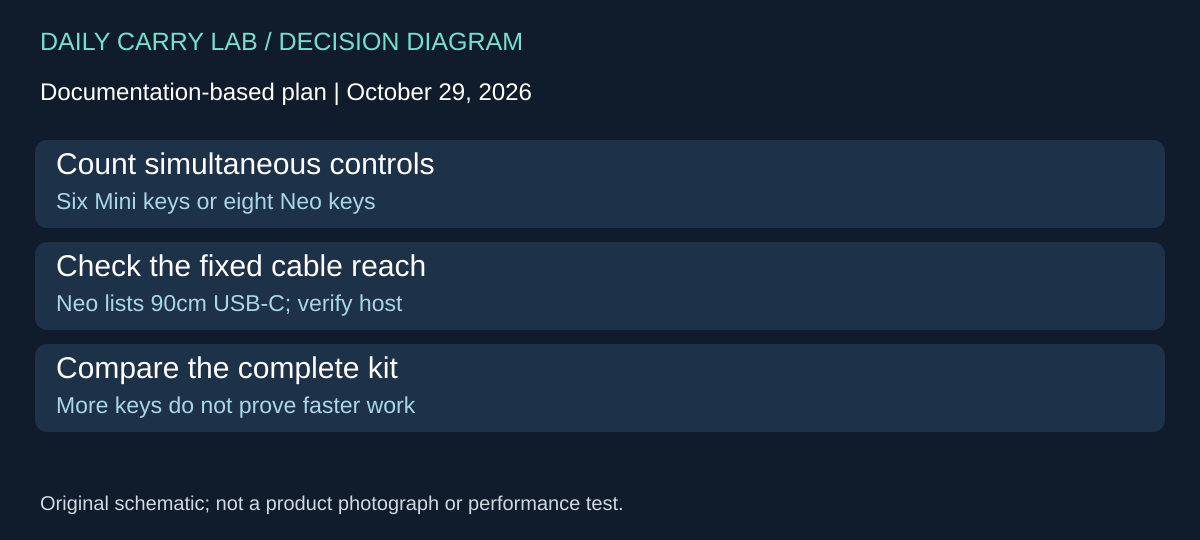
When the Mini’s six physical keys are the actual constraint, compare the Stream Deck Neo, 10GBJ9901, before assuming pages or a timed sequence solve the problem. Elgato’s Neo page, checked October 29, 2026, documents eight LCD keys, an Infobar and two Touch Points for moving between layouts. Those extra physical keys answer a different requirement from putting more layouts behind the Mini’s six targets. Neither arrangement establishes a productivity gain.
| Documented hardware choice | Mini retained above | Neo alternative | Tradeoff |
|---|---|---|---|
| Immediately visible LCD keys | Six | Eight | Count controls that must remain visible at once |
| Fixed cable | 150cm; exact connector conflict remains above | 90cm USB-C cable listed | Shorter reach can change where the pad sits |
| Published body and weight | 84 × 60 × 58mm; 160g | 107 × 26 × 78mm; 210g | Compare desk and bag space, not just key count |
| Host software | Current Mini requirements above | macOS 13+ or Windows 11+; Stream Deck software | Hardware alone does not remove installation policy |
Neo’s named USB-C cable gives a clearer documented connection option for a USB-C workstation than the unresolved Mini page/QSG mismatch. It does not retroactively resolve the plug on a Mini shipment. It also does not prove that a particular hub, adapter or managed computer supports your intended arrangement. Match the actual Neo and host rather than transferring a connection instruction between models.
A useful shortlist exercise is to draw six boxes and eight boxes, then place the controls needed during one real task. Keep unrelated occasional actions on another layout. If six boxes already hold everything important, Neo’s extra two keys may not justify the additional size or another purchase. If a seventh and eighth control must remain visible, the hardware difference is relevant. This is a planning method; we have not timed navigation or assessed key feel.
Budget and drawback: current exact-offer totals, added software services and any adapter costs remain unknown. The alternative is source-only here; no Neo retailer package, price or stock has been accepted. Compare the complete working kit with keeping Mini or existing keyboard shortcuts. Neo still depends on the intended software/actions and has a fixed cable. Check each plugin or service separately and retain another route to important controls. We have not installed its software, tested switching or demonstrated equivalent behavior across Windows and Mac.
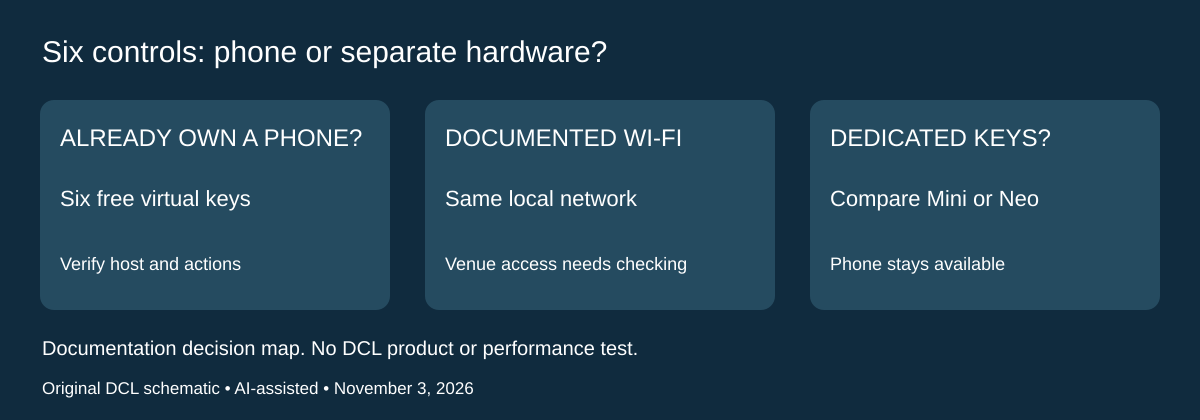
Try six phone controls before adding another physical pad
Research addition, November 3, 2026. The Mini and Neo comparisons above assume you want a separate device. Stream Deck Mobile offers a different first decision: whether an already-owned compatible phone can provide the controls you need before you buy physical keys. Elgato’s current Mobile page, checked today, advertises six free keys and an optional Pro tier with up to 64. This is a virtual controller, not a standalone computer.
The page’s FAQ says the computer performs the actions, while the phone or tablet supplies the controller. Its documented Wi-Fi arrangement requires the mobile device and computer on the same Wi-Fi network. That matters when the intended venue controls the network. Being connected to the internet does not establish that this local arrangement works there, and a permitted phone does not establish permission to install Stream Deck on the computer.
| Need | Candidate to evaluate | Remaining drawback |
|---|---|---|
| Establish whether six actions are useful | Mobile’s documented six-key free tier | Requires a compatible mobile device and working host setup |
| Keep the phone available for another task | Compare a separate Mini or Neo | Another object, cable and desk position |
| More than six virtual controls | Investigate the optional Pro tier | Current local purchase terms and total are not verified here |
| Work on a restricted venue network | Confirm the documented Wi-Fi path is permitted and usable | Do not assume every shared or guest network permits it |
Elgato’s free-use explainer also documents plugins, folders, pages and profiles for the six-key option. Those features let a reader investigate the action list; they do not establish equivalent touch feel, eyes-free control or reliability compared with LCD hardware keys. We have not tried the mobile app or either physical pad.
The product page lists iOS 15.0 or Android 9 or newer and Stream Deck 6.3 or newer, alongside its computer requirements. Treat those as the page’s listed requirements, not a promise that every current plugin or new desktop release works at that minimum. Verify the actual app, host software and essential actions before choosing a controller.
Budget and selection: the six-key tier is documented free on the checked date; extra hardware, paid plugins/services and Pro’s local checkout total remain unknown. No paid plan is needed merely to investigate those six controls with compatible equipment you already own. Preserve another way to reach important computer controls. Choose separate hardware for a demonstrated need such as dedicated keys or keeping the phone free, rather than buying it to discover whether an unverified action exists. The Wi-Fi route here is not a claim that every app version lacks other connection methods.
Shop the researched models
These Amazon links are affiliate links. Daily Carry Lab may earn a commission from qualifying purchases. Match the model and included contents to your needs; this guide is based on manufacturer-source research, without hands-on testing.
-
Elgato Stream Deck Mini 10GAI9901
Exact model; no unverified accessory inclusion promise
Check Elgato Stream Deck Mini 10GAI9901 on Amazon
Sources and limits
This guide compares published specifications and source documentation. Daily Carry Lab has not performed hands-on tests of the products in this guide. Consult the dated sources and verify the exact model and current terms before buying.
- elgato-mini primary documentation
- elgato-qsg primary documentation
- elgato-backup-web primary documentation
- Six keys can follow the active app, with limits primary documentation
- Choose separate keys or a timed sequence before buying more controls primary documentation
- October 29 neo primary documentation
- Elgato Mobile current page: FAQ JSON-LD, six-key/Pro and requirements
- Elgato May4 2026 free-use explainer: six keys, profiles/pages/folders/plugins
Related guides
Portable document scanners: choose the feed, power and file workflow
Compare Epson ES-50 and ES-60W simplex workflows with discontinued Brother DS-740D duplex limits, USB power and current software checks.
USB-C Ethernet adapters: match the host, driver and network rate
Compare TP-Link, Plugable and Belkin INC012 Ethernet adapters by host connector, link rate, tether reach and complete kit. Research; throughput untested.
Bluetooth numeric keypads: check layout, host and charging
Compare Satechi ST-XLABKM with the documented Microsoft Number Pad Windows route. Check layout, host support and replaceable battery versus charging.
Compact drawing tablets: active area and current driver checks
Compare One by Wacom Small CTL-472 by drawing area, packed size and dated Windows/Mac driver support. Screenless pen input tradeoffs without testing claims.