
By Daily Carry Lab. Manufacturer documentation checked October 15, 2026 (Pacific).
Research disclosure: We have not tested these products. This guide uses manufacturer documentation and practical compatibility checks. We have not measured performance, reliability or comfort.
Affiliate disclosure: As an Amazon Associate, Daily Carry Lab earns from qualifying purchases. Retailer links may earn a commission at no extra cost to you.
For desktop speakers, choose the audio path and power source together. A Bluetooth connection carries audio wirelessly; it does not remove the Pebble V3’s USB power connection. A USB wall supply can power the speakers without being a computer audio source.
We selected Creative Pebble V3, model MF1700, to explain this distinction because its product page and quick-start guide document three input paths. The reviewed retailer identity is the black version, ASIN B08F57GSJ7. Do not transfer this guide to the original Pebble, V2 or another colour/model bundle without checking its documentation. This is a desktop connection guide, distinct from our travel Bluetooth speaker guide; it does not claim portable battery operation.
Daily Carry Lab publishes research guides for people choosing everyday carry, travel and desk accessories. This guide explains documented compatibility and buying tradeoffs.
Does a USB connection power the speakers, carry audio, or both?
Creative Pebble V3 is a powered desktop stereo pair. A supported computer USB connection can carry audio and power; Bluetooth or AUX carries audio while USB power is still required. A wall supply alone does not provide computer USB audio. Choose the input path before buying adapters, then check the documented power conditions for the amplifier output you need. The AUX cable and power adapter are not included in the reviewed quick-start guide. Current checkout totals and DCL sound-quality measurements are unavailable.
Pick an audio path before choosing the USB socket
| Path | Signal connection | Power and setup limitation |
|---|---|---|
| USB audio from a computer | USB connection carries the audio | Check the host’s available power as well as audio support |
| Bluetooth | Bluetooth 5.0 audio connection | USB power still required; no latency result established |
| Analog AUX | 3.5mm stereo input | Separate USB power; AUX cable is not included according to the QSG |
| USB wall power alone | Supplies power | Does not supply computer USB audio; select an actual audio source |
The Creative QSG lists USB audio, Bluetooth and 3.5mm analog stereo input. It says first connection to a PC/Mac defaults to USB Audio mode; first connection to a power source without USB audio defaults to Bluetooth pairing. Those are documented initial states, not a guarantee of how a previously configured unit will behave. Use its source button and matching instructions if the expected input is not selected.
For a computer USB-C connection, check that your intended port is available after other work accessories are connected. If you need USB-A, Creative lists a USB-C-to-A converter. A connector adapter does not prove that the chosen socket can deliver the power required for the maximum output specification.
The output number depends on the supply and gain setting
Creative lists up to 8W RMS total and 16W peak. Its QSG conditions the 8W RMS figure on high gain with a 10W USB-C port or USB-C power adapter, or a 5V/2A USB-A power adapter. The power adapter is not included. These figures are manufacturer amplifier specifications; we have not measured loudness, distortion, fidelity or room coverage.
| Requirement | Evidence to check | Why it matters |
|---|---|---|
| Full listed output | Documented 10W supply and high-gain setting | A socket that fits is not enough evidence |
| Laptop USB power | Actual port capability and current setup | QSG advises a 10W USB source if laptop-port volume remains low |
| External power | Correct supply plus chosen Bluetooth/AUX signal path | Moving power off the computer does not keep USB audio automatically |
| Gain control | Switch under the right speaker, identified in the QSG | Gain selection and device volume are separate controls |
| Analog connection | Correct 3.5mm stereo cable | Cable is an additional item if you do not own one |
The manufacturer product page also describes the conditional output. For the physical gain control, use the QSG’s explicit switch description. We do not treat promotional audio language as listening evidence. A peak wattage figure cannot decide whether these speakers will suit a room, and Bluetooth version alone cannot establish audiovisual synchronization for games or editing.
Budget for the connection you will actually use
| Setup | Costs to include | Drawback |
|---|---|---|
| Existing computer speakers | No new speaker purchase | Does not add a separate stereo desktop pair |
| Pebble V3 on a suitable computer port | Exact black MF1700 pair; check included converter | Occupies a host port and draws host power |
| Bluetooth plus separate USB power | Pair plus suitable power adapter if needed | Wireless signal still leaves power wiring |
| AUX plus separate power | Pair, AUX cable and suitable supply if missing | Additional wiring and analog-output requirement |
Current delivered totals and stock are unknown. We assign no price ceiling or sound-quality ranking. Lay out both speakers, the connection between them, the host cable and the intended power socket before purchase. An available USB-C port behind a monitor may be convenient physically but still needs its own power/audio capability check.
Choose Pebble V3 when its documented input options and a powered desktop arrangement fit your setup. Keep comparing if you require battery operation, verified low Bluetooth latency, microphone input or a tested acoustic result: none is established by this research.
Use the input indicators before buying another adapter
A powered speaker can still be listening to the wrong source. The Pebble V3 MF1700 quick-start guide, Rev B, checked October 22, 2026, provides distinct indicators for input and Bluetooth state. Read them alongside the gain switch; blue alone does not identify one universal operating state.
| Indication in the QSG | Documented meaning | What to check next |
|---|---|---|
| Solid blue or solid green | USB Audio, high or low gain respectively | Intended computer audio selection and source volume |
| Solid cyan | AUX detected/connected | Analog source and cable |
| Pulsing blue or green | Bluetooth paired/connected, high or low gain | Which source is actually sending audio |
| Flashing blue or green | Bluetooth pairing, high or low gain | Pairing state rather than a completed audio connection |
These indicators describe mode, not a measurement of available USB power or proof that audio reaches the speakers. Retain the supply requirements above. Our next-check column is troubleshooting guidance, not a tested diagnostic guarantee.
The QSG says a master reset removes previously paired Bluetooth devices and restores defaults. Re-pairing is therefore part of that decision; consult the illustrated reset instructions before using it. Do not reset merely to compare wattage claims.
For an existing setup, check source selection before budgeting for a different adapter, cable or supply. Prices remain unknown. We have not tested these indicators, switching reliability or recovery behavior, and they do not apply automatically to Pebble V2 or other revisions.
Measure both cable routes before choosing the desk layout
Pebble V3 needs two different cable routes. Creative’s manufacturer specifications, checked October 24, 2026, list a 1.35m end-to-end connection from right to left speaker and a 1.2m USB-C cable to the computer for audio and power. One number is not a substitute for the other when a laptop sits on one side of a display.
| Published physical detail | Planning check | Limit |
|---|---|---|
| Right-to-left cable: 1.35m | Trace the actual route between intended speaker locations | Not a guaranteed 1.35m separation between speaker centers |
| Computer USB-C cable: 1.2m | Trace the route from the right speaker to the intended socket | Cable bends and routing consume some reach |
| Each speaker: 123 × 120 × 118mm | Reserve two places on the desktop | The two enclosures need space beyond the laptop footprint |
| Left 310g; right 360g | Account for both units if carrying them | These are manufacturer component weights, not our packed-kit measurement |
Measure the route around the display base, shelf or cable opening instead of measuring only a straight line across the desk. Leave enough freedom to avoid pulling on the speakers or the computer connector. This is a layout recommendation, not a tested minimum bend radius or a certified installation rule.
The two published unit masses sum to 670g. That is arithmetic from the specifications, not DCL weighing, and it does not establish shipping weight or the mass of a bag-ready setup with a supply and protection. Consider the full arrangement when comparing these desktop speakers with the separate travel-speaker category.
Budget and drawback: first check whether the documented cable arrangement reaches your existing computer or permitted power source. Current accessory prices and complete delivered totals are unknown. We have not established extension-cable support or that the speaker link is user-replaceable; do not budget on either assumption. If placing USB power closer solves reach, retain the earlier audio-path check: wall power alone does not supply computer USB audio. DCL has not tested cable durability, acoustic placement or sound quality at any separation.
Pebble Pro: separate the USB audio cable from optional PD power
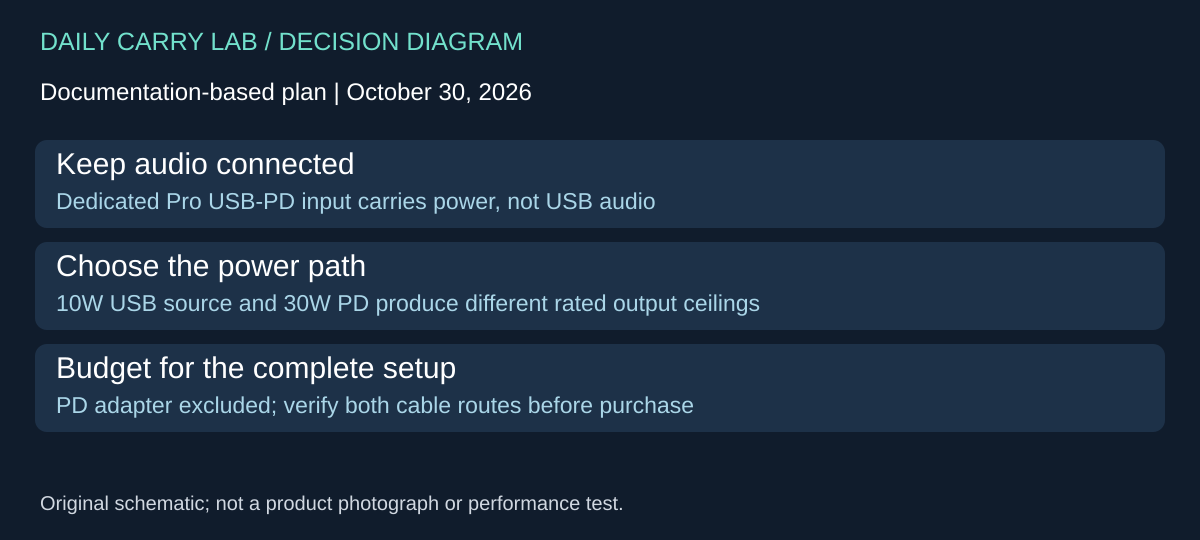
Creative Pebble Pro adds a different connection choice from the V3. Creative’s Pro product documentation, checked October 30, 2026, identifies a separate USB-PD power port that does not carry USB audio. This lets the buyer plan the audio connection and additional supply separately; it does not remove the audio-source requirement.
| Pro arrangement | Manufacturer specification | What to verify |
|---|---|---|
| Suitable 10W USB-C source | Up to 10W RMS total, 20W peak | Actual source capability; these are amplifier ratings |
| Separate 30W USB PD adapter | Up to 30W RMS total, 60W peak | Adapter is not included; use the dedicated PD input |
| USB PD port alone | Power only | USB-C audio, Bluetooth or AUX source still needed |
| USB audio plus separate PD | Separate audio and power paths | Keep both connections in the complete-kit plan |
Those are conditional specifications, not measured loudness or a sound-quality ranking against V3. A higher peak number does not establish better dialogue clarity, bass, distortion or audiovisual synchronization. We have not listened to either pair as a comparative test.
Creative lists a 1.5m USB-C-to-C cable, a 1.5m USB-C-to-A cable and a 1.2m AUX cable in the Pro package. The page also describes a 1.8m link between speakers. These Pro inclusions and lengths do not replace the V3 specifications above. Confirm the exact offered model and package; this addition does not approve a Pro retailer listing or transfer V3’s ASIN.
Before buying, draw the host-to-right-speaker path and the separate supply path. Leave access to each required socket and check whether the PD adapter can reach an outlet without stretching a cable. Compare that drawing with the V3 layout you already own. Moving power to an external adapter solves a different problem from changing an audio source.
| Need | Spending decision | Drawback |
|---|---|---|
| Existing V3 already fits the desk | Keep it if the documented arrangement meets your needs | No demonstrated listening benefit from replacement here |
| Want Pro’s separate PD arrangement | Price exact pair plus suitable PD adapter if missing | Extra supply and cable to place |
| Need battery operation | Continue separate travel-speaker research | Pro documentation describes USB power, not a self-contained travel battery |
Current delivered totals are unknown. Select around the actual connections and desk space; postpone any purchase that depends on a tested acoustic result we do not have.
Shop the researched models
These Amazon links are affiliate links. Daily Carry Lab may earn a commission from qualifying purchases. Match the model and included contents to your needs; this guide is based on manufacturer-source research, without hands-on testing.
-
Creative Pebble V3 MF1700
Black stereo desktop pair
Check Creative Pebble V3 MF1700 on Amazon
Sources and limits
This guide compares published specifications and source documentation. Daily Carry Lab has not performed hands-on tests of the products in this guide. Consult the dated sources and verify the exact model and current terms before buying.
Related guides
Portable document scanners: choose the feed, power and file workflow
Compare Epson ES-50 and ES-60W simplex workflows with discontinued Brother DS-740D duplex limits, USB power and current software checks.
USB-C Ethernet adapters: match the host, driver and network rate
Compare TP-Link, Plugable and Belkin INC012 Ethernet adapters by host connector, link rate, tether reach and complete kit. Research; throughput untested.
Bluetooth numeric keypads: check layout, host and charging
Compare Satechi ST-XLABKM with the documented Microsoft Number Pad Windows route. Check layout, host support and replaceable battery versus charging.
Compact drawing tablets: active area and current driver checks
Compare One by Wacom Small CTL-472 by drawing area, packed size and dated Windows/Mac driver support. Screenless pen input tradeoffs without testing claims.