
By Daily Carry Lab. Manufacturer documentation checked October 15, 2026 (Pacific).
Research disclosure: We have not tested these products. This guide uses manufacturer documentation and practical compatibility checks. We have not measured performance, reliability or comfort.
Affiliate disclosure: As an Amazon Associate, Daily Carry Lab earns from qualifying purchases. Retailer links may earn a commission at no extra cost to you.
An M.2 enclosure is worth considering when you already have an identifiable bare SSD and want to attach it by USB. Start with the drive’s exact model, protocol and physical length. A USB-C connector on the enclosure does not tell you whether the drive inside will fit or work.
We selected Sabrent EC-SNVE as a documented example because its manufacturer explicitly lists both SATA and NVMe support. This is a single-model compatibility guide, not a tested ranking of enclosures. It answers a different question from our ready-made portable SSD guide: whether a drive you own is a sensible starting point for an external-storage assembly.
Daily Carry Lab publishes research guides for people choosing everyday carry, travel and desk accessories. This guide explains documented compatibility and buying tradeoffs.
Will an M.2 enclosure work with the SSD you already own?
An M.2 enclosure houses a bare SSD and connects it to a computer by USB. Consider Sabrent EC-SNVE for an identified SATA or NVMe drive with documented length support. Pause for a 2230 drive: the maker’s length lists conflict. Check heatsink clearance, host data capability and cable support separately. Its 10Gbps interface is a ceiling, not a measured file-copy speed. If you need to buy both drive and enclosure, compare the complete assembly with a ready-made portable SSD. Current checkout totals are unknown.
Drive compatibility: protocol and dimensions are separate checks
| Your drive | EC-SNVE evidence | Buying consequence |
|---|---|---|
| M.2 SATA, 2242/2260/2280 | Listed in Sabrent’s product highlights | Confirm exact drive identity and physical clearance before ordering |
| M.2 NVMe, 2242/2260/2280 | Listed in the same highlights | A faster internal interface does not raise the enclosure’s USB ceiling |
| M.2 2230 | Present in specifications, absent from highlights | Ask Sabrent to confirm retention for your exact drive; fit remains unresolved here |
| Drive with an attached heatsink | Physical clearance not established by the manufacturer evidence reviewed | Do not assume the cover will close or remove hardware merely to make it fit |
| A 2.5in SATA drive, mSATA or unidentified module | Not established by this M.2 selection | Identify the module and choose the appropriate enclosure separately |
The EC-SNVE product page is internally inconsistent about 2230: its highlights list 2242/2260/2280, while its specification text also includes 2230. We retain that uncertainty rather than treating the longer list as definitive. Matching an advertised protocol does not establish mechanical retention for every length or heatsink configuration.
Read the label on the drive and look up its manufacturer specification before spending money. If all you know is that it came from a laptop, stop at identification. This guide does not establish support for proprietary laptop modules or make a successful data-recovery promise.
A 10Gbps interface is a ceiling, not a file-copy result
Sabrent specifies USB 3.2 transfer support up to 10Gbps, tool-free installation and a supplied 8in USB-C to USB-C cable. These are manufacturer specifications. We have not measured transfers, heat, disconnect behavior or sustained performance. Do not read the interface rate as a guaranteed storage speed, and do not convert it into a promised copy time.
| Part of the path | What to verify | Limit to retain |
|---|---|---|
| Computer port | Its documented data capability, not just connector shape | A lower-capability host does not become a 10Gbps host through an enclosure |
| Cable | Data support and connector fit | A spare charge cable is not an equivalent substitute simply because it fits |
| Hub or dock | Exact host link and other attached traffic | The enclosure headline does not guarantee the complete path’s throughput |
| Drive and workload | Correct protocol, health, available space and intended operation | No sustained speed or thermal result has been measured by DCL |
| Operating system | Current maker support and how your existing data is formatted/protected | Recognition does not establish access to every existing volume |
Sabrent’s FAQ says it communicates through standard protocols on macOS and Linux. That is a manufacturer compatibility statement, not our verification of every current OS release. Review current support for your exact host if it is a purchase requirement. Our USB-C cable buying guide explains why cable charging and data capabilities need separate checks.
Budget and assembly drawbacks
| Choice | Cost evidence | Main drawback |
|---|---|---|
| Keep using an existing external drive | No enclosure purchase required | Does not reuse a bare internal SSD |
| EC-SNVE with an already owned compatible SSD | Current enclosure checkout total unknown | You own drive identification, assembly and host checks |
| EC-SNVE plus a newly purchased SSD | Add both exact items and any required host adapter | Compare the complete assembly with a ready-made SSD, not enclosure price alone |
| Buy specifically for a 2230 drive | Current total unknown; fit clarification needed first | Published length lists conflict |
The retail identity under review is EC-SNVE enclosure only, ASIN B08RVC6F9Y; an SSD is not included. No current price band, stock promise or recovery-service substitute is implied. Tool-free installation describes the fasteners, not protection against a drive being mishandled or the wrong disk being initialized. Keep an independent copy of important data and consult the matching instructions before assembly or any operation that could erase a disk.
Choose this route when reusing a known compatible SSD is the main benefit. Choose a ready-made external SSD when you would otherwise buy both parts and do not need a removable bare-drive setup. Neither choice has been proven faster or more reliable by DCL.
Reusing an encrypted SSD requires an unlock path too
Before buying an enclosure for an old laptop drive, establish whether you can access its protected files. Physical fit and USB detection answer different questions from authorization. Microsoft’s BitLocker recovery guidance, checked October 27, 2026, covers recovery prompts for data and external drives as well as startup drives. It identifies the recovery key as a 48-digit number.
| What you have | Preparation before buying or changing the disk | Limit |
|---|---|---|
| A drive asking for BitLocker recovery | Note the first eight digits of its recovery key ID and match the saved key | The ID identifies the key; it is not the unlock credential |
| A personally managed drive | Check the account, printout or saved USB record used when protection was configured | A different Microsoft account may not hold that key |
| A former work or school drive | Ask the organization’s IT support about authorized access | Ownership and account policy still matter |
| No matching key | Preserve the drive and seek the appropriate support | Microsoft says it cannot recreate a lost recovery key |
DCL’s decision rule is to settle access before paying for a faster enclosure or assuming initialization is needed. Do not reset, format or initialize a wanted-data disk to dismiss an unlock prompt. The earlier blank-disk instructions remain a separate case.
No private key belongs in an accessory comparison or support screenshot shared publicly. We have not tested this enclosure with an encrypted drive or established macOS/Linux unlock support. Current recovery and replacement costs are unknown; an enclosure is not a decryption or recovery guarantee.
Decide whether the SSD is blank before following Windows setup
An enclosure purchase does not settle what Windows should do with the drive’s contents. Microsoft’s new-disk initialization guide, checked October 22, 2026, applies to an uninitialized disk with no existing data. It warns that initialization erases data; an old drive containing wanted files is a different problem.
| Drive situation | Next decision | Stop condition |
|---|---|---|
| Known new, blank SSD | Follow matching Windows preparation instructions; administrative or Backup Operators permission is required | Confirm the selected disk before any write |
| Used SSD containing wanted files | Preserve a backup and investigate why files are inaccessible | Do not initialize merely because File Explorer is empty |
| Disk with errors or uncertain history | Use the documented troubleshooting path or obtain suitable help | No recovery guarantee from this enclosure |
| Work computer without required permission | Ask the authorized administrator | Buying hardware does not grant disk-management rights |
Microsoft separates initialization from creating a volume, assigning its drive letter and choosing its file system. It also notes that some USB drives cannot be initialized through this procedure. The document does not certify EC-SNVE or resolve its 2230 discrepancy.
Before buying, identify the SSD’s contents and who can prepare the host. Include independent backup capacity if missing; current total costs are unknown. DCL has not performed these operations or recovered data from this enclosure. Never use this buyer checklist as permission to erase a disk.
Include safe disconnection in the reusable-drive decision
The value of a reusable enclosure depends on the routine around it as well as its drive fit. Sabrent describes EC-SNVE as tool-free. That concerns installing or removing the bare SSD. It does not establish that an operating system has finished using the connected volume or that you can open the enclosure during use.
Microsoft’s safe-removal guidance for Windows, checked October 24, 2026, recommends safely removing external storage before disconnecting it. Its system-tray procedure selects the particular device for ejection and waits for the safe-to-remove notification. Follow the instructions for the actual Windows version and device; this general document is not EC-SNVE certification.
| End-of-work check | Decision before unplugging | Buying or workflow drawback |
|---|---|---|
| Several external drives connected | Identify the intended device in the removal menu | A generic USB icon does not identify the enclosure for you |
| Eject command completes | Use the documented safe-removal notification | A finished application window is not the same evidence |
| Removal icon absent | Consult Microsoft’s hidden-icon/settings instructions | Absence can also mean the hardware is not connected or recognized |
| Bare SSD needs changing | Finish host disconnection before following enclosure instructions | Tool-free construction does not replace the host’s storage workflow |
If you frequently close a laptop and leave in a hurry, consider whether this extra device and disconnection step fit the way you actually work. A ready-made external SSD still has an external-storage workflow; switching products does not eliminate it. An enclosure adds a separate assembly decision when changing the internal module.
Budget and drawback: keeping a working storage setup can avoid a purchase when the difficulty is the disconnect routine. If reusing a bare SSD remains the goal, include any missing backup capacity in the complete cost; current totals remain unknown. Do not treat ejection as a backup or as proof that an earlier interrupted copy is intact. DCL has not tested data integrity, removal timing or recovery with EC-SNVE. The existing protocol, 2230 retention and initialization limits remain separate checks.
When a USB4 enclosure changes the reuse decision
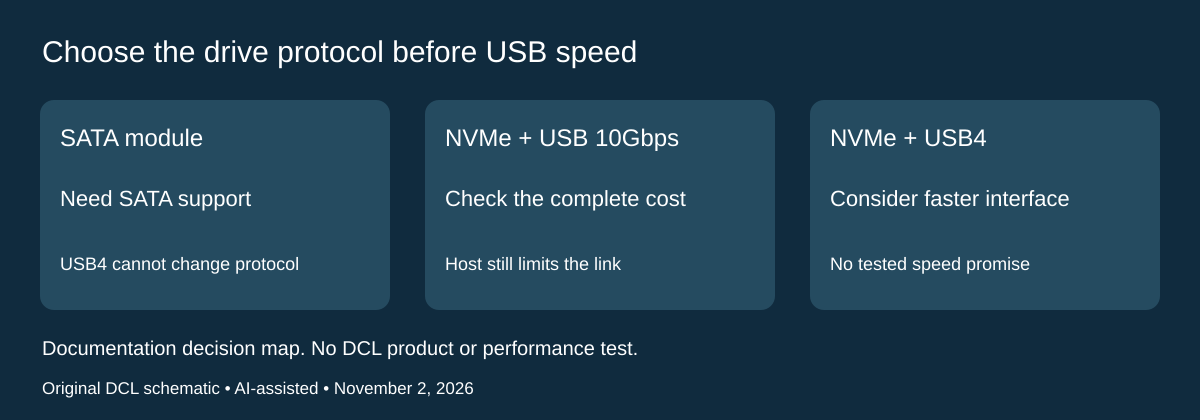
November 2, 2026 research update: Consider StarTech 1USB4-NVME-ENCLOSURE when the drive you already own is NVMe and you want a documented USB4 option. It is not a replacement for the SATA compatibility of EC-SNVE. The manufacturer datasheet explicitly excludes M.2 SATA even though it describes both M-Key and B+M-Key NVMe modules. Match the protocol on the SSD maker’s specification; the notch alone does not settle this purchase.
| Your starting point | Documented StarTech constraint | Decision before spending |
|---|---|---|
| M.2 SATA SSD | Unsupported | Keep looking for a SATA-capable enclosure; a USB4 host cannot fix a drive-protocol mismatch |
| NVMe 2230, 2242, 2260 or 2280 | These lengths are listed | Confirm the exact SSD and assembled clearance; this does not resolve the separate EC-SNVE 2230 discrepancy |
| NVMe with USB4 or Thunderbolt host | Published interface ceiling is 40Gbps | Consider the faster interface only if the host and workflow can use it; no DCL transfer benchmark is available |
| NVMe with USB 10Gbps host | Backward compatibility is documented | Compare the complete cost with a 10Gbps enclosure before paying for capacity in the link you cannot use today |
The package list identifies an enclosure, pre-installed thermal pad, USB4 cable, screwdriver and documentation. An SSD is not listed. This matters when comparing a bare enclosure with a ready-made portable drive: a lower enclosure price would not represent the same purchase. The datasheet identifies UPC 065030907248; it does not establish the identity, condition or contents of an arbitrary marketplace offer.
For packing, StarTech lists a 30.5cm cable and a 125 × 65 × 28.8mm enclosure weighing 340g. Check where the drive can rest beside the laptop before choosing such a short connection. Those exterior measurements do not certify fit with an SSD’s existing heatsink, a sleeve, or a crowded USB port. We have not assembled or weighed this unit.
The enclosure uses bus power and a passive thermal design. Do not turn the maker’s cooling description into a promise that a particular drive will stay at full speed. Likewise, the connector table’s “100W PD Input” label is not evidence of a laptop charging passthrough feature; this guide does not recommend it as a charger.
Budget and drawbacks: current delivered enclosure and SSD costs remain unknown. If an existing 10Gbps assembly already handles your workload, keep it until a concrete limitation justifies replacement. If buying both parts, compare drive, enclosure, backup provision and any required host connection against the portable SSD options. A faster enclosure neither recovers an encrypted drive without its unlock path nor creates another copy of your files.
Shop the researched models
These Amazon links are affiliate links. Daily Carry Lab may earn a commission from qualifying purchases. Match the model and included contents to your needs; this guide is based on manufacturer-source research, without hands-on testing.
-
Sabrent EC-SNVE
Enclosure only; SSD not included
Check Sabrent EC-SNVE on Amazon
Sources and limits
This guide compares published specifications and source documentation. Daily Carry Lab has not performed hands-on tests of the products in this guide. Consult the dated sources and verify the exact model and current terms before buying.
Related guides
Portable document scanners: choose the feed, power and file workflow
Compare Epson ES-50 and ES-60W simplex workflows with discontinued Brother DS-740D duplex limits, USB power and current software checks.
USB-C Ethernet adapters: match the host, driver and network rate
Compare TP-Link, Plugable and Belkin INC012 Ethernet adapters by host connector, link rate, tether reach and complete kit. Research; throughput untested.
Bluetooth numeric keypads: check layout, host and charging
Compare Satechi ST-XLABKM with the documented Microsoft Number Pad Windows route. Check layout, host support and replaceable battery versus charging.
Compact drawing tablets: active area and current driver checks
Compare One by Wacom Small CTL-472 by drawing area, packed size and dated Windows/Mac driver support. Screenless pen input tradeoffs without testing claims.