By Daily Carry Lab. Primary documentation checked October 30, 2026 (Pacific).
Affiliate disclosure: As an Amazon Associate, Daily Carry Lab earns from qualifying purchases. Retailer links may earn a commission at no extra cost to you. This guide uses manufacturer source links; no exact retailer offer is verified.
Research disclosure: We have not tested these products or measured charging speed, battery gain, heat or runtime. Selection follows documented power profiles and the exact Mac connection. Manufacturer performance claims are not DCL results.
For a MacBook travel kit, select a wired USB-PD path before battery capacity. A magnetic phone-battery recommendation does not answer this laptop decision. Identify your Mac, the charging port and cable, then compare the bank’s single-port output with the adapter Apple recommends for that model. A pack’s total wattage cannot replace those checks.
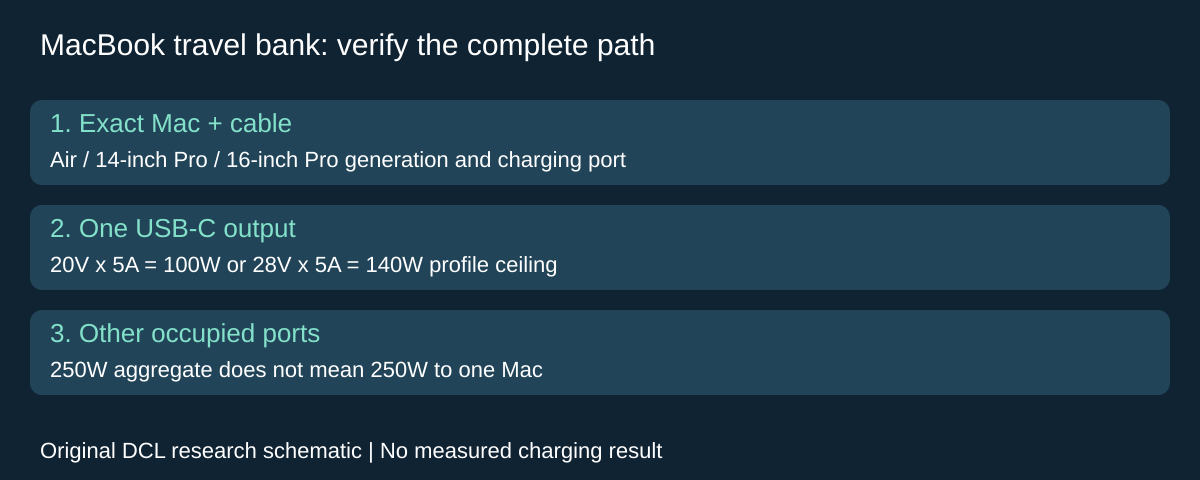
Select for ordinary charging or a documented fast-charge arrangement
Apple’s power-adapter guide allows USB-PD charging sources for USB-C charging Macs and recommends meeting the model’s adapter wattage for the best experience. Its fast-charge guide describes a narrower set of Mac, supply and cable combinations. Treat ordinary charging and fast charging as separate goals.
| Mac reference | Relevant Apple fast-charge example | Buying implication |
|---|---|---|
| MacBook Air introduced in 2022 or later | 70W Apple adapter with USB-C charge cable or MagSafe 3 cable | Match your model and bank profile; a third-party bank is not that tested adapter |
| 14-inch MacBook Pro introduced in 2021 or later | 96W Apple adapter with USB-C charge cable or MagSafe 3 cable | Budget power for the laptop port, rather than the bank’s combined headline |
| 16-inch MacBook Pro introduced in 2021 or later | 140W Apple adapter with MagSafe 3 cable | Older and newer USB-C paths differ; check the next row before choosing a cable |
| 16-inch MacBook Pro, November 2023 or later | Apple also lists its 240W USB-C charge cable with the 140W adapter | A USB-C connector alone does not establish the same fast-charge path for earlier models |
These are selected reference combinations, not a complete Apple compatibility list or a promise for a power bank. Check Apple’s current exact-model instructions before ordering. Its charge-time results depend on conditions; we do not transfer those results to an untested kit.
A documented bank candidate: Anker Prime A1340
We selected the Anker Prime 27,650mAh Power Bank, model A1340, as a research candidate because Anker publishes separate USB-C profiles and an aggregate rating. This is a qualification example, not a universal winner or a current-stock recommendation. Do not silently substitute another Anker Prime capacity or revision.
| Manufacturer field | A1340 documentation | Practical limit |
|---|---|---|
| USB-C profile | 20V/5A and 28V/5A among its listed outputs | Arithmetic ceilings of 100W and 140W; the Mac must negotiate a supported path |
| Aggregate output | Up to 250W total | One Mac does not receive 250W |
| Ports | Two USB-C and one USB-A | Check allocation for the combination you actually occupy |
| Capacity and mass | 27,650mAh; listed 665g | Neither figure is measured usable laptop energy or a carry-comfort result |
Source: Anker’s exact A1340 specifications (source link unavailable). Anker distinguishes the single-port ceiling from the combined total. We have not established a guaranteed per-port allocation under every multi-device arrangement, or performance when the bank is hot or partly depleted.
Start with one direct laptop connection if you do not need peripherals. If you also charge a phone, recheck the occupied-port budget before relying on the laptop’s single-port rating. A dock adds its own power and host constraints; buying a larger bank cannot establish an undocumented dock path.
Drawbacks: this is a substantial extra item to carry, and a matching output ceiling does not establish sustained performance or fastest charging. The correct cable and the Mac generation remain part of the system. We have not verified a current delivered price, retailer identity or package contents for an offer.
Choose capacity after the connection works
Do not turn 27,650mAh directly into MacBook charging hours: cell-capacity units alone do not specify energy delivered through the cable. Usable output energy, conversion losses, the Mac’s changing workload and its starting charge are unmeasured here. We therefore give no full-charge count or extra-workday promise.
Before a trip, check your actual arrangement under its intended workload and verify that the battery level behaves as needed. A charging indicator alone is not a measurement of how quickly stored energy increases. If the goal is simply to bridge a short gap before an outlet, buying maximum capacity may add weight without useful benefit; that is a planning judgment, not a test result.
| Plan | Complete-kit budget as of October 30 | Main tradeoff |
|---|---|---|
| Existing suitable wall adapter at destination | No new bank purchase if the existing kit meets the need | Requires outlet access |
| A1340 with a suitable direct Mac charging cable | Delivered total unknown; confirm bank revision and cable separately | Finite stored energy and additional mass |
| Bank plus dock and phone | All-in total unknown; check dock, cable and occupied-port allocation | More components and an unresolved shared-power budget unless documented |
For cable selection, use the 100W laptop-cable guide. Confirm a suitable higher-power path separately when the chosen arrangement exceeds that guide’s scope. For a general USB travel kit rather than Mac-specific cable and generation choices, see the large power-bank guide. Current carrier requirements and the exact battery label must be checked separately before flying; no airline acceptance is established by this guide.
Sources and limits
This guide compares published specifications and source documentation. Daily Carry Lab has not performed hands-on tests of the products in this guide. Consult the dated sources and verify the exact model and current terms before buying.
Related guides
Is Anker Prime worth it? Power-bank specs, ports and tradeoffs
Assess Anker Prime A110B and A110A by single-port power, total output, recharging requirements and carry weight.
Handheld gaming power banks: match the USB-C profile before capacity
Compare Steam Deck OLED, original ROG Ally and Ally X RC72LA power paths, Anker output profiles, and the limits of runtime estimates.
High-capacity power banks: weigh energy, mass and flight limits
Use exact Wh and carried mass rather than a 30,000mAh headline. Compare a documented CARBO 20 example with current FAA and airline limits.
Anker vs UGREEN power banks: compare exact models and support
Compare documented A1336 and UGREEN 90597A limits, note missing shared-power evidence, and check seller-specific warranty terms without a universal brand ranking.