By Daily Carry Lab. Manufacturer research checked October 13, 2026 (Pacific).
October 28, 2026 research update: Ally X RC72LA connection planning and processor-power versus whole-system energy. Original bank and handheld comparisons below retain their stated research date.
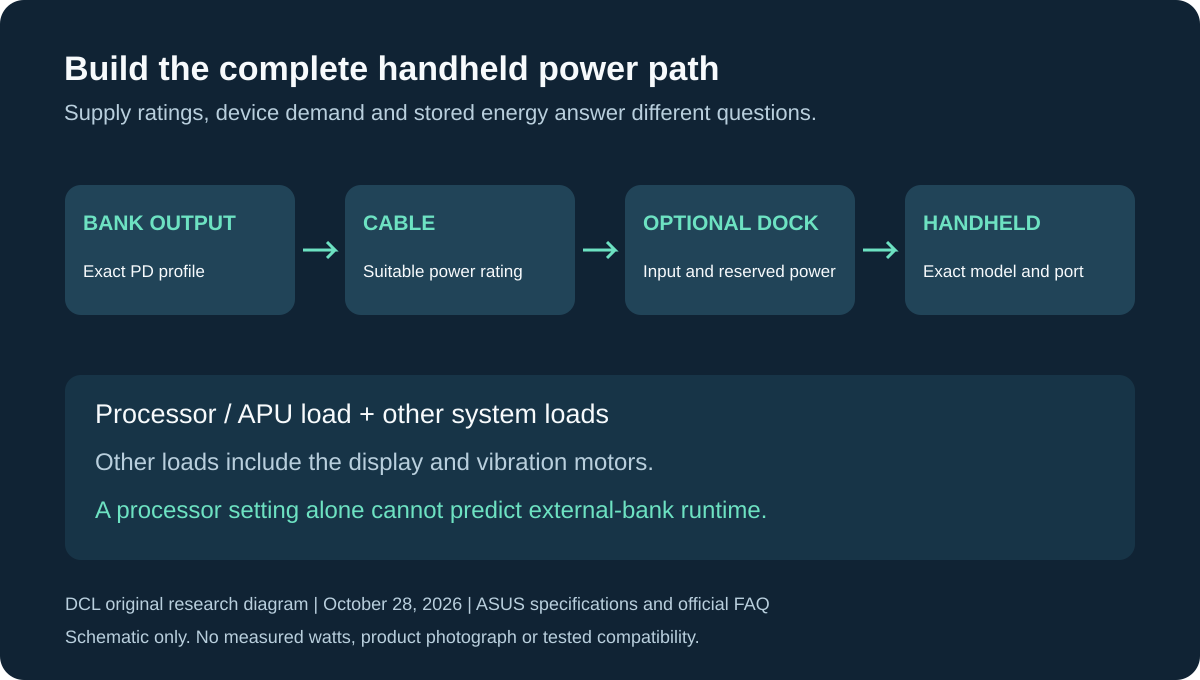
Original DCL research diagram, October 28, 2026. Schematic only: no product photograph, measured power flow or tested compatibility is implied.
Which handheld charging kit should you compare?
Match the exact handheld and occupied power path first. Steam Deck OLED uses a documented 45W supply reference; the original Ally and Ally X RC72LA references here are 65W. These are supply ratings, not continuous draw or guaranteed gaming performance. For Ally X, distinguish its two USB-C ports and any intervening dock. Processor watts alone cannot establish system draw or runtime; the new sections below explain that decision before buying more bank capacity.
Affiliate disclosure: As an Amazon Associate, Daily Carry Lab earns from qualifying purchases. Retailer links may earn a commission at no extra cost to you. Manufacturer links below identify our sources.
A handheld gaming power bank needs a compatible USB-C output profile before extra capacity becomes useful. A250W total rating is not 250W delivered to one handheld. Nor does a pack’s cell capacity establish how many hours a demanding game will run.
This researched comparison uses Steam Deck OLED and the original ROG Ally2023 as device references, then compares documented Anker737 PowerCore24K A1289 and Anker Prime27K250W A1340 outputs. We chose those batteries because primary pages identify the relevant voltage/current profiles. DCL has not measured charging while playing, battery gain, frame rates, sustained output, heat or added runtime. This is not a blanket recommendation for Switch, Legion Go or later revisions. The October 28 section separately evaluates the documented connection requirements of Ally X RC72LA.
Start with the exact handheld
| Device reference | Manufacturer evidence | Limit of that evidence |
|---|---|---|
| Steam Deck OLED | Valve lists 45W PD3.0 USB-C supply and 50Wh internal battery | Does not promise 45W draw continuously or runtime from an external pack |
| ROG Ally2023 | ASUS lists 65W supply at20V,3.25A and 40Wh internal battery | Does not prove a third-party pack unlocks a particular performance mode |
| Other handheld/revision | Obtain its own supply and USB-PD documentation | This guide does not substitute one console’s requirement for another |
Sources: Valve OLED specifications, ASUS original Ally specifications. Supply ratings are reference points, not DCL measurements of device consumption. Match the exact handheld generation before treating 45W or 65W as relevant.
Compare ports, not the headline alone
| Documented specification | Anker737 A1289 | Anker Prime A1340 |
|---|---|---|
| Cell-capacity label | 24,000mAh | 27,650mAh |
| USB-C ports / USB-A ports | 2 /1 | 2 /1 |
| Useful listed C profiles | 15V3A;20V5A;28V5A | 15V3A;20V5A;28V5A |
| Single C ceiling from highest listed profile | Up to140W | Up to140W |
| Aggregate output limit | 140W total | 250W total; QSG lists240W for C+C,205W for C+A |
| Manufacturer size / weight | 155.7 ×54.6 ×49.5mm /630g | 57 ×49.7 ×161.7mm /665g |
Sources: A1289 page, A1340 page (source link unavailable), A1340 model-bound guide. Multiplying28V by5A gives the140W profile ceiling; it does not mean a handheld negotiates that profile. The A1340 page and guide differ at12V, so this comparison uses only the relevant15V/20V/28V values on which they agree.
Anker737: compare for one handheld with a documented high-power C port
A1289 documents20V5A, giving an output-profile ceiling above the original Ally’s stated20V3.25A supply reference. That establishes a reason to compare the exact model; it does not guarantee battery gain while playing or a particular turbo mode. Its140W figure is also the total ceiling, so two 140W USB-C devices cannot both receive their individual maxima.
**Drawback:**630g is substantial carried mass, and the page’s individual-port specifications do not settle every simultaneous-device allocation. For the simplest documented starting setup, connect the handheld alone and verify behaviour on your actual firmware and workload rather than assuming a second phone leaves its negotiated power unchanged.
Anker Prime A1340: compare when multiple high-power devices matter
A1340 adds a higher documented aggregate ceiling. Its guide lists240W for both USB-C ports and205W for one USB-C plus USB-A, but those totals alone are not a guaranteed per-device assignment. A larger total is useful only when the occupied-port allocation and each device’s negotiation meet your needs.
Drawback: the listed 665g weight and larger cell capacity add carry burden without establishing more gaming time in this guide. We have not verified continuous operation at the maximum, charge-through gaming or transition interruptions. No full-charge estimate or universal premium recommendation follows from the label.
Cable, capacity and carry checks
| Check | Action | Why it matters |
|---|---|---|
| More than60W USB-C requirement | Use a cable explicitly rated for the intended output | The original Ally’s65W reference exceeds a 60W cable ceiling |
| Dock or accessory between battery and console | Check its input, reserved power and passthrough specification | Battery-port output is not proof of console input after a dock |
| Phone charging at the same time | Obtain the occupied-port table | Individual maxima cannot be assumed simultaneously |
| Travel by air | Read pack’s exact Wh marking and current carrier rules | We do not infer airline eligibility from mAh or guarantee boarding |
| Recharge the pack | Match its documented input to your wall adapter | A weak recharge setup can leave the pack unready |
The USB-C cable guide explains power-rating checks. The multiport wall-charger guide covers a different shared-output decision. These batteries do not replace a compatible dock or supply specification.
Budget around the session
| Need | Start with | Budget status |
|---|---|---|
| Play near a socket | Existing supported supply | No external battery required |
| One handheld away from power | Exact profile plus acceptable packed mass | Current checkout comparison unknown |
| Handheld plus laptop or phone | Documented simultaneous outputs | Do not pay only for a headline total |
| Predict added runtime | Measurements for your game and settings | No minutes-per-dollar or recharge-count claim |
Keep the battery supported in your bag or on a surface; do not plan a setup that hangs its weight from the console port. Choose by negotiated power, cable, carry mass and observed behaviour on your own device. Exact runtime and performance need real testing; this source-based guide leaves those outcomes open.
Ally X owners: choose the power path before buying a dock
The 2024 ROG Ally X RC72LA needs its own connection plan. ASUS’s exact RC72LA specification, checked October 28, 2026, lists an 80Wh battery and a 65W adapter reference at 20V/3.25A. It lists two USB-C ports: one USB 3.2 Gen 2 with DisplayPort and Power Delivery, and one USB4 with DisplayPort 1.4 and Power Delivery 3.0. The page qualifies adapter inclusion by country, region and model. Confirm the actual box rather than assuming that reference means every offer includes a charger.
The original Ally comparison above remains useful, but its connector arrangement must not be transferred to Ally X. ASUS’s Ally-series support FAQ explicitly excludes Ally X from the listed XG Mobile eGPU compatibility. A power bank cannot make an incompatible proprietary accessory fit. This update covers RC72LA; it does not establish charging or accessory compatibility for later ROG Xbox Ally models.
| Your intended kit | What to establish before spending | Remaining drawback |
|---|---|---|
| Ally X and bank, no other accessories | Exact USB-PD profile, suitable cable and connection under your workload | The bank’s 140W ceiling does not prove this handheld draws 140W |
| Ally X with a USB4 accessory | That accessory’s host, power and cable requirements; identify the USB4 port | The two USB-C connectors are not evidence of identical data capability |
| Ally X with a dock between bank and handheld | Dock’s own input, reserved power and downstream charging contract | A bank’s advertised output is not proof of power reaching the handheld |
| Reuse an original Ally XG Mobile setup | Exact host compatibility in ASUS documentation | ASUS does not support the listed XG Mobile models on Ally X |
Both retained Anker candidates list a 20V/5A single-port profile in their A1289 and A1340 (source link unavailable) specifications, freshly rechecked for this update. That makes them profile candidates relative to the RC72LA adapter reference, not tested complete systems. A supported profile is only one part of choosing the battery, cable and any intervening accessory. We have not established maximum charging input, fastest charging, simultaneous use of both handheld ports or a particular performance mode for this arrangement.
Our buying advice is to write the complete path first: bank output, cable, any dock, then the exact handheld port. Start with a direct connection when no dock functions are needed. Add a dock only for a documented display, network or peripheral requirement. Keeping those jobs separate can prevent buying a more expensive battery to compensate for an unresolved dock limit. This is a planning inference, not a DCL test result.
A processor-power setting cannot predict the bank size you need
ASUS’s official FAQ, checked October 28, distinguishes APU WATT, covering CPU and integrated-GPU consumption, from BATT Power, covering total system draw from the battery, including other components. A displayed processor setting therefore cannot stand in for the whole handheld’s energy use.
For a runtime estimate, this matters before you pay for extra capacity. Dividing a bank’s stored Wh by a processor-power setting ignores other loads, the conversion path and energy used while charging. An 80Wh internal-battery label also does not promise twice the playing time of a 40Wh device under different conditions. Use measurements for the actual game, settings and connection if a duration is essential; none are supplied by this comparison.
| Number you may see | What it describes | Purchase decision it cannot settle alone |
|---|---|---|
| Processor/APU watts | One part of system consumption | External-bank runtime |
| BATT Power | System draw from the internal battery as reported by the device | USB input power or a bank’s usable delivered energy |
| Adapter or bank port watts | A documented supply/profile limit | Continuous demand or battery gain while gaming |
| Internal battery Wh | Stored-energy specification for the handheld | A guaranteed number of extra sessions from another battery |
If you already own a suitable bank, observe the actual battery trend during your normal session before replacing it for capacity alone. A percentage that falls while connected calls for checking the complete power path and workload; it does not identify which component needs replacement. Do not treat BATT Power as a calibrated USB power meter, and do not change firmware or override charging controls on the strength of this guide.
Budget and selection limit: the bank, suitable cable and any needed dock form the complete cost. Current delivered totals are unknown. Neither larger stored capacity nor a second handheld port removes the need to verify the path. Retain the existing bank if it already serves the actual session; compare another exact model when a documented limit prevents that. DCL has not measured these handheld/bank combinations, runtime, heat, battery gain or performance modes.
ROG Ally: decide whether the session needs a different target before a bigger bank
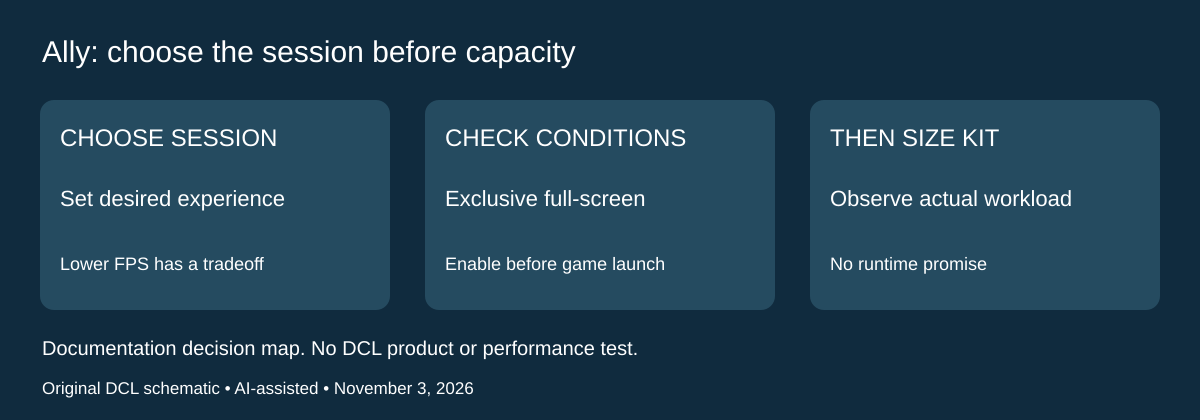
Research checked November 3, 2026. External capacity is one way to plan a longer gaming session, but it should follow the experience you intend to run. ASUS’s ROG Ally-series FAQ, under the Command Center FPS limiter question, documents selectable frame-rate limits. It says the setting can reduce battery use or improve consistency in some games, and qualifies it with Exclusive Full-screen mode and activation before game launch. Those conditions matter when evaluating whether a setting has actually been applied.
| What you need from the session | Comparison to make before shopping | Remaining tradeoff |
|---|---|---|
| Prefer lower battery demand over the highest frame-rate target | Evaluate a supported lower FPS limit in your actual game | A lower ceiling changes the requested experience; savings are unmeasured here |
| Need a particular high frame-rate experience | Keep that target in the bank/workload comparison | A larger capacity label does not guarantee the target or duration |
| Limiter appears to have no effect | Check ASUS’s full-screen and pre-launch conditions | A configuration issue is not evidence that the bank is undersized |
| Compare direct power with a docked setup | Keep game and settings consistent while observing the actual result | Different settings would confound the power-path comparison |
Our advice is to choose the acceptable game experience first and keep a record of the settings used when checking the existing battery kit. Rehearse before the trip rather than changing several settings and accessories during a session. This is a comparison method, not a DCL runtime experiment. We have not measured the battery effect of any limit, established game-specific frame pacing or verified the feature on every later Ally revision.
The earlier APU-versus-system-power section explains why a processor-watt figure cannot size a bank. This section adds a different purchasing decision: whether you want to preserve the current workload or accept a different frame-rate ceiling before carrying more battery mass. Neither approach is automatically best. If the existing compatible setup already serves the session you want, a higher-capacity purchase needs another reason.
Budget and limits: changing a documented setting does not itself require buying an accessory. Current bank and cable totals remain unknown, and this guide gives no hours gained or cost-saving estimate. Keep the exact handheld, USB-PD, cable and dock requirements above. ASUS’s Ally feature instructions do not establish that Steam Deck uses the same controls, or that an arbitrary bank supports a particular performance mode.
Shop the researched models
These Amazon links are affiliate links. Daily Carry Lab may earn a commission from qualifying purchases. Match the model and included contents to your needs; this guide is based on manufacturer-source research, without hands-on testing.
-
Anker 737 A1289
Check Anker 737 A1289 on Amazon -
Anker Prime A1340
Check Anker Prime A1340 on Amazon
Sources and limits
This guide compares published specifications and source documentation. Daily Carry Lab has not performed hands-on tests of the products in this guide. Consult the dated sources and verify the exact model and current terms before buying.
Related guides
Is Anker Prime worth it? Power-bank specs, ports and tradeoffs
Assess Anker Prime A110B and A110A by single-port power, total output, recharging requirements and carry weight.
High-capacity power banks: weigh energy, mass and flight limits
Use exact Wh and carried mass rather than a 30,000mAh headline. Compare a documented CARBO 20 example with current FAA and airline limits.
Anker vs UGREEN power banks: compare exact models and support
Compare documented A1336 and UGREEN 90597A limits, note missing shared-power evidence, and check seller-specific warranty terms without a universal brand ranking.
Magnetic iPhone battery packs: Qi2 25W, phone compatibility and shared power
Compare Anker A1664, MagGo 2 Pro A110R and Belkin BPD004 by phone support, wireless ceilings, shared output and case limits. Manufacturer research.