By Daily Carry Lab. Primary documentation checked October 14, 2026 (Pacific).
Affiliate disclosure: As an Amazon Associate, Daily Carry Lab earns from qualifying purchases. Retailer links may earn a commission at no extra cost to you.
Research disclosure: We have not tested these products. Selection uses primary documentation and the compatibility decisions below; no DCL ratings or measured performance are claimed.
Choose a travel tablet stand by the tablet with its case fitted, then by the position you need on the table. Screen diagonal alone does not establish cradle clearance, balance, cable access or room to write.
We selected Satechi R1 Aluminum Hinge Holder Foldable Stand and UGREEN 50748 adjustable tablet stand to compare an articulated metal support with a compact folding ABS support. Both use a physical cradle; neither is selected here as a MagSafe or magnetic charging mount. We have not tested stability, hinge force, typing movement, scratching or durability.
Compare dimensions and adjustment carefully
| Exact model | Published dimensions and mass | Adjustment evidence | Device-fit limit |
|---|---|---|---|
| Satechi R1; ST-R1M Space Gray | 4.5 × 5.5 × 5.5in; 11.88oz / 340g as listed | Maker describes a 270-degree mount; a numeric screen-height range is not established here | Most 4–13in phones/tablets; case clearance and load need exact confirmation |
| UGREEN 50748 black | Maker says folded 107 × 120mm; spec table lists 12 × 2 × 10.7cm; mass unverified | That regional page describes adjustment up to 100 degrees; no screen-height range established | Use the narrower listed 4–11in and up-to-700g envelope; confirm the cased device |
Sources: Satechi R1 specifications and UGREEN’s 50748 specification, checked October 14, 2026. These dimensions are not a measured folded envelope. Hinge travel is not the same metric as screen tilt or eye-level height; do not rank the stands by subtracting degree figures.
Satechi R1: articulated placement with more published mass
The R1 folds for storage and has a support arm plus device cradle. Its 340g listed mass is a concrete item to include in the carry plan; it is not evidence of better stability. Check whether the device remains supported in portrait and landscape, with the case, a charging cable and any attached keyboard you intend to use.
The exact color codes matter when comparing listings: ST-R1 is silver, ST-R1M Space Gray, ST-R1K black and ST-R1B blue. This guide’s selected variant is ST-R1M, using the manufacturer’s identity. Do not confuse the R1 stand with Satechi’s R1 Bluetooth presentation remote, a hub stand or a magnetic charging product.
Drawback: the reviewed specification does not establish a numeric maximum supported tablet mass, a cradle-depth limit or an adjustable screen-height interval. Ask Satechi about a heavy tablet/case combination before treating the 13in diagonal as approval for every such setup. We have not verified writing stability.
UGREEN 50748: a small folding cradle
UGREEN’s Spanish specification identifies SKU 50748, black, an ABS body and rubber-lined supports. Its listed dimensions suggest a different packing envelope from R1, but we have not measured either item when folded. Lay out the real bag opening and check the manufacturer’s diagram before deciding it fits a pocket or pouch.
The Spanish page is internally inconsistent: its headline and feature text specify 4–11in devices up to 700g, while its example list includes 12.9in iPads. Use the narrower 4–11in/up-to-700g envelope, including the case, and obtain exact confirmation if the tablet falls outside it. We make no universal 13in fit promise and do not transfer another model’s figures to this SKU. Obtain confirmation for the exact tablet, orientation and case thickness if the fit is close.
Drawback: the current captured specification does not establish a reliable mass or numeric case-clearance limit. Its listed 700g ceiling is a limit, not proof of stability while drawing; include the case in that mass.
Compatibility checks that can rule out either
| Your setup | Check before buying | Why it matters |
|---|---|---|
| Thick folio or rugged case | Full thickness at the supporting edge | A diagonal-size claim cannot establish cradle clearance |
| Portrait video call | Camera height, cable clearance and balance | A hinge figure does not establish final camera position |
| Handwriting or drawing | Contact points and maker’s permitted use | Finger or pen pressure can change the load; no DCL stability test |
| External keyboard | Entire table footprint, not stand dimensions alone | An elevated screen still needs space for controls |
| Magnetic phone accessory | Actual mounting method | These selected stands rely on cradles, not magnetic charging |
Keep the lower charging connector accessible and avoid pinching the cable between the tablet and supporting lip. Test the arrangement over a clear table before relying on it near an edge. Follow the stand manufacturer’s setup instructions for the exact product.
Budget for the whole tablet workspace
| Option | Costs to include; current totals unknown | Main drawback |
|---|---|---|
| Keep an existing supporting folio | No stand purchase if it already meets the task | May not provide the camera position or writing angle you need |
| R1 plus external keyboard | Exact stand variant, keyboard and carry allowance | 340g listed stand mass before other accessories |
| 50748 plus existing controls | Correct SKU and any permitted case change | Fit and mass uncertainties need resolving |
| A magnetic or powered stand instead | Exact tablet-specific mount and any power supply | Separate product selection; no compatibility inferred here |
No price ceiling or cheapest-product ranking is supported. The travel-keyboard guide covers the input-layout decision, and the tech pouch guide addresses storage organization. Neither establishes that these stands fit a particular bag. Buy only after matching the actual tablet, case and intended position to a documented support arrangement.
When a base-and-clamp stand earns its place in the bag
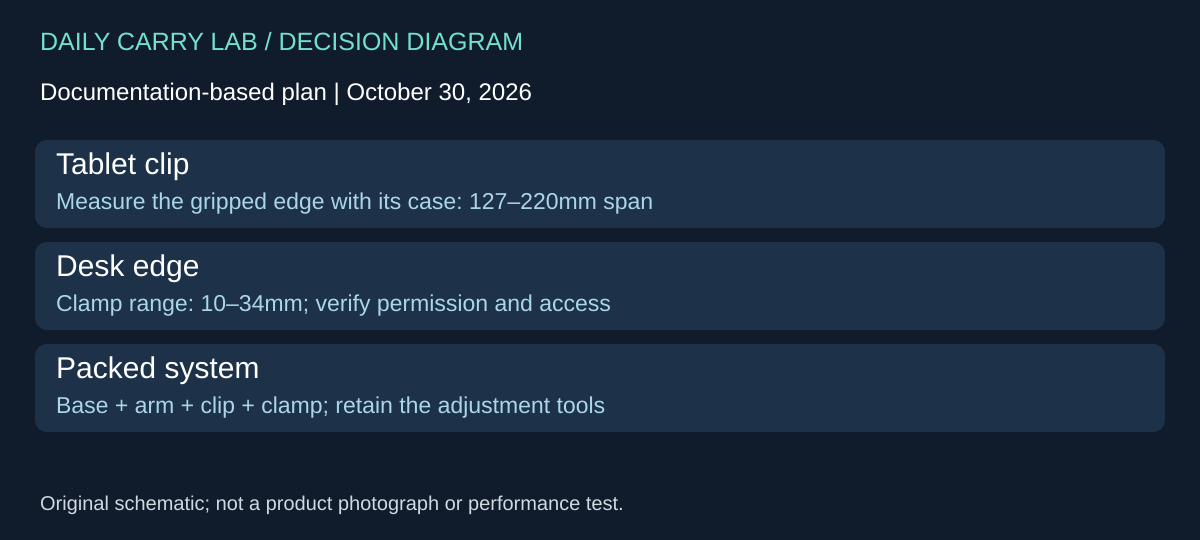
A tabletop cradle is not the only support arrangement. Twelve South HoverBar Duo, second generation, combines a weighted desktop base with a shelf clamp and a movable arm. Consider it when you repeatedly use a desk where clamping is permitted, or need to change between the base and clamp. It is not automatically a better travel choice than R1 or 50748. The current product page and its linked second-generation owner’s guide, checked October 30, 2026, document this different support system.
| Fit or packing question | Documented HoverBar Duo boundary | Decision before buying |
|---|---|---|
| Will the tablet enter the clip? | Product page gives a 127–220mm clip span | Measure the edge the clip will grip, including the case; this is not a screen-diagonal range |
| Can the desk take the clamp? | Page lists a 10–34mm shelf-clamp range | Check the actual edge, access beneath it and permission to clamp there |
| Is arm reach enough? | Fully extended arm length is listed as 15 inches | Arm length does not establish final screen height in every posture |
| What travels with it? | Guide lists clip, base with arm, shelf clamp and 4mm/3mm hex wrenches | Count the parts needed for the intended arrangement, rather than only the tablet clip |
The guide says the desk stand is the default arrangement and the shelf clamp attaches to the lower back of the base for storage. Its QuickSwitch mechanism moves the arm between the two supports. That is a concrete storage and setup distinction from the smaller folding cradles above. Confirm the second generation: the manufacturer’s page links separate first- and second-generation manuals, so do not assign QuickSwitch operation to an older unit from a generic listing.
The owner’s guide also describes adjusting arm and base hinges with the included hex wrenches. If you expect to reconfigure the stand, those small tools become part of the kit. This is not evidence of a tool requirement at every setup or a measurement of hinge stiffness. We have not installed the stand, tested clamp marks, measured packed mass or established stability while handwriting.
Budget and drawback: a base, arm and clamp may be useful at a repeated destination but can be excessive for an unknown hotel table or a narrow tray. Current complete-kit checkout totals, packed dimensions and mass are not established here. Ask about the cased tablet and support surface before purchasing. Keep a functioning folio or simpler cradle when it already provides the needed position; do not buy an articulated arm merely to maximize its published reach.
Shop the researched models
These Amazon links are affiliate links. Daily Carry Lab may earn a commission from qualifying purchases. Match the model and included contents to your needs; this guide is based on manufacturer-source research, without hands-on testing.
-
UGREEN adjustable tablet stand 50748 (black)
Check UGREEN adjustable tablet stand 50748 (black) on Amazon
Sources and limits
This guide compares published specifications and source documentation. Daily Carry Lab has not performed hands-on tests of the products in this guide. Consult the dated sources and verify the exact model and current terms before buying.
Related guides
Portable document scanners: choose the feed, power and file workflow
Compare Epson ES-50 and ES-60W simplex workflows with discontinued Brother DS-740D duplex limits, USB power and current software checks.
USB-C Ethernet adapters: match the host, driver and network rate
Compare TP-Link, Plugable and Belkin INC012 Ethernet adapters by host connector, link rate, tether reach and complete kit. Research; throughput untested.
Single-port 65W laptop chargers: profiles, plugs and cable limits
Compare Anker A2663 and Supertiny 65W for one USB-C laptop, including PPS evidence, plug variants and cable limits.
E Ink note-taking tablets: Scribe, reMarkable or BOOX?
Compare exact Kindle Scribe, reMarkable Paper Pro and BOOX Go10.3 Gen II models by pens, file export, lighting and subscription limits.