By Daily Carry Lab. Primary documentation checked October 14, 2026 (Pacific).
Affiliate disclosure: As an Amazon Associate, Daily Carry Lab earns from qualifying purchases. Retailer links may earn a commission at no extra cost to you. Manufacturer links provide evidence.
Research disclosure: We have not tested these products. This is a comparison of documented connections and limitations, without DCL ratings or measured performance.
Choose the microphone kit after deciding how audio enters your phone or camera. The receiver, connector and recording app are as important as the transmitter clipped to a shirt. DJI Mic Mini 2 TX + 1 RX + Charging Case and RØDE Wireless GO II Single are our documented examples. They answer different needs: a two-person DJI kit and a one-transmitter RØDE kit with an internal recording option. This is a connection and backup comparison, not a sound-quality ranking.
We selected these kits because the manufacturer instructions explain receiver outputs, phone adapters and recording limits. The retailer identities below bind the actual bundles; one product family’s picture does not prove how many transmitters are included.
Compare the exact kits
| Documented feature | DJI Mic Mini kit | Wireless GO II Single |
|---|---|---|
| Receiver included in selected kit | ✓ | ✓ |
| Two transmitters included in selected kit | ✓ | — |
| Camera analog connection documented | ✓ | ✓ |
| Digital phone connection documented | ✓ | ✓ |
| Transmitter internal recording | — | ✓ |
RØDE documents the Single package as one transmitter with the same dual-channel receiver used in its two-transmitter edition. An additional compatible transmitter can be paired, but it is not included in the selected Single listing. DJI’s reviewed charging-case kit contains two transmitters and one receiver. RØDE Single kit explanation, DJI Mic Mini FAQ.
Match the receiver to the recording device
| Recording device | Documented connection | Check before buying |
|---|---|---|
| Camera with 3.5 mm microphone input | Receiver’s camera-audio connection; RØDE specifies supplied3.5 mm TRS cable | It must be a microphone input, not simply a headphone output |
| USB-C phone | Correct receiver adapter or USB data cable for that system | Confirm exact phone, app and external microphone selection |
| Lightning phone | System-specific compatible digital audio connection | DJI Mic Mini Lightning adapter is sold separately; standard USB-C/Lightning charging cable is not a RØDE audio substitute |
| Computer | RØDE receiver via USB, selected as audio input | Check application input and monitoring before recording |
| Phone without receiver, via DJI Bluetooth | DJI transmitter’s documented direct Bluetooth path | Livestreaming support depends on phone OS and app |
RØDE’s guide calls for an appropriate Lightning accessory cable for Lightning devices and explicitly rejects standard USB-C to Lightning cables for this purpose. Its USB-C phone/computer path uses a suitable data cable. DJI says Mic Mini phone adapters are not interchangeable with adapters for its earlier microphone systems. Do not fill a missing connector with a similar-looking accessory and assume it will work. RØDE connection instructions, DJI adapter FAQ.
Direct Bluetooth is convenient when supported, but DJI qualifies phone livestreaming by the app and operating system. Pairing success alone does not prove that the actual video app records that microphone. Record a short sample and play it back with your intended app before relying on the setup. We make no universal app compatibility claim and recommend no unverified accessory model.
Decide whether local backup is required
DJI explicitly says the Mic Mini transmitter has no internal storage and cannot operate as a voice recorder. The charging case does not add that capability. If the receiver path or phone app fails to record, this kit does not supply a hidden transmitter file to recover afterward.
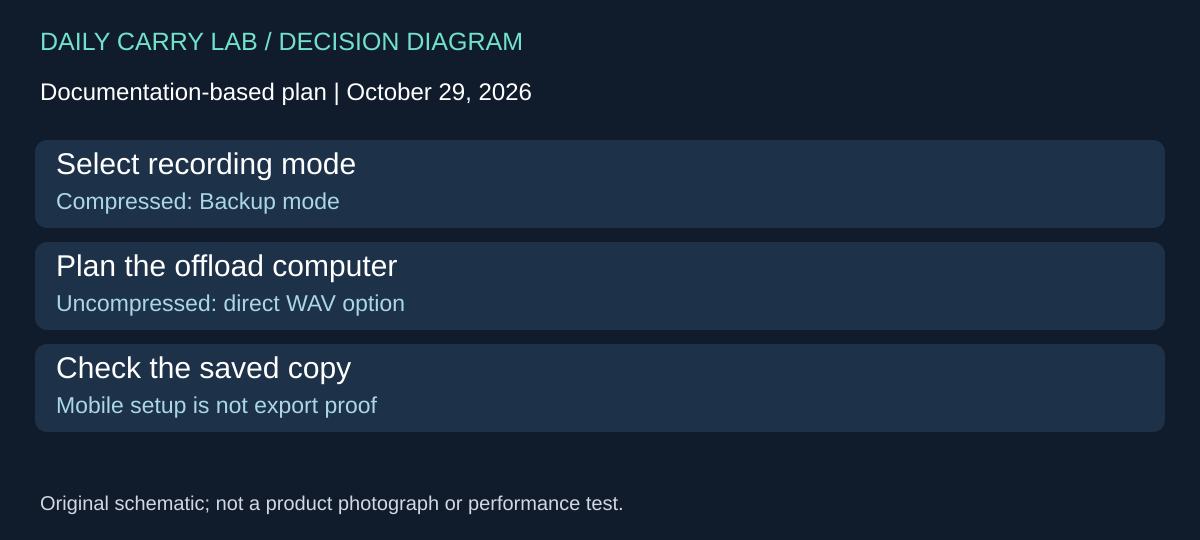
RØDE’s guide documents on-board recording, enabled through its companion software. Its Always mode begins recording when the transmitter is switched on and continues regardless of receiver connection; Backup mode begins with connection to the receiver and stops when the receiver is switched off. The guide also documents Button and Off modes. Check the chosen mode and recording indicator before the session, and confirm you can export the file afterward. Desktop software is required for the described export workflow. RØDE on-board recording guide.
The mode names are not guarantees of a recoverable session. Battery, remaining storage, configuration and export all matter. We deliberately omit a single memory-duration figure because it varies with recording format and mode. Internal recording also does not prove that the camera’s live audio level is correct.
Budget the complete recording path
| Exact option | Budget evidence, October 14, 2026 | Useful when | Drawback |
|---|---|---|---|
| DJI Mic Mini2 TX / 1 RX / case | Current US price unknown | Two included transmitters meet the intended session | No transmitter internal backup; Lightning accessory separate |
| RØDE Wireless GO II Single, black | Current US price unknown | Solo recording with a configured on-board backup workflow | Only one included transmitter; phone cable requirements add planning |
| Keep an existing suitable mic | No new mic purchase if its output meets the recording device | Audio input and sample playback already work | Existing ownership does not establish a new phone/app connection |
Retailer captures checked October 14 bind B0DDL8WGH5 to the DJI2 TX / 1 RX / case bundle and B09PXCZ247 to the RØDE Single black kit. Do not read the Single ASIN as a dual-transmitter bundle. Identity is separate from current stock, price and image reuse, none of which is claimed here. The tech organizer guide can help keep the correct receiver cables together; the travel router guide addresses the network path for a livestream, not microphone compatibility.
Choose editable channels before counting backup features
For Wireless GO II, a safety channel and an internal transmitter recording solve different problems. RØDE’s user guide, checked October 24, 2026, lets you send the transmitters separately in Split mode or sum them in Merged mode. The safety channel requires Merged mode and puts the same summed audio on a second channel at 20dB lower level. It does not preserve two separately editable speakers at the receiver output.
| Intended recording | Choose or check | Drawback for the purchase decision |
|---|---|---|
| One speaker, lower-level alternative | Merged output with safety channel enabled in RØDE Central | Check that the recording application preserves both channels |
| Two speakers to edit independently | Split output, one transmitter per left/right channel | The receiver’s Merged-only safety channel is unavailable in this arrangement |
| Backup against loss of the receiver path | Configure the separate transmitter recording feature above | A lower-level receiver channel cannot replace a file recorded at the transmitter |
| Phone or computer via USB | Set input level in the recording software or app as needed | Receiver output-gain buttons do not adjust digital USB output |
RØDE documents the receiver’s gain control for its 3.5mm output. If your actual workflow uses USB, buying another cable or repeatedly lowering that analog-output setting does not establish that the digital recording level has changed. First identify the input selected in the app and its available controls. We have not tested that app or measured clipping.
For a two-person kit, decide which matters more in the delivered receiver file: independent speaker edits or a lower-level copy of their combined sound. The selected Single kit still contains only one transmitter; these two-speaker choices require an additional compatible transmitter or a differently verified kit. Do not treat an output-mode setting as an extra included microphone.
Complete-kit budget: current transmitter, cable and software totals remain unknown. Before adding hardware, make a representative recording with the equipment you already have and inspect its channel layout during playback or editing. Confirm the intended internal-recording/export route separately. These are buyer verification steps, not tests DCL carried out, and a safety-channel label is not a guarantee of recoverable audio. The DJI comparison above needs its own documented controls; Wireless GO II settings do not transfer to Mic Mini.
Check what mute leaves recording on Wireless GO II
A muted receiver feed and a stopped local recording are different states. For Wireless GO II, RØDE says that Always mode continues local recording whenever the transmitter is on, regardless of its receiver connection. Muting does not stop that on-board recording, although it does mute wireless transmission. If a speaker expects a private break, establish how the local recording will be stopped as well as what reaches the camera. These are the manufacturer’s documented controls, not a privacy guarantee DCL has tested. Wireless GO II user guide, checked October 25, 2026.
| Workflow decision | Documented boundary | Preparation or drawback |
|---|---|---|
| Mute the camera feed during a break | Always-mode local recording continues | Confirm the local recording state separately with the speaker |
| Keep several sessions on a transmitter | New recordings overwrite the oldest when storage fills | Copy and check wanted files before the next session |
| Offload without the Central export workflow | Uncompressed recordings appear as WAV files when the transmitter connects to a computer | This does not establish phone-only access to compressed recordings |
| Use desktop Central for file management | The guide documents playback, export and deletion | Verify the saved copy before deleting the source |
RØDE distinguishes compressed Backup recording from the uncompressed format used by Always and Button modes. Do not assume changing the mode preserves the same available recording duration or file-access workflow. The selected Single kit still supplies one transmitter; buying another transmitter does not resolve an unclear file-management procedure.
Before choosing this system for a trip, check whether your available computer and data cable can complete the intended offload. Play back the saved file and keep a separate copy of important material before clearing transmitter storage. Those are DCL preparation recommendations, not actions we performed. Current computer, cable and additional-transmitter costs are unknown. If the existing kit already meets the connection and offload requirement, changing it solely because a mute icon was misunderstood may not address the actual issue. DJI Mic Mini has no internal recorder, as explained above; these local-recording controls cannot be transferred to it.
Mic Mini: choose the phone connection for the controls you need
A receiver-free phone kit saves one piece of hardware to carry, but it can change the controls available during recording. If you want to adjust noise reduction for different surroundings, decide that before buying a transmitter-only offer or leaving the receiver at home. This is a control-workflow decision, separate from the local-backup and channel-editing decisions above.
DJI’s Mic Mini FAQ, checked October 27, 2026, distinguishes the original DJI Mic Mini receiver from a transmitter connected directly to a smartphone by Bluetooth. With direct phone Bluetooth, the noise-cancellation level defaults to Strong and cannot be adjusted in DJI Mimo; Mimo Low Cut settings are also unavailable. For phone or camera recording through the documented receiver arrangement, DJI describes Basic and Strong noise-cancellation levels adjustable in Mimo. Its transmitter power button can toggle noise cancellation. Follow the instructions for the connection actually in use.
| Your phone-recording requirement | Arrangement to investigate | Tradeoff before purchasing |
|---|---|---|
| Carry no receiver and accept the documented direct-link controls | Mic Mini transmitter paired directly by Bluetooth | Strong is the fixed noise-cancellation level; Mimo Low Cut adjustment is unavailable |
| Choose Basic or Strong through Mimo | Original Mic Mini receiver workflow with the correct phone adapter | Receiver, adapter and app access belong in the complete kit |
| Livestream from a specific phone app | Check that exact app and OS with the selected connection | Successful pairing alone does not establish that the app records the microphone |
| Compare a newer DJI Mic Series Mobile Receiver offer | Read that receiver’s own instructions and exact package | Its separate physical noise-control switch must not be inferred from the original receiver workflow |
The FAQ now also describes the separately named DJI Mic Series Mobile Receiver. DJI assigns its noise-cancellation adjustment to the receiver’s physical switch, rather than to the transmitter or Mimo. That is an identity boundary, not a recommendation to buy that accessory: the selected two-transmitter/case kit in this guide is the original Mic Mini receiver package. We have not verified a new retailer bundle or approved substituting receivers.
Our recommendation is to start with the control you need for the actual session. If fixed Strong-level direct Bluetooth is acceptable and the intended app works with it, you may not need to carry the receiver for that use. If selectable noise reduction matters, investigate the receiver workflow and phone-adapter requirements before choosing a smaller package. Neither arrangement adds internal recording to a Mic Mini transmitter.
Before departure, make and play back a short sample with the intended phone, app, connection and settings. Listen for whether the voice and surrounding sound suit your purpose; no setting is a DCL-tested sound-quality winner. Current receiver, adapter and kit prices remain unknown. A receiver purchase does not guarantee app compatibility, natural-sounding processing or a recoverable recording.

Wireless GO II: choose a backup you can actually offload
Internal recording is useful only when you can recover the files in the workflow you will carry. For Wireless GO II, the current RØDE guide, RØDE Central and on-board recording sections, checked October 29, 2026, distinguishes configuring the system from exporting recordings. The Single kit above has one transmitter; do not transfer these storage instructions to DJI Mic Mini or a later Wireless GO generation.
RØDE Central’s recording optimization and export tools require the desktop app. However, the guide also describes direct WAV copying to a computer for uncompressed recordings: the connected transmitter appears as a drive. That alternative matters if you prefer a simple computer-copy step. It does not establish a phone-only copying path, and it does not provide the Central waveform and export tools for compressed recordings.
| Intended workflow | Exact documented dependency | Tradeoff to budget for |
|---|---|---|
| Configure recording away from a desk | Central has desktop and mobile configuration support | Mobile configuration does not prove mobile export |
| Review and optimize on-board recordings in Central | Desktop Central | Carry access to a compatible computer and connection |
| Copy uncompressed WAV recordings directly | Transmitter connected to a computer as a drive | Check copied files separately; this is not a verified mobile workflow |
| Prefer compressed storage | Compressed format is available in Backup recording mode | Always and Button recording use uncompressed format |
| Move between editing computers | Recording names assigned in Central are stored there, not on the transmitter | Preserve clear exported filenames and session notes |
The guide describes over 40 hours of compressed storage following firmware improvements and around seven hours uncompressed. Those are storage descriptions under the stated format conditions, not battery endurance or a guaranteed uninterrupted session. Confirm firmware and recording mode before allocating the whole trip’s recording time. Choosing Always mode for its capture behavior also chooses the documented uncompressed-storage constraint.
The earlier overwrite warning remains important: more recording can replace wanted material when storage fills. A practical preparation check is to make a short recording, offload it using the method you intend to carry, and confirm that the saved copy opens before clearing anything. Keep the source recording until the copy has been checked. This is an evaluation procedure for the buyer; DCL has not performed a recovery test or verified your computer, phone or editing app.
Budget and drawback: the delivered kit and any extra connection/storage costs are unknown. If your trip is phone-only and recovering backup audio during the trip is essential, the evidence here leaves that requirement unresolved. Obtain exact workflow proof before buying on the internal-recording label. If you already carry a suitable computer, compare Central’s editing/export controls with direct uncompressed WAV copying instead of assuming an extra recording product is necessary.
Wireless GO II: check the transmitter input before blaming the camera connection
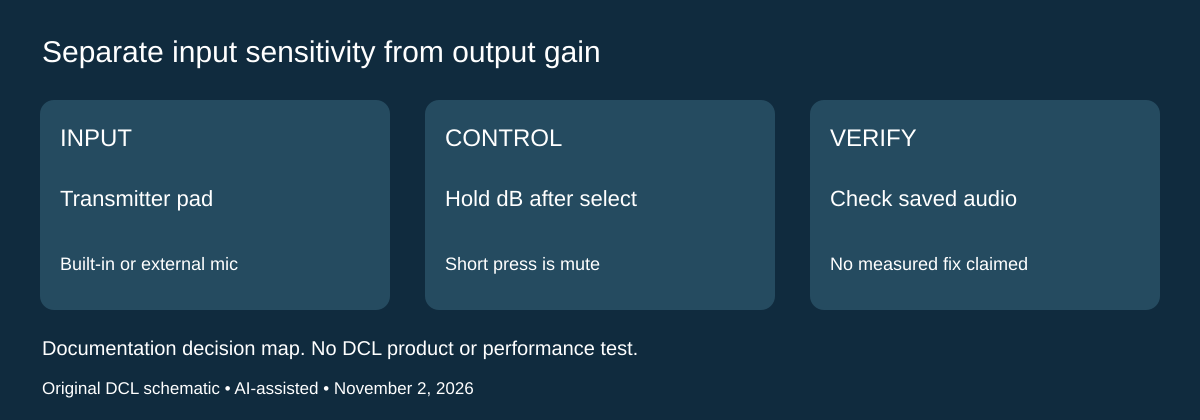
Research checked November 2, 2026. The existing receiver-output and backup choices do not cover every control at the source. RØDE’s Wireless GO II user guide, Low Sensitivity Mode, documents a separate transmitter input pad for reducing sensitivity. This is relevant when deciding whether the existing microphone setup has an appropriate control for close speech before buying another adapter or microphone.
| Control or connection | Documented distinction | What to check |
|---|---|---|
| Transmitter input pad | Reduces sensitivity for built-in or external microphone | This is separate from the receiver’s output setting |
| RØDE Central | Toggle Pad for the transmitter | Confirm the selected transmitter |
| Receiver shortcut | Select the transmitter with the pair button, then hold dB until the pad symbol appears | A short press activates mute instead |
| External lavalier | Pad also affects the transmitter’s 3.5mm microphone input | Do not assume only the built-in mic changes |
RØDE identifies very close speech with its Interview GO adapter as a use case. That does not establish a needed attenuation amount for your voice, prove that distortion originates at the transmitter, or approve an arbitrary external lavalier. This guide does not assign an undocumented dB reduction to this particular control.
Our diagnostic recommendation is to identify the microphone, selected transmitter, output connection and recording application together. Check input controls and the actual captured file with a disposable recording at representative distance and loudness. A change to one stage cannot establish the cause of every recording problem. DCL has not recorded samples, isolated clipping or measured a noise-floor tradeoff.
Budget and choice: replacement-microphone, adapter and complete-kit totals are unknown. Try the documented appropriate control on an existing supported setup before assuming a new cable solves the problem. If you need a different pickup arrangement, establish that requirement separately. Keep the earlier USB-level, channel-routing and backup limitations: this input pad is not an additional backup recording and does not establish equivalent Mic Mini controls.
Shop the researched models
These Amazon links are affiliate links. Daily Carry Lab may earn a commission from qualifying purchases. Match the model and included contents to your needs; this guide is based on manufacturer-source research, without hands-on testing.
-
DJI Mic Mini (2 TX + 1 RX + Charging Case)
Check DJI Mic Mini (2 TX + 1 RX + Charging Case) on Amazon -
RØDE Wireless GO II Single
Check RØDE Wireless GO II Single on Amazon
Sources and limits
This guide compares published specifications and source documentation. Daily Carry Lab has not performed hands-on tests of the products in this guide. Consult the dated sources and verify the exact model and current terms before buying.
Related guides
iPhone 18 Pro: Wrist Strap or Crossbody Strap, with the right case
Compare exact Apple Wrist and Crossbody strap packages for iPhone 18 Pro by attachment, length, complete cost and limitations.
iPhone Duo cases: Apple Case versus Folio with Kickstand
Compare exact Apple iPhone Duo Case and Folio parts by coverage, viewing support, charging arrangements, separate equipment and dated US prices.
Portable label makers: choose phone control or a built-in keyboard
Compare Brother PT-P300BT CUBE and PT-H110 by phone dependence, TZe tape widths, power and cable-label workflow.
Travel AA/AAA chargers: match the cells, slots and USB input
Compare four-slot AA/AAA charging systems by exact chemistry and USB input. Includes conditional XTAR BC4 research and explicit operating-manual limits.