
By Daily Carry Lab. Primary documentation checked October 14, 2026 (Pacific).
Affiliate disclosure: As an Amazon Associate, Daily Carry Lab earns from qualifying purchases. Retailer links may earn a commission at no extra cost to you.
Research disclosure: We have not tested these products. Selection uses primary documentation and the compatibility decisions below; no DCL ratings or measured performance are claimed.
For a road trip, a portable power station makes sense when you need stored energy plus an AC outlet away from mains power. Choose by watt-hours, continuous output and recharge inputs before counting sockets. The two stations below are not suitable for passenger-aircraft baggage: both exceed the FAA’s 160Wh lithium-battery limit.
We selected the US EcoFlow RIVER 3 Plus, 286Wh, and Jackery Explorer 300 Plus, JE-300B, 288Wh, to compare similar nominal energy with different AC and USB arrangements. This is research for ground travel and existing-device planning, not a hands-on runtime ranking. We have not measured usable capacity, inverter losses, fan noise or charging time.
Compare energy, output and carry weight
| Exact station | Nominal energy and carry mass | AC output | USB allocation |
|---|---|---|---|
| EcoFlow RIVER 3 Plus, US 286Wh version | 286Wh; listed 10.4lb | Three outlets sharing 600W rated AC output | One USB-C up to 100W; two USB-A up to 12W each, 24W total |
| Jackery Explorer 300 Plus JE-300B, US | 288Wh; about 8.27lb / 3.75kg | 120V/60Hz; 300W rated AC; station total output 300W | One USB-C input/output up to 100W; second USB-C output 15W; USB-A 15W; second C plus A share 24W |
Sources: EcoFlow’s US specification and Jackery’s US JE-300B manual, retrieved October 14, 2026. The wattages are limits, not a promise that every connected device receives its maximum at once. EcoFlow’s AC total is not an independently verified combined AC-plus-DC station budget; do not add all port labels into a guaranteed simultaneous-output figure.
The 286Wh and 288Wh labels describe nominal stored energy. They do not establish equal usable runtime or a meaningful endurance winner. For an illustrative 50W constant load, 286Wh divided by 50W gives 5.72 hours before losses, not predicted actual runtime. Conversion overhead, load changes, operating limits and reserve reduce or alter the result. A device’s startup demand can also exceed its running draw.
EcoFlow RIVER 3 Plus: higher continuous AC allowance
The RIVER 3 Plus is the more relevant of these two when the intended AC load exceeds the Jackery’s 300W rating but fits EcoFlow’s documented 600W continuous AC budget and other requirements. The three outlets share that AC limit; three sockets do not mean three 600W devices. Verify the load’s startup behavior and voltage compatibility separately.
Its manufacturer promotes 1200W X-Boost separately from the 600W rating. We do not treat X-Boost or a surge figure as 1200W conventional continuous output. A captured Amazon title says 760W; that retailer title does not override the maker’s 600W AC specification. Check the exact 286Wh unit rather than confusing it with another RIVER 3 version or an expansion bundle.
Drawback: its listed mass is higher than the Jackery’s, and the USB-C port on the reviewed base unit is documented as an output. Do not assume a laptop USB-C charger can recharge that base unit; an expansion accessory can have a different port arrangement.
Jackery Explorer 300 Plus: identify the high-power USB-C port
The JE-300B manual separates a 100W USB-C input/output port from a second 15W USB-C output. This is not a pair of independent 100W USB-C outputs. The 15W C and 15W A ports share a 24W budget. Check the actual port labels when connecting a laptop and phone together, and stay within the station’s documented total.
For recharging, the US manual lists AC input at 100–120V/60Hz and DC input through USB-C at 12–27V, up to 5A/100W. Solar and car charging use the specified connection/adaptor arrangement. Do not plug an arbitrary panel into USB-C because its wattage headline looks suitable: input voltage, current, connector/adaptor and polarity must all be compatible.
Drawback: its 300W station limit narrows the AC loads it can serve, and the second USB-C port is a low-power output. We did not establish a current exact US Amazon identity for the 300 Plus; the original Explorer 300, 300 v2 and solar bundles are not silently substituted. The retained manual supports the model comparison without implying current stock.
Small overnight loads and backup power need another check
A station can have enough watt-hours and still stop powering a small load because of its operating mode. The US JE-300B manual, page 03, rechecked October 20, documents default energy-saving behavior: after 12 hours under its low-load conditions, all outputs turn off. Its thresholds are AC at or below 25W, USB at or below 2W, and car output at or below 2W. Inspect the manual’s mode instructions before planning a long unattended low-power session; a large remaining battery percentage does not override that setting.
| Reader decision | Extra check beyond capacity | Purchase consequence |
|---|---|---|
| Leave a small USB device charging overnight | Compare its changing draw with the low-load setting | Do not infer continuous service from a low average wattage |
| Use an AC device through a mains interruption | JE-300B EPS transfer is specified within 20ms, not zero | It is not a professional UPS; Jackery excludes high-continuity equipment such as data servers/workstations |
| Judge whether the station has shut down | Distinguish the sleeping display from the output indicators | A dark screen alone is not evidence of a failed supply |
| Buy only to support small USB gear | Compare a compatible bank and its own low-load behavior | An AC station may add weight without resolving the operating-mode question |
The manual’s basic operations section separately describes the display sleeping after two minutes without an operation. Display sleep, main-power standby and low-load output shutdown are different conditions. Check the relevant output indicator and device behavior rather than treating all three as one fault.
For ordinary compatible backup use, follow Jackery’s instruction to check the actual device repeatedly before relying on EPS. We have not tested transfer behavior and do not establish compatibility with your equipment. If an interruption would lose critical work, the 288Wh label is insufficient purchase evidence. These JE-300B settings also cannot be transferred to the RIVER 3 Plus: its own current manual and settings must answer the same questions.
RIVER 3 Plus backup power and computer communication are separate paths
If buying the US RIVER 3 Plus to support a computer, distinguish supplying AC power from communicating with that computer. EcoFlow’s US RIVER 3 Plus manual, Backup for Essential Devices, checked October 27, 2026, describes standby UPS transfer within 10ms. Its basic setup connects the station to a wall outlet and appliances totaling less than 600W to its AC sockets. This is a manufacturer specification, not our uninterrupted-operation test.
| Required job | Documented arrangement | Extra decision |
|---|---|---|
| Supply backup AC | Wall input plus the station’s AC outputs | Check actual equipment and its tolerance of transfer |
| Communicate with a computer or NAS | Power Manager software plus the included USB-B-to-USB-A UPS communication cable | Check the intended operating system and permission to install |
| Use a USB-C charging cable instead | Not the communication path specified in this section | A matching charging connector does not establish UPS monitoring |
| Compare with Explorer 300 Plus | Use that model’s separate EPS instructions above | Do not transfer EcoFlow’s software or timing claim to Jackery |
EcoFlow’s advanced setup follows the basic power setup, then connects the station’s USB-B communication port to the computer’s USB-A port and launches Power Manager. Verify that complete connection on your own equipment before relying on it. The presence of an AC outlet does not establish monitoring or a configured shutdown workflow.
Current cable-adapter and complete-kit totals are unknown. We have not tested Power Manager, application support, data preservation or switchover behavior. If only USB charging is needed, compare the simpler compatible power-bank arrangement first. Do not treat the 10ms claim as zero transfer time or an automatic compatibility promise.
Recharge and travel compatibility
| Requirement | RIVER 3 Plus evidence | Explorer 300 Plus evidence |
|---|---|---|
| Wall recharge | US maker lists AC charging | US manual specifies 100–120V/60Hz input |
| Solar recharge | Maker lists up to 220W solar input | DC input up to 100W through specified USB-C arrangement |
| Vehicle recharge | Maker lists car charging; confirm actual vehicle/cable input limit | Follow manual’s car adaptor/input instructions |
| USB-C laptop | One documented 100W output | Use the 100W input/output port, not the 15W output |
| Flight with station | 286Wh exceeds passenger-aircraft limit | 288Wh exceeds passenger-aircraft limit |
EcoFlow’s solar maximum is an input ceiling, not a guarantee of panel yield or recharge duration. Assess the exact panel’s electrical envelope and the current station manual before purchase. We do not give a car-input wattage from a broad marketing table when the actual vehicle socket and cable can impose a lower limit.
The FAA’s power-station notice says lithium battery-powered devices above 160Wh are not allowed on passenger aircraft. Do not interpret a handle, compact size or the word “travel” as a carry-on or checked-bag exemption. For smaller devices, the large power-bank guide addresses a different USB-only decision; battery labels and current carrier rules still need checking.
Budget for the whole charging system
| Plan | Costs to include; current totals unknown | Main compromise |
|---|---|---|
| Existing USB-only gear | Suitable compatible power bank instead of AC station if sufficient | Does not supply an AC outlet |
| Base station for ground travel | Exact US unit, permitted loads and carry allowance | Weight and finite stored energy |
| Solar-equipped station | Electrically compatible panel, adaptor and cables | Weather, panel placement and input limits |
| Vehicle recharge plan | Approved cable/adaptor and compatible supply | Socket limits and vehicle battery management |
No cheapest-station, appliance-coverage or delivered-price ranking is supported. The off-grid solar guide covers the separate panel-selection decision. Start with the actual load, then validate the station’s continuous rating, per-port/shared budget and recharge method; do not buy extra sockets as a substitute for those checks.
Decide whether you can maintain a station between trips
A station bought as a vehicle reserve also needs a storage plan. The US Explorer 300 Plus JE-300B manual, page 9, checked October 22, 2026, distinguishes charging and discharge temperatures and warns against high-temperature storage.
| Planned use | Documented requirement | Buying consequence |
|---|---|---|
| Recharge after travel | Charging ambient temperature 0–45°C | Discharge eligibility does not establish charging eligibility |
| Use stored energy | Discharge temperature −10–45°C | Check actual conditions before use |
| Leave unused for months | Check charge regularly; long-term storage around 60–80% | A depleted station is not a maintenance-free reserve |
Jackery says depleted storage for three to six months can impair performance and may leave the unit unable to recharge. Its instructions also prohibit high-temperature storage. These conditions matter if your plan is to leave the station in a parked vehicle indefinitely: establish a suitable storage location and maintenance routine first. We have not measured vehicle temperatures or tested battery aging.
If you cannot meet that routine, reconsider the purchase or storage arrangement. Current maintenance/replacement costs are unknown. This is a JE-300B constraint; the EcoFlow candidate needs its own instructions. Nominal watt-hours do not answer whether your between-trip storage plan is suitable.
Verify the solar adapter chain for Explorer 300 Plus
An Explorer 300 Plus purchase needs a more specific solar-kit check than matching the panel’s advertised watts. The US JE-300B manual, printed pages5–6, checked October 24, 2026, gives different connection drawings for SolarSaga 100/60 and SolarSaga 40/80 arrangements. They terminate at the station’s USB-C input using a DC7909-to-USB-C adaptor. The panel cable and any intervening DC8020/DC7909 adapter depend on the specific arrangement.
| Solar-kit decision | Evidence to obtain before purchase | Drawback if left unresolved |
|---|---|---|
| Station-only offer | List the selected panel, panel cable and complete adapter chain separately | The station name does not establish that a solar kit is included |
| SolarSaga 100 or 60 route | Match the actual connectors to the manual’s page5 drawing | Do not order by panel wattage alone |
| SolarSaga 40 or 80 route | Follow the relevant page6 drawing through the DC connector adapters to USB-C | A DC8020 plug by itself is not a completed connection to this station |
| Already-owned panel | Verify its exact revision, electrical output and documented adapter compatibility | Similar connector appearance does not prove a supported replacement |
The same manual explicitly excludes Explorer 300 Plus from its direct DC8020 connection description for other Pro/Plus stations. That exception matters when reusing accessories: the shared family name does not make another station’s wiring instructions applicable. We have not validated an arbitrary panel or generic barrel-to-USB-C cable.
Use the existing12–27V, up to 5A/100W input limits above together with the actual compatible connection instructions. The adapter names alone do not certify voltage conversion, polarity or every panel’s electrical behavior. If the exact kit cannot be matched to the current instructions, obtain manufacturer confirmation before choosing it. More nominal panel watts do not establish a faster recharge through this 100W input ceiling.
Complete-kit budget: request an itemized offer for the exact station, panel, cable and required adapters, then compare delivered totals. Current prices, package contents and stock are unknown here. An apparently simpler station-only offer can leave the essential solar connection unresolved. Keeping a documented existing arrangement may avoid unnecessary accessories; DCL has not tested solar yield, adapter losses or recharge time. These are JE-300B checks and do not authorize the same chain for RIVER 3 Plus or other Jackery models.
Read the Explorer 300 Plus fault code before replacing the station
An output that stops and a fault code need different checks from an empty battery. For the US JE-300B, Jackery’s manual gives specific F8/F9 actions and a separate support route for other codes. Do not interpret the station’s remaining percentage, low-load setting or a dark screen as the explanation for every shutdown. Explorer 300 Plus manual, printed page 4, checked October 25, 2026.
| Displayed condition | Manufacturer’s documented action or boundary | Limit |
|---|---|---|
| F8 | Remove the load or unplug the charging plug; contact after-sales service if it does not recover | No fault-component diagnosis is supplied here |
| F9 | Remove the load; contact after-sales service if it does not recover | Do not treat this as the same charging-plug instruction as F8 |
| Other fault code | Contact after-sales service | No generic repeated reset or dismantling procedure |
| High-temperature warning | Manual describes recovery after cooling | No fixed waiting time or permission to continue in unsuitable conditions |
| Low-temperature warning | Manual describes recovery when ambient temperature is restored | Charging and discharging temperature limits above still apply |
These are exact-model instructions, not a set of error definitions for every Jackery or EcoFlow unit. We do not infer which internal component has failed from a code. Disconnecting a load also does not establish that it can be reconnected safely: first compare its running and startup demands with the station’s documented ratings and obtain support where the manual calls for it. Do not defeat a protection or disassemble the station.
This matters when choosing a replacement. If the intended device exceeds a permitted rating or the storage/use environment is unsuitable, another unit of the same model may leave the original constraint unchanged. If a persistent fault needs service, a capacity comparison alone does not resolve it. Keep the model, displayed code and connected-equipment details available for support; that is DCL preparation advice, not a diagnostic test we performed.
Budget and drawback: service, replacement and alternative-station totals remain unknown. Compare a documented compatible load and the actual recovery/support outcome before committing to more capacity. No repair success, recovery time, appliance compatibility or continuous-backup guarantee is claimed.
RIVER 3 Plus: X-Boost does not raise every backup-power limit
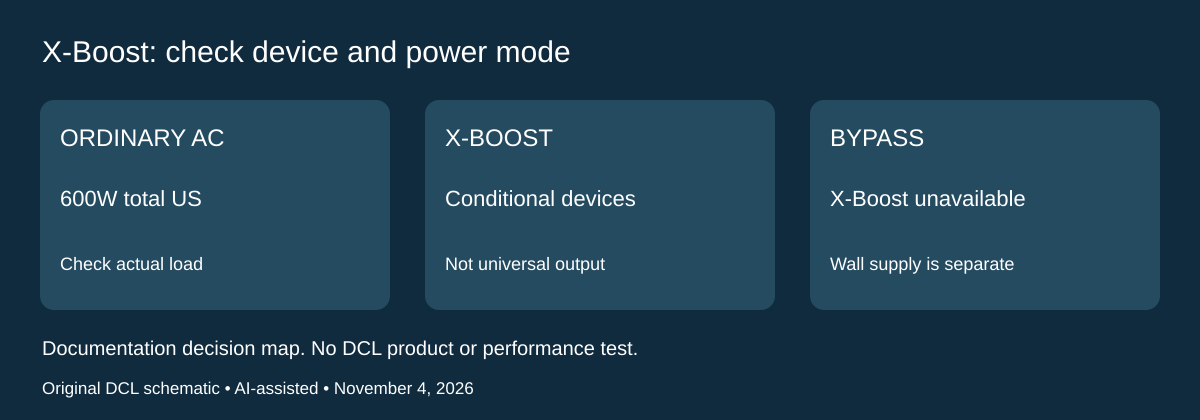
Documentation checked November 4, 2026. The earlier 600W comparison is the ordinary AC-output decision. EcoFlow’s separate 1200W X-Boost statement needs two further checks: the kind of appliance and whether the station is connected to wall power. A buyer who needs computer backup should not select this station by treating the larger number as a universal continuous rating.
The US RIVER 3 Plus manual, X-Boost: Powering High-Wattage Appliances, says X-Boost is enabled by default and can be enabled or disabled in the EcoFlow app. It identifies heating and motor-driven appliances as suitable categories, excludes devices with voltage protection such as precise instruments, and asks users to check their own device compatibility. That is conditional manufacturer guidance, not DCL approval of an appliance or a measured result.
| Intended arrangement | Documented boundary | What to compare before buying |
|---|---|---|
| Ordinary battery-powered AC use | US specification lists 120V, 60Hz and 600W total | Total connected load, startup demand and the actual equipment |
| A device considered for X-Boost | The feature has appliance-type restrictions | Obtain exact-device compatibility evidence; do not use only its wattage label |
| Wall input connected while AC sockets supply devices | This is bypass mode; X-Boost is unavailable | Use the applicable ordinary output limit and backup requirements |
| A device with voltage protection | EcoFlow excludes this category from X-Boost support | Do not treat the 1200W headline as the purchase justification |
EcoFlow defines bypass as supplying connected AC devices directly from the grid while the station has AC input connected. Therefore, a proposed arrangement that depends on X-Boost while left connected to a wall outlet has a documented mismatch. The UPS setup in the preceding section also requires its own load and communication checks; neither the transfer-time claim nor the USB monitoring cable removes the X-Boost restriction.
Selection and budget: keep an existing station if its documented ordinary output already suits the task. If it does not, compare a station with the necessary conventional output and appropriate backup behavior rather than assuming an app setting supplies the missing capacity. Current replacement and complete-kit totals remain unknown. DCL has not tested X-Boost, voltage behavior, switchover or any named appliance. These US RIVER 3 Plus conditions do not establish Explorer 300 Plus compatibility, a Japanese model’s rating, or safe operation of a particular load.
Shop the researched models
These Amazon links are affiliate links. Daily Carry Lab may earn a commission from qualifying purchases. Match the model and included contents to your needs; this guide is based on manufacturer-source research, without hands-on testing.
-
EcoFlow RIVER 3 Plus (286Wh)
Check EcoFlow RIVER 3 Plus (286Wh) on Amazon
Sources and limits
This guide compares published specifications and source documentation. Daily Carry Lab has not performed hands-on tests of the products in this guide. Consult the dated sources and verify the exact model and current terms before buying.
Related guides
iPhone 18 Pro: Wrist Strap or Crossbody Strap, with the right case
Compare exact Apple Wrist and Crossbody strap packages for iPhone 18 Pro by attachment, length, complete cost and limitations.
Portable label makers: choose phone control or a built-in keyboard
Compare Brother PT-P300BT CUBE and PT-H110 by phone dependence, TZe tape widths, power and cable-label workflow.
Travel AA/AAA chargers: match the cells, slots and USB input
Compare four-slot AA/AAA charging systems by exact chemistry and USB input. Includes conditional XTAR BC4 research and explicit operating-manual limits.
USB-C bike front lights: compare modes, mounts and charging
Compare Lezyne Micro Drive 800+ and Fenix BC15R using exact modes, rated runtime, battery design and mounting limits, without road-certification claims.