By Daily Carry Lab. Primary documentation checked October 14, 2026 (Pacific).
Affiliate disclosure: As an Amazon Associate, Daily Carry Lab earns from qualifying purchases. Retailer links may earn a commission at no extra cost to you.
Research disclosure: We have not tested these products. Selection uses primary documentation and the compatibility decisions below; no DCL ratings or measured performance are claimed.
A portable photo printer commits you to a paper system as well as a device. Start with the object you want to make: a small adhesive photo for a journal, or an instant-film print with a border. Neither system is interchangeable with ordinary printer paper.
We selected Canon IVY 2 Mini Photo Printer and Fujifilm instax mini Link 3 to compare those two workflows. They are phone-connected printers, not cameras. DCL has not tested color fidelity, fading, reliability or cost per print. A print-time specification is not our stopwatch result.
Choose the consumable first
| Exact model | Print system | Size information | Phone connection |
|---|---|---|---|
| Canon IVY 2 | Canon ZINK photo paper with adhesive back; no separate ink cartridge | Maximum paper size 2 × 3in | Bluetooth5.0 with Canon Mini Print app; no Wi-Fi or memory-card support listed |
| Fujifilm instax mini Link 3 | FUJIFILM instax mini Instant Film, sold separately | Image area62 ×46mm | Bluetooth5.1 with compatible phone/app; maker lists JPEG,PNG,HEIF,DNG printable formats |
Sources: Canon IVY 2 technical specifications, instax mini Link 3 specifications and Link 3 user manual. Paper’s full exterior size and the exposed picture area are different measurements. The table does not establish that one system has a larger usable picture by comparing unlike dimensions.
Canon IVY 2: compare for adhesive journal prints
Its ZINK workflow is a direct fit for making small photo stickers. The manufacturer lists a built-in rechargeable battery and approximately20 sheets per charge. It also states approximately45 minutes for a full charge at5V/1A; these are manufacturer conditions, not DCL measurements.
Drawbacks: phone/app compatibility matters. Canon’s specification section says iOS12+/Android6+, while a footer carries older minimums; verify the current app store requirement rather than treating either capture as a guarantee for an old phone. No Wi-Fi or memory-card route is listed. The reviewed store page contains conflicting availability labels, so we make no stock claim.
instax mini Link 3: compare for the instant-film format
Fujifilm specifies approximately100 prints from a full charge, with results dependent on use. The internal lithium-ion battery is not removable, and charging is approximately1.5–2hours depending on temperature. The maker lists a supplied USB Type-C cable. Carrying suitable film is part of the setup, not an optional replacement for ordinary paper.
Drawbacks: the film format determines the physical result and ongoing consumable requirement. The approximately15-second printing specification concerns the printer’s operation; a finished instant-film image has its own development process described in the manual. We do not present15seconds as a guarantee that the photograph has fully developed. Keep the film and printer within their documented operating/storage conditions.
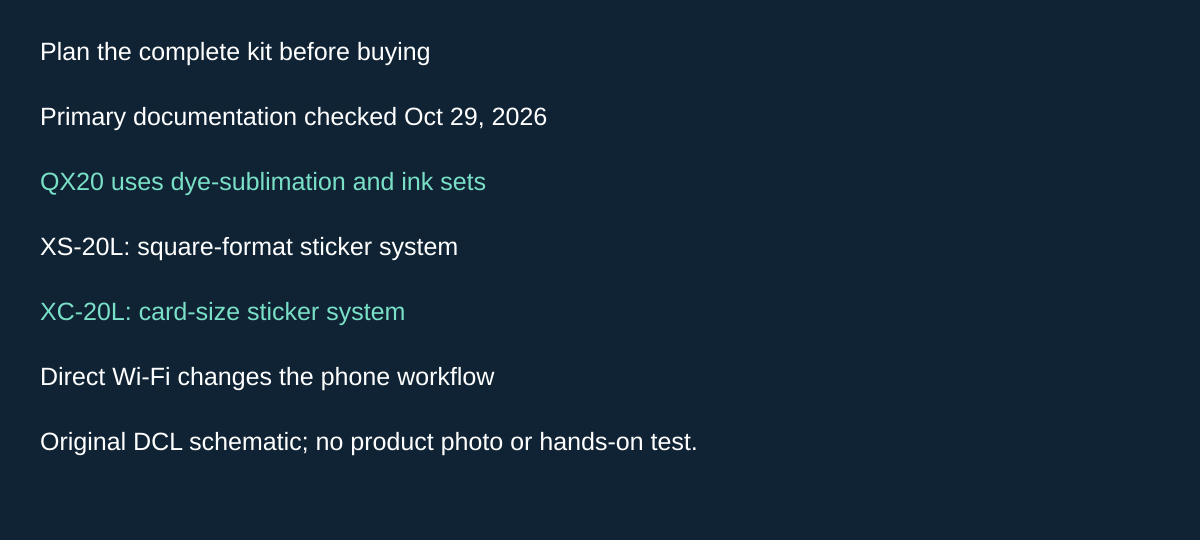
Original DCL research schematic, October 29, 2026; documented choices, not a product photograph or test.
Consider QX20 when you want square and card-format stickers
The earlier two choices are not the only formats worth comparing. Canon SELPHY QX20 is a third candidate when you want adhesive prints in both square and card formats. We selected it for that consumable choice and its different phone connection, not as a print-quality upgrade over IVY 2 or mini Link 3.
Canon’s QX20 specifications, checked October 29, 2026, identify dye-sublimation printing with separate ink cassettes and label sets. The same manual names XS-20L square and XC-20L card-size sets. These are QX20 supplies; they are not replacements for IVY 2 ZINK paper or instax mini film.
| Buying requirement | QX20 evidence | Tradeoff against the earlier choices |
|---|---|---|
| Square-format adhesive result | XS-20L label exterior 72 × 85 mm | Square-format naming does not mean the entire label is a square image |
| Card-size adhesive result | XC-20L label exterior 54 × 85 mm | Decide the wanted crop and border before committing a sheet |
| Phone connection | Direct 2.4 GHz Wi-Fi; SELPHY Photo Layout 4.0.0 or later | Different setup from the two Bluetooth printers above |
| Packed weight | About 455 g, excluding ink cassette and label | Add the actual consumables and charging kit; no complete-kit weight comparison tested |
Canon warns that the phone may lose internet connectivity during the direct printer connection, depending on the phone. If your routine involves downloading a photograph and then printing it, check both steps with that arrangement. The documented app version is a baseline, not proof of compatibility with every current phone; check the current app and actual device before purchase.
Selection and budget: choose the physical result first. Retain IVY 2 as the earlier candidate for its documented small ZINK sticker workflow, mini Link 3 for instant film, and investigate QX20 when its two label formats and direct Wi-Fi fit the task. Count the exact compatible ink/paper set in QX20’s cost; current delivered prices, stock and cost per usable print are unknown. A cheaper-looking refill for another Canon printer is not a compatible consumable merely because the brand matches.
No QX20 retailer bundle has been verified here; this candidate remains source-only. We have not tested color, longevity, wireless reliability or print waste. The instax-specific unused-film screening warning above must not be transferred to QX20 supplies without their own evidence.
Compatibility checks before packing
| Check | Why it matters | Action |
|---|---|---|
| Exact consumable | ZINK and instax mini film cannot be swapped | Confirm model-specific pack, not only brand name |
| App and phone version | Published product-page minimums can lag app changes | Install/check the current app before travel |
| Camera-roll access and Bluetooth | Both workflows need phone access and pairing | Confirm permissions with a sample photo at home |
| Cropping | A phone image’s aspect ratio may differ from the print | Preview framing before spending a sheet |
| Charger/cable | A connector shape does not prove every charger pairing | Use the documented input setup; confirm supplied accessories |
| Remaining paper/film | Device charge alone does not produce another photo | Pack enough compatible consumables for the intended use |
For a shared travel journal, agree on the physical format before buying the printer. If the goal is to stick pictures straight onto a page, the adhesive workflow may matter more than an image-resolution number. If you want the instant-film format, select it deliberately instead of comparing it with a paper printer solely on a battery figure.
Budget for the system, not only the printer
| Planned use | Practical choice to investigate | Budget status |
|---|---|---|
| A few keepsakes after returning home | Existing print service or printer | Portable hardware may be unnecessary |
| Adhesive photos during a trip | IVY2 plus exact compatible paper | Current hardware/consumable totals unknown |
| Instant-film prints during a gathering | Link3 plus instax mini film | Current hardware/film totals unknown |
| Frequent printing | Count expected prints and compare actual consumable packs | No unsupported cost-per-print or cheapest-system claim |
Our portable SSD guide covers digital-file storage, which is a separate decision from producing a physical print. The tech pouch guide can help organize the cable and consumables; confirm storage instructions before putting film in a hot vehicle.
Both exact manufacturers’ product identities are recorded in the ledger. Canon’s official store identifies IVY2 variants; a color/bundle must be chosen explicitly. Fujifilm’s product documentation binds mini Link3, but an exact purchasable retailer bundle is unresolved and remains source-only. We do not imply that a similar printer name or a supplied sample pack guarantees the same contents at checkout.
Choose the print format you want to keep, verify your phone can use the app and account for compatible consumables. Those checks answer more of the travel buying decision than an untested “best print quality” ranking.
Plan several print sessions without opening an unfinished film pack
If you want a few journal prints each evening, include the installed film pack in your packing plan. The instax mini Link 3 North American manual, checked October 24, 2026, says to keep the film door closed until all ten sheets in the pack are used. Opening it early can expose the remaining film and make those sheets unusable. An installed pack is therefore a continuing commitment across sessions, rather than a loose supply to remove after each photograph.
| Situation | Check before acting | Drawback to budget for |
|---|---|---|
| Only a few photographs needed tonight | Leave the unfinished pack installed | Changing the pack can sacrifice unused sheets |
| Some prints emerge white | Check whether the film door was opened with sheets remaining | Recharging cannot undo film exposure |
| Printer shuts down during use | Consult the manual’s battery troubleshooting | A charge problem and exposed film are different failures |
| Packing after printing | Finish ejection before putting the printer away | Keep the exit clear during operation |
Our advice is to agree on the intended print format with everyone sharing the printer, choose the images in the app first and check the crop before committing a sheet. Avoid opening the door simply to inspect the supply. Keep a note of the sheets you print if that helps plan the next session; this is our suggestion rather than a claimed automatic counting feature.
Budget and selection: allow for compatible replacement film and possible spoiled sheets, with current pack prices and actual waste unknown. Buying more battery capacity does not address film exposed during handling. If keeping an installed film pack between sessions does not suit your packing routine, compare that workflow with the IVY 2’s documented paper system before choosing. This is a handling distinction, not a claim that ZINK is cheaper, more reliable or better looking. We have not tested either printer or measured print waste.
Decide whether unused film needs to fly with you
Printing during a trip and printing its photos after returning are different packing decisions. For the instax mini Link 3, the consumable can matter even when phone compatibility and battery charge are already settled. Fujifilm’s North American mini Link 3 manual, page 17, checked October 27, 2026, warns that checked-luggage inspection and other strong X-ray exposure can fog or otherwise affect unused instax mini film. It recommends carrying the printer and film in carry-on luggage and checking with each airport for information.
That recommendation is not a promise that every carry-on scanner is harmless, that hand inspection is available, or that a particular airport will follow a requested procedure. Resolve the screening question for the airports on your actual itinerary before relying on unused film for a time-sensitive gathering. The warning is about unused instax film; it does not establish the screening tolerance of Canon ZINK paper.
| Your reason for printing | Preparation before buying or packing | Tradeoff |
|---|---|---|
| Give someone an instant-film print during the trip | Check the airport arrangements and keep the printer and compatible film accessible in carry-on, following Fujifilm’s guidance | Unused film introduces a handling concern that charging the printer does not resolve |
| Make a personal travel journal after returning | Consider keeping the photos digitally and making the prints at home | You lose the immediate physical keepsake, but need not carry unused film on that flight |
| Continue a partly used pack across several stops | Follow the unfinished-pack instructions above and include the printer in the film plan | Do not open the film door merely to remove the remaining sheets for screening |
| Choose between IVY 2 and mini Link 3 | Choose the print format first, then check the exact consumable’s travel instructions | This instax warning alone does not prove ZINK safer, cheaper or better |
Our recommendation is to decide when the physical print is actually needed. If it can wait until home, a printer purchase or an extra travel film pack may be unnecessary for this trip. If immediate instant-film prints are the point, include consumable handling in the selection decision before adding spare film to the bag. Current printer, film-pack and spoiled-sheet costs remain unknown; no savings amount or failure probability is implied.
The same manual says to keep unused film cool and avoid leaving it in extreme heat, such as a closed car, for hours. After very hot or cold storage, let the film reach room temperature before loading or printing. Keep the full film instructions with the kit. This is manufacturer-based packing advice, not DCL testing of scanner exposure, temperature tolerance or print quality.

Plan duplicate keepsakes before switching mini Link 3 off
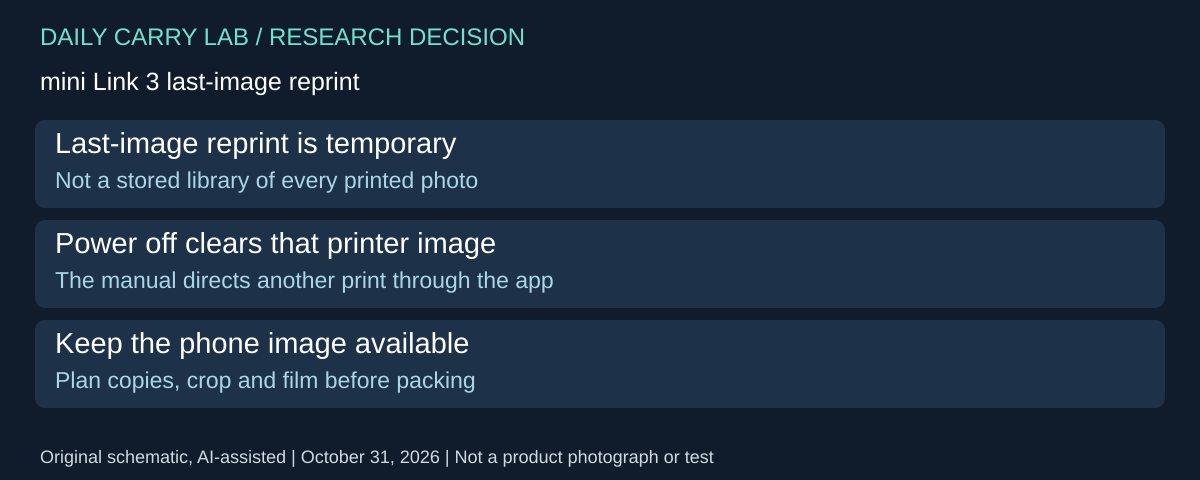
For several people wanting the same keepsake, decide on copies before packing the instax mini Link 3 away. Its North American manual, page 12, checked October 31, 2026, documents reprinting the last printed image. This is a useful session feature, not evidence of a permanent printer photo library.
| Session decision | Documented boundary | Planning consequence |
|---|---|---|
| Repeat the last print | Turn the printer over with its ejection slot downward and press Power; keep at least 10cm clearance | Follow the full illustrated procedure and keep the exit clear |
| Printer paired in INSTAX Camera Mode | That reprint function is unavailable | Check the active app mode |
| Switch the printer off | The last printed image held for this function is deleted | Print again through the app instead |
| Repeat an earlier photograph | Last-image function does not establish a multi-image archive | Retain access to the intended phone image |
The purchase implication is the complete workflow: phone access, chosen images and compatible film still matter after the first successful print. A reprint shortcut does not turn this into a phone-independent travel printer. Agree on copies and framing with recipients before consuming sheets; this is DCL planning advice, not a measured waste-reduction result.
Budget and drawback: each planned physical copy needs compatible film. Current film prices, usable yield and cost per finished keepsake are unknown. Compare the number of prints you actually want with the available supply, rather than equating the battery’s print specification with included film. If copies can wait until home, retain the digital photographs and compare that option before buying extra travel consumables.
We have not tested reprint reliability, print appearance or data erasure. The manual’s last-image deletion statement does not establish secure deletion of every possible record on the phone, app or printer.
mini Link 3: a sleeping laptop is an unreliable charging plan
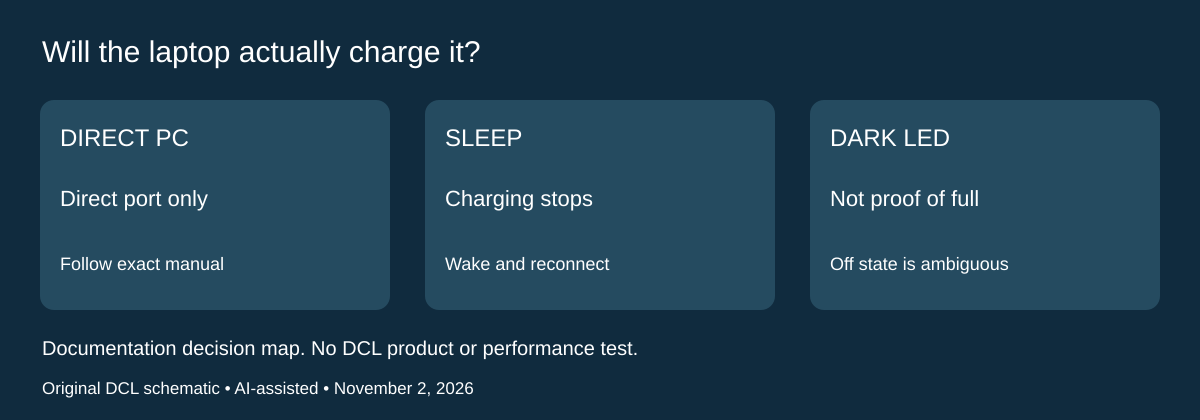
Research checked November 2, 2026. If you intend to leave the instax mini Link 3 charging from a travel laptop, check the power arrangement before buying another printer cable. Fujifilm’s North American manual, printed page 4 says to connect directly to the PC, without a USB hub or keyboard. It also says charging stops if the PC sleeps; resume the PC and reconnect USB-C to continue.
| Planned charging arrangement | Documented boundary | Decision for the kit |
|---|---|---|
| PC awake, direct connection | Charging still depends on PC specifications, settings and conditions | Check the actual computer before relying on it |
| PC put to sleep | Charging is discontinued | Do not equate leaving the lead attached with a completed charge |
| Hub or keyboard passthrough | Manual instructs a direct connection instead | Reserve a direct port or another documented power arrangement |
| Indoor outlet | Supplied USB-C cable connects through a separately sold USB AC adapter | Check the existing adapter before adding one to the bag |
The manual allows printing while charging. That is useful for a session near an outlet, but it does not establish a particular USB-C hub, power bank or charger as compatible. We do not infer a required wattage from connector shape or select a higher-power charger merely because it is already in a laptop kit.
Status also depends on whether the printer is on. Fujifilm shows flashing green during charging in either state. With the printer on, steady green means charging is complete; when it is off, an unlit LED can mean not charging or complete. An unlit printer alone is therefore insufficient confirmation that the overnight plan worked. Follow the manual and app’s available charging information rather than guessing from the cable connection.
Budget and drawback: current adapter and replacement-cable totals are unknown. Start with a suitable existing direct connection and verify the planned session before buying additional power equipment. If your laptop must sleep or its direct ports are occupied, resolve that constraint in advance. This section does not establish faster charging, measured print endurance, an approved travel power bank or a battery-replacement procedure. DCL has not tested these arrangements; the film and reprint limits above still apply.
Sources and limits
This guide compares published specifications and source documentation. Daily Carry Lab has not performed hands-on tests of the products in this guide. Consult the dated sources and verify the exact model and current terms before buying.
- canon-ivy2-web primary documentation
- instax-mini-link3-spec primary documentation
- instax-mini-link3-manual primary documentation
- Plan several print sessions without opening an unfinished film pack primary documentation
- October 29 editorial-photo-printer decision documentation
- Fujifilm mini Link 3 North American manual printed page4 PC charging
Related guides
iPhone 18 Pro: Wrist Strap or Crossbody Strap, with the right case
Compare exact Apple Wrist and Crossbody strap packages for iPhone 18 Pro by attachment, length, complete cost and limitations.
Portable label makers: choose phone control or a built-in keyboard
Compare Brother PT-P300BT CUBE and PT-H110 by phone dependence, TZe tape widths, power and cable-label workflow.
Travel AA/AAA chargers: match the cells, slots and USB input
Compare four-slot AA/AAA charging systems by exact chemistry and USB input. Includes conditional XTAR BC4 research and explicit operating-manual limits.
USB-C bike front lights: compare modes, mounts and charging
Compare Lezyne Micro Drive 800+ and Fenix BC15R using exact modes, rated runtime, battery design and mounting limits, without road-certification claims.