By Daily Carry Lab. Primary documentation checked October 14, 2026 (Pacific).
Affiliate disclosure: As an Amazon Associate, Daily Carry Lab earns from qualifying purchases. Retailer links may earn a commission at no extra cost to you.
Research disclosure: We have not tested these products. Selection uses primary documentation and the compatibility decisions below; no DCL ratings or measured performance are claimed.
A travel flash drive should solve the connector problem you actually have. Choose Samsung Type-C 128GB MUF-128DA/AM when the machines you use have USB-C and you want a single connector. Compare SanDisk Ultra Dual Drive Luxe 128GB SDDDC4-128G-G46 when you regularly move files between USB-C devices and USB-A computers. Neither choice removes phone file-system or app restrictions.
Why these two drives
Our shortlist compares a dedicated USB-C drive with a swivel dual-connector design at the same labelled 128GB capacity. That makes connector access, host compatibility and the read/write distinction more useful than a generic fastest-drive ranking. Capacity labels and manufacturer maximum speeds are specifications, not our measurements.
| Decision | Samsung MUF-128DA/AM | SanDisk SDDDC4-128G-G46 |
|---|---|---|
| Plug layout | USB-C only | USB-C and USB-A, swivel design |
| Older USB-A laptop | Needs a suitable adapter | Separate built-in USB-A connector |
| USB-C phone or iPad | Host, format and file app must support it | Same checks; a second connector does not change them |
| Carry detail | Cap/connector clearance needs checking against your phone case | Swivel protection and keyring hole documented by SanDisk |
| Main drawback | Adds an adapter to a mixed-port workflow | More connector hardware; no demonstrated durability advantage |
Sources: Samsung’s exact 128GB page and SanDisk’s Luxe family page.
Read speed is not write speed
Samsung’s January 2022 Type-C datasheet identifies the 128GB MUF-128DA family, a USB 3.1 interface with a 5Gbps bus, and manufacturer-tested sequential maxima of 400MB/s read and 60MB/s write for that capacity. The exact US product page also advertises 400MB/s reads. Do not interpret the read figure as the speed at which you can fill the drive; Samsung says host and test conditions affect results. The retailer’s contradictory write-speed field is excluded from this comparison.
SanDisk’s current page describes USB 3.2 Gen 1 and separates capacity/colour panels. Its 128GB silver panel has a blank model-number field, while the gold panel names a different suffix. We therefore use the exact G46 retailer identity to establish the selected product, but do not transfer a current panel’s numeric read speed to every G46 shipment. We have no verified write-speed comparison for the two drives.
Samsung’s dated datasheet is evidence for that family’s specification; it does not promise sustained copy speed or performance through an adapter.
Check the file workflow before leaving
On iPad, Apple requires one data partition and a supported format, including exFAT, FAT32, APFS and others listed in its guide. Open Files, choose Browse and look under Locations. A matching physical connector alone does not guarantee that a drive with an unsuitable format appears. Back up data before changing a drive’s format, and check the formats supported by every computer that must use it.
For Android, Files by Google documents USB storage access on Android 7.0 and later. That is an app workflow requirement, not certification of every phone’s USB host implementation. SanDisk’s current family page separately lists Android 10+, macOS 12+ and Windows 10+; don’t substitute the app’s lower minimum for the product’s published compatibility.
Before a trip, copy a representative file, open it on the destination device, and copy it back. Check case clearance and whether a hub blocks adjacent ports. Keep another copy of irreplaceable documents: carrying one USB stick is a transfer method, not a backup strategy.
Budget and drawbacks
| Option | Budget evidence | Useful purchase condition | Cost or drawback to check |
|---|---|---|---|
| Samsung 128GB | Current delivered total unknown | Your devices are USB-C and support the intended file workflow | Any USB-A adapter; read/write difference |
| SanDisk Luxe 128GB G46 | Current delivered total unknown | You actually need both plug types | Exact suffix/colour; current speed-panel ambiguity |
| Keep an existing working drive | No purchase total assessed | It already opens and copies the files you need | Spare copy and connector protection |
We do not call either the cheapest option or impose a price ceiling. If you need larger working files or sustained storage use, compare the portable SSD guide; an SSD is a separate storage decision, not an automatic upgrade for every document transfer.
Exact retailer checks
The SanDisk listing title says black while its attributes say silver; verify the selected colour before checkout. The retailer identity evidence establishes the exact model and capacity, not a guaranteed colour, stock level or speed revision.
Separate Android permission from a failed transfer
A USB-C plug and an installed file app are only the start of a phone-transfer workflow. Files by Google’s USB instructions, checked October 22, 2026, describe a USB available notification, selecting the connected device and granting Allow. The drive is then accessed under Storage devices. Its Android 7.0 app minimum does not override the higher SanDisk product requirements above or certify every phone.
| What you see or need | Documented workflow check | Buying implication |
|---|---|---|
| USB is detected but contents are not open | Select that device and grant the access prompt | Do not interpret an unfinished permission step as insufficient drive speed |
| You need a copy on the phone | Select the source file, choose Copy to, pick the destination and finish with Copy here | Opening the drive alone has not completed a copy |
| You need several files | Use Select and the file check circles, then the copy menu | Include selection and destination checks in your rehearsal |
| You want to relocate files | Google documents Move separately | Choose intentionally; do not treat Move as the same backup decision as Copy |
Our recommendation for a first rehearsal is a disposable sample and the copy workflow, followed by opening the destination copy in its intended app. Keep wanted originals until you have checked the result. Google’s file-manager instructions do not certify that every document, video codec or protected file will open in another application.
This matters when choosing between the Samsung’s single USB-C connector and the SanDisk’s USB-A/USB-C layout. The second connector can address the computer-port problem; it does not complete Android permission, source selection or the destination step for you. A faster read-speed headline also cannot establish successful copying into your actual app workflow.
We have not tested either drive on a phone or measured transaction speed. Current adapter and replacement-drive costs remain unknown. If the documented workflow works with an existing compatible drive, there may be no reason to buy another purely to solve that setup problem. If it does not, resolve exact phone, format and product support before assigning blame to capacity or speed.
Choose a format before erasing an iPad transfer drive
A format change deserves a separate decision from buying a different connector. Apple documents formatting in Files, checked October 25, 2026, on iPads with a USB-C port. Its options include APFS, ExFAT and MS-DOS (FAT). This is an iPad software workflow, not a performance certification for either selected drive.
| Before changing anything | Decision to resolve | Drawback or cost |
|---|---|---|
| The drive already works on all intended hosts | Keep its current format unless another requirement justifies change | No replacement purchase established |
| Another host needs to read the drive | Verify its documented format support first | iPad’s menu alone does not establish cross-platform compatibility |
| Wanted files remain on the stick | Make and verify another copy before erasing | Time and separate storage may be required; current total unknown |
Apple’s sequence is to hold the device name under Locations, select Erase, choose the format and confirm Erase. Treat that confirmation as destructive; do not use the only copy of trip documents for an experiment. Use a disposable sample afterward to check both destinations. We have not formatted either model or verified your backup.
When a large video will not copy, check format before buying capacity

A drive can have enough free space for a video and still reject that individual file. Microsoft’s filesystem comparison, checked October 27, 2026, lists FAT32’s maximum file size as 4 GiB. A file larger than that limit cannot be stored as one file on FAT32, even when the drive’s remaining capacity is much larger. Buying a higher-capacity stick with the same unsuitable format would leave that constraint unresolved. This is a filesystem limit, not a measured fault in either shortlisted drive.
| What you establish first | Decision before buying | Remaining limitation |
|---|---|---|
| The individual file exceeds 4 GiB and the drive uses FAT32 | Investigate a suitable cross-device format or another supported transfer route | A larger capacity label alone does not remove the file limit |
| The drive lacks enough total free space | Review files and the space needed for the complete transfer | Changing format is not a substitute for adequate usable capacity |
| iPad is one receiving device | Check partition layout and its supported formats, then check every other receiver | A format supported by one host may not suit the entire trip |
| The file copies but will not open | Investigate the receiving application and file type separately | Successful storage does not certify playback or editing support |
Apple’s iPadOS 26 storage guide, captured October 27, 2026, requires a single data partition and includes exFAT and FAT32 among supported formats. That makes exFAT a candidate to investigate for this workflow; it does not prove support on your other computer, camera, phone or app. Check those devices’ exact documentation before changing anything. We do not establish the factory format of Samsung MUF-128DA/AM or SanDisk SDDDC4-128G-G46 here.
Purchase decision: first inspect the file’s size, the drive’s format and available space. If the existing drive already meets the capacity and connector requirements, investigate whether the documented file workflow solves the failure before replacing it. The Samsung’s single USB-C connector and the SanDisk’s dual plugs address physical access; neither connector layout removes a filesystem constraint. If the actual requirement is more total usable space, compare exact capacity variants separately instead of transferring the 128GB specifications above to a larger model.
Budget and drawback: current replacement-drive, adapter and separate-backup totals remain unknown. Reformatting can erase wanted files. Make and verify a separate copy before considering it, then rehearse copying a disposable representative file and opening the destination copy on every intended receiver. Keep irreplaceable originals separately. This is research-based preparation advice; DCL has not performed that transfer, formatted either product or measured write speed. No format change is promised to cure every copy failure.
A third mixed-port option: choose the exact microDuo revision
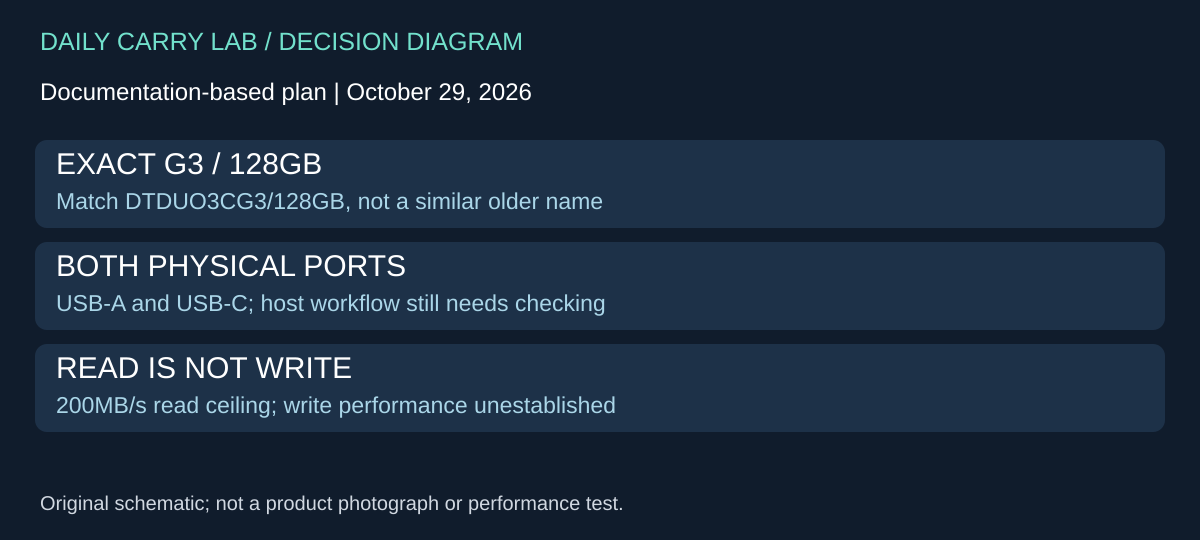
If the Samsung’s USB-C-only layout would add an adapter to your trip, the SanDisk is not the only dual-interface design to investigate. Kingston’s DataTraveler microDuo 3C DTDUO3CG3/128GB supplies another documented 128GB USB-A/USB-C option. We selected it to make the mixed-port purchase more concrete, not to name a faster or more durable winner.
The US Kingston datasheet, revision MKD-07212025, retrieved October 29, 2026, identifies that part alongside separate 64GB and 256GB versions. It lists USB 3.2 Gen 1, up to 200MB/s read, and a 29.94 × 16.60 × 8.44mm body. No write-speed figure is established in that sheet. Its mobile-device footnote requires USB-C and On-The-Go functionality; the desktop list names Windows 11/10, macOS 12.7.6 or later, Linux 4.4.x or later, and Chrome OS. These are manufacturer specifications, not DCL transfer measurements.
| Purchase question | What this candidate changes | Remaining drawback |
|---|---|---|
| Need both USB-A and USB-C without a separate adapter? | Both interfaces are documented for the G3 model | Check space around the actual port and phone case |
| Need predictable large-file writes? | The sheet supplies a read ceiling only | It does not establish sustained write performance |
| Comparing similar Kingston names? | Match DTDUO3CG3/128GB, including G3 and capacity | Older or differently suffixed products need their own evidence |
| Need phone transfers? | USB-C OTG is an explicit host condition | Format, app permissions and destination-file support still matter |
Our buying advice is to compare the actual connector mix before paying for another drive. If every receiving computer has USB-C, dual plugs may add no needed capability. If an older computer has only USB-A, this option can be investigated alongside the SanDisk rather than assuming an adapter must accompany the Samsung. Rehearse the same representative copy/open workflow on each host; a second connector does not resolve a filesystem limit.
Budget and selection: current delivered drive and adapter totals are unknown. We have not verified an exact retailer offer for this G3 variant, so it remains source-only. The previous Samsung and SanDisk discussion stays relevant; this addition does not transfer their specifications or offer identities to Kingston. Keep a separate verified copy of important files. Neither the manufacturer’s capacity label nor a successful connection establishes a backup strategy or a performance ranking.
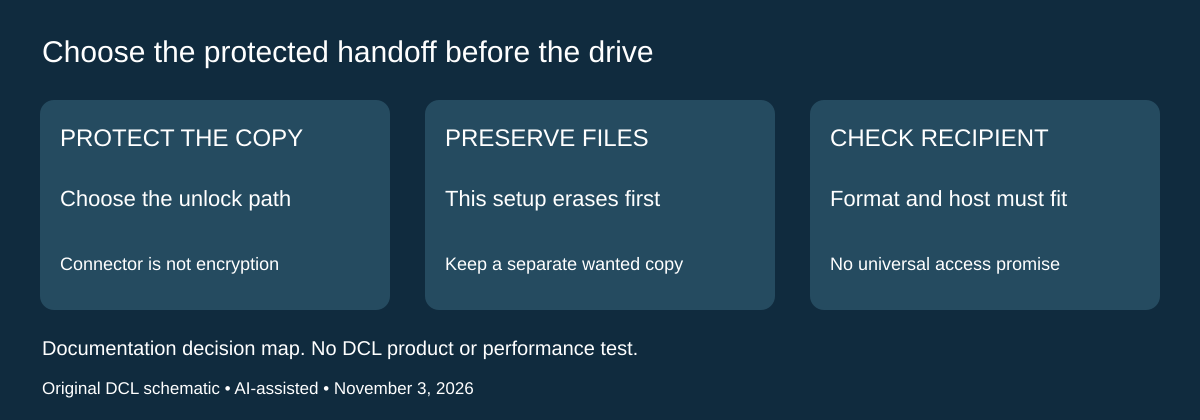
A Mac password-protected handoff changes the format decision
Research addition, November 3, 2026. If the drive carries private documents, connector choice and capacity are only part of the purchase. Decide how the recipient will unlock the files before buying another dual-plug drive. Neither a USB-C connector nor the selected drives’ transfer specifications establishes password protection.
Apple’s Disk Utility encryption instructions, checked today, describe formatting an external device with a password. That particular Disk Utility procedure erases the device first. Copy files you need to retain to another storage device or volume before considering it. This is not a direction to erase an existing working drive merely to evaluate a purchase.
| Handoff requirement | Documented choice to investigate | Drawback before spending |
|---|---|---|
| Password-protected Mac volume | Apple lists APFS (Encrypted) | The recipient needs a compatible access path and password |
| Ordinary Windows file exchange | Apple’s format guide lists ExFAT as Windows-compatible | That listing is not evidence of encryption |
| Keep files already on the drive | Preserve them elsewhere before the documented erase-and-encrypt procedure | Encryption setup must not become accidental loss |
| Deliver to an unknown recipient computer | Establish OS, permitted tools and unlock workflow first | Two physical plugs do not settle filesystem access |
The current file-format guide describes APFS for macOS 10.13 or later and explicitly distinguishes its encrypted variant from ordinary APFS. It identifies ExFAT as a Windows-compatible format for volumes above 32GB. Do not extend that Windows compatibility statement to APFS encryption, or infer password protection from an ExFAT label.
Apple’s erase-and-encrypt route uses Show All Devices, the intended storage device, GUID Partition Map and an encrypted format before setting a password. Identifying the correct device and preserving wanted files comes first. This guide does not establish that all encryption methods require erasure; it describes this specific documented route. It also does not verify any selected drive’s bundled security application or Windows access to an encrypted Mac volume.
Selection and budget: compare the entire handoff, including recipient access, any independently verified software cost and a separate retained copy. Current hardware and complete-workflow totals are unknown. Keep a suitable existing drive if its supported arrangement already meets the requirement. Buying more capacity or an additional connector cannot resolve an unverified unlock path. We have not encrypted these drives, tested cross-platform access or measured encryption performance. The existing capacity and large-file advice remains separate from this protection decision.
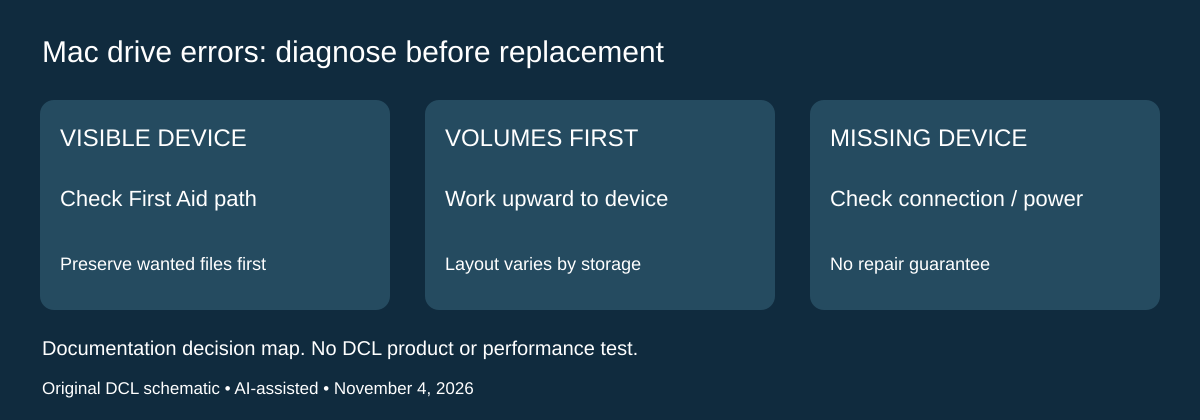
Mac transfer errors: check the storage structure before buying another drive
Research checked November 4, 2026. A flash drive that connects but behaves unexpectedly presents a different decision from a drive with the wrong plug or an incompatible file format. Apple’s Disk Utility repair guidance, published September 14, 2026, identifies First Aid as a way to find and repair errors in formatting and directory structure. That is a documented diagnostic path, not evidence that a particular Samsung, SanDisk or Kingston drive is healthy or repairable.
| What you observe | Documented check to investigate | Limit before replacing hardware |
|---|---|---|
| Device appears, but storage behaves unexpectedly | Disk Utility First Aid for the intended device | No promise of successful repair or file recovery |
| Device has several volumes or containers | Show All Devices and work through the hierarchy | Selecting only the top device omits the documented volume checks |
| External device does not appear | Check cable, connections and power; Apple also describes disconnecting nonessential devices | A format change cannot be selected for an absent device |
| Errors cannot be repaired | Preserve recoverable data and evaluate the next step separately | Apple’s later erase route destroys the existing filesystem; it is not a harmless retry |
Apple starts with a current backup because files may be damaged or errors unrepairable. In its First Aid sequence, begin with the last volume, work upward through the volumes and any volume groups, then containers, and finally the device. The layout can differ: a removable drive need not have the startup-disk structure shown in Apple’s example. Identify the intended external device before running any operation, and follow the current article if a control is unavailable or an unlock prompt appears.
This changes the buying checklist: connector count and a read-speed ceiling do not diagnose directory errors. If a supported drive already meets the host and capacity requirements, investigate that documented storage check before assuming another model is required. Conversely, a clean check does not prove the flash memory, connector or every file is sound. We have not repaired these drives or tested recovery software.
Budget and drawback: current replacement and recovery-service totals remain unknown. First Aid is an existing Mac utility, but investigation still needs a separate retained copy and time. If the only copy of important material is on the failing drive, resolve preservation or recovery needs before destructive formatting. For intentional encryption or ordinary cross-platform formatting, use the separate sections above; neither is a substitute for diagnosing an unexpected error.
Shop the researched models
These Amazon links are affiliate links. Daily Carry Lab may earn a commission from qualifying purchases. Match the model and included contents to your needs; this guide is based on manufacturer-source research, without hands-on testing.
-
Samsung Type-C 128GB (MUF-128DA/AM)
Check Samsung Type-C 128GB (MUF-128DA/AM) on Amazon -
SanDisk Ultra Dual Drive Luxe 128GB (SDDDC4-128G-G46)
Check SanDisk Ultra Dual Drive Luxe 128GB (SDDDC4-128G-G46) on Amazon
Sources and limits
This guide compares published specifications and source documentation. Daily Carry Lab has not performed hands-on tests of the products in this guide. Consult the dated sources and verify the exact model and current terms before buying.
- Microsoft filesystem limits, checked October 27 2026
- Apple iPadOS 26 external storage, checked October 27 2026
- samsung-type-c-128gb primary documentation
- samsung-type-c-datasheet primary documentation
- sandisk-dual-luxe primary documentation
- ipad-storage primary documentation
- android-usb primary documentation
- Choose a format before erasing an iPad transfer drive primary documentation
- October 29 drive primary documentation
- Apple Disk Utility: encrypt external device, erase warning and GUID sequence
- Apple Disk Utility: APFS variants and Windows-compatible formats
- Apple repair article: Before you begin; Use First Aid; cannot repair or see device
Related guides
Portable document scanners: choose the feed, power and file workflow
Compare Epson ES-50 and ES-60W simplex workflows with discontinued Brother DS-740D duplex limits, USB power and current software checks.
USB-C Ethernet adapters: match the host, driver and network rate
Compare TP-Link, Plugable and Belkin INC012 Ethernet adapters by host connector, link rate, tether reach and complete kit. Research; throughput untested.
Single-port 65W laptop chargers: profiles, plugs and cable limits
Compare Anker A2663 and Supertiny 65W for one USB-C laptop, including PPS evidence, plug variants and cable limits.
E Ink note-taking tablets: Scribe, reMarkable or BOOX?
Compare exact Kindle Scribe, reMarkable Paper Pro and BOOX Go10.3 Gen II models by pens, file export, lighting and subscription limits.