By Daily Carry Lab. Primary documentation checked October 14, 2026 (Pacific).
Affiliate disclosure: As an Amazon Associate, Daily Carry Lab earns from qualifying purchases. Retailer links may earn a commission at no extra cost to you. Manufacturer links provide evidence.
Research disclosure: We have not tested these products. This is a comparison of documented connections and limitations, without DCL ratings or measured performance.
Choose a smart plug only after checking the outlet, supply voltage, attached appliance and control system. Tapo P125M US and Kasa KP125M US are documented options for switching a home-office device from an app or automation. They do not convert voltage, provide USB power or replace an international travel adapter. We selected them because TP-Link publishes regional electrical specifications and Matter setup requirements, rather than treating a Matter logo as universal compatibility.
Our retailer comparison uses a single P125M and the KP125MP2 two-pack containing two KP125M plugs. Bundle quantity matters when comparing a purchase; the two-pack is not a different individual plug’s load rating. We have not tested app reliability, automation latency, energy accuracy or appliance switching.
Check the regional electrical label first
| US model | Reviewed input rating | Reviewed maximum load | Main limitation |
|---|---|---|---|
| Tapo P125M | 100–125 V~,50/60 Hz | 15 A;1800 W at 120 V;1/6 HP motor listed | US regional product; do not transfer this limit to other regions or load types |
| Kasa KP125M | 100–120 V~,50/60 Hz in US datasheet | 15 A,1800 W general-use/resistive load | Resistive-load rating does not certify every motor, heater or appliance |
Sources: P125M US specifications, KP125M US datasheet. Check the purchased unit’s label and current instructions; do not infer a 230 V rating from a similarly named overseas product. A socket adapter cannot change the allowed input voltage.
For a desk lamp or another proposed load, compare the appliance’s own label and permitted switching behavior with the exact smart plug instructions. A power rating alone does not establish safe unattended use or suitability for a device with high starting current. This guide does not certify a particular appliance pairing. Both plug families must remain within their documented load and environmental requirements.
Matter still needs the correct network and controller
The P125M page specifies2.4 GHz Wi-Fi only, with Bluetooth for setup. The KP125M datasheet specifies2.4 GHz 802.11b/g/n. Neither reviewed document identifies these as Thread plugs. A Matter controller does not upgrade a5 GHz-only network into a compatible2.4 GHz connection.
| Documented capability | P125M US | KP125M US |
|---|---|---|
| Matter integration | ✓ | ✓ |
| 2.4 GHz Wi-Fi connection | ✓ | ✓ |
| 5 GHz Wi-Fi connection | — | — |
| Energy monitoring explicitly documented for selected model | — | ✓ |
The last row means energy monitoring is documented for KP125M and is not established for this selected P125M by the reviewed page. It does not describe another P125M-family bundle marketed with different features. KP125M manufacturer page.
For a Matter setup, KP125M’s datasheet requires a Matter-supported controller and the smart-home app from the same ecosystem, then Bluetooth on the phone and scanning the provided Matter code. For the manufacturer’s own app path, check its app/account and network requirements. These are separate control choices; a retailer’s list of platform names does not verify the particular controller or software version you own.
Energy readings and apps are separate decisions
Kasa documents real-time and historical energy monitoring, but its US datasheet explicitly says energy monitoring is not supported in Apple Home. Do not assume that because a plug can turn on in a Matter app, every manufacturer feature appears there. If energy visibility is the reason for buying, confirm the current manufacturer app’s available functions for your hardware/firmware before choosing it. We have not measured wattage accuracy or validated bill estimates.
| Planned setup | What to verify | Drawback |
|---|---|---|
| Fixed home-office outlet | Plug fit, appliance label and compatible2.4 GHz network | Automation still depends on the actual control configuration |
| Matter-controlled desk lamp | Supported controller, ecosystem app and code onboarding | Platform integration does not guarantee every energy feature |
| Temporary workspace | Permission and ability to join a compatible network | Shared or captive-portal network compatibility is not established here |
| Overseas outlet | Exact regional plug and input rating | These reviewed US units are not a voltage-conversion solution |
| Power-sensitive workstation | What happens when switched off and after power returns | Do not use an untested automation as a backup or graceful shutdown plan |
A hotel network is not automatically a usable smart-home network. We have not verified these plugs through a captive portal, enterprise login or every travel router. The travel router guide explains uplink choices; it does not establish smart-plug onboarding. Check the exact network and controller path first.
Budget the quantity and controller
| Exact retail option | Budget evidence, October 14, 2026 | Useful decision | Drawback |
|---|---|---|---|
| Tapo P125M US 1-pack | Current US checkout price unknown | One switching point with a verified model identity | Energy monitoring not established for this selected model |
| Kasa KP125MP2 US 2-pack, two KP125M units | Current US checkout price unknown | Two switching points; energy monitoring documented for KP125M | Manufacturer features do not all appear in Apple Home |
| Keep a suitable existing setup | No new plug purchase if already suitable | Verify it supports the desired network and load | Matter-controller costs or a network change may still be needed |
Amazon identities checked October 14: B0BNWGZ545 for P125M 1-pack and B0BYGRLRS1 for KP125MP2, whose captured model/part and package fields identify two KP125M plugs. No current price, availability, energy-savings amount or photograph reuse is claimed. Choose the model for the verified electrical and app path; choose the bundle quantity only after counting the actual outlets you need.
Decide which control must survive an internet outage
A second smart plug will not automatically fix a control-path problem. For the selected P125M US, TP-Link’s product page, Local Control and Share to Families sections, checked October 22, 2026, says devices remain accessible through Tapo or an already configured Matter-certified app when the internet connection is lost. That is a narrower claim than operation through every network failure.
| Your requirement | Evidence to establish before buying | Boundary |
|---|---|---|
| Switch the device while at home during an internet outage | Complete the intended local app setup in advance | Existing local control does not establish new onboarding without internet |
| Switch it while away from home | Verify the remote path from your phone | The local-control statement is not proof of remote access during an outage |
| Share control with household members | Choose Tapo management sharing or the appropriate Matter ecosystem setup | A family member possessing an app is not proof they have access |
| Work when the router or plug has no power | Assess a separate power-continuity plan | The cited internet-loss feature establishes no backup power |
TP-Link separately documents Tapo Bluetooth onboarding and setup by scanning the included Matter code in a compatible app. Its family-sharing section describes management permissions and access through different control ecosystems. It does not provide a complete second-ecosystem commissioning procedure on this page; follow the current setup instructions for the actual controller rather than assuming a second scan always works.
Our suggested check is to document who needs control, from where, and which connection must remain available. Rehearse the intended local and remote paths before depending on an automation. We have not tested outage behavior, household permissions or platform reliability. Do not switch off equipment that needs a graceful shutdown merely to perform a check.
This requirement check adds no promise of energy savings and no extra plug or controller recommendation. Current controller and replacement-plug totals remain unknown. Preserve the regional voltage, appliance-load and network checks above; local control does not change them, and this P125M statement is not transferred to KP125M without its own evidence.
Share the existing Matter plug before buying a second one
Adding another ecosystem is different from first-time commissioning. TP-Link’s multi-controller instructions, checked October 25, 2026, say the original Matter setup code serves the first ecosystem. For another ecosystem, generate a fresh setup code through the first ecosystem’s app.
| Existing setup | Next check | Purchase implication |
|---|---|---|
| Plug already controlled by one ecosystem | Use that app’s sharing/commissioning instructions | A second plug is not automatically required |
| Matter device configured in Tapo | Its Matter Setup Code interface generates a code valid for 15 minutes | Prepare the receiving app before generating it |
| Device, phone and hub are separated across networks | Follow TP-Link’s same-Wi-Fi requirement; phone and device use 2.4GHz | Another platform account does not repair network separation |
The manufacturer provides separate app-specific paths; use the path for the first controller actually configured. Do not apply the Tapo code lifetime to every ecosystem. Sharing access also does not establish that energy features become available in every app, or change either US plug’s electrical limits. Our purchase recommendation is to resolve the controller and network path before pricing duplicate hardware. Current controller and plug totals remain unknown. We have not commissioned these combinations or tested household permissions.
Changing the router is a network decision before a replacement-plug decision
If an existing plug goes offline after a router replacement, buying another plug may leave the same network mismatch. TP-Link’s router-change guidance, checked October 27, 2026, lists Tapo P125M and KP125MP2 among applicable products. It says the Tapo/Kasa app does not directly switch the device’s Wi-Fi network.
| Migration choice | Manufacturer’s documented path | Drawback to plan for |
|---|---|---|
| Keep the previous wireless configuration | Match the old SSID, encryption type and Wi-Fi password on the new router | This is a router configuration decision affecting other devices too |
| Change those settings | Reset the plug using its exact model guide, then configure it for the new network | Budget setup time; do not assume old settings survive |
| Still offline | Follow manufacturer support with the exact device/router identity and LED state | Offline status alone does not prove failed hardware |
TP-Link says matching the previous settings should allow reconnection; this is not our tested guarantee. Retain the selected plugs’ 2.4GHz and US electrical limits above. This migration guidance also does not prove that every Matter controller or automation survives unchanged. Current replacement totals are unknown. We have not reset these plugs or changed a household network; check the actual model instructions before choosing the reset path.

A motor load needs more evidence than the headline wattage
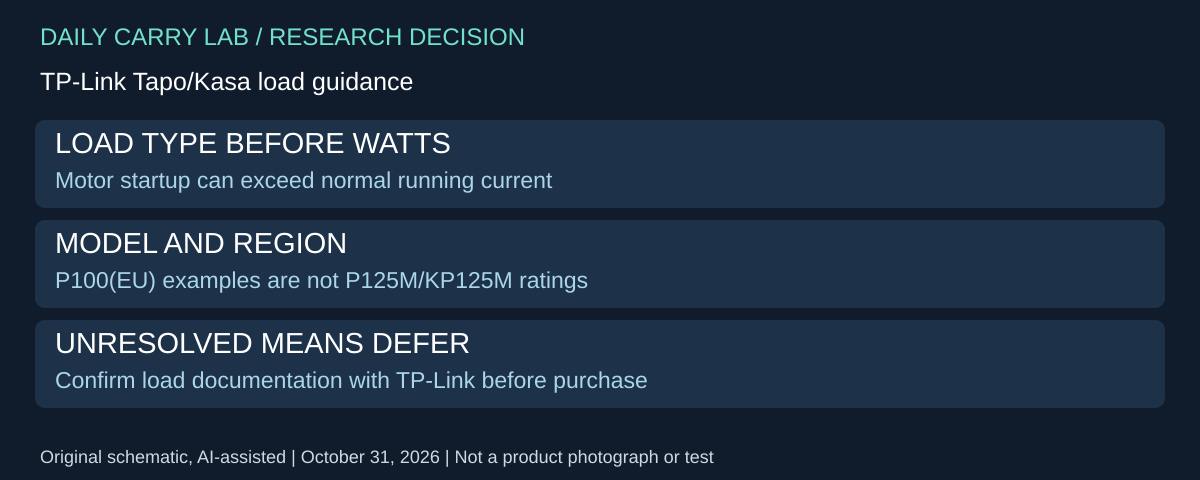
Research added October 31, 2026. Matter and Wi-Fi compatibility answer how a plug is controlled; they do not establish that the connected appliance is an acceptable electrical load. Before buying a plug for a fan, pump, refrigerator or other motor-driven device, identify the load type as well as its running wattage.
TP-Link’s load-compatibility FAQ, updated June 12, 2026 and retrieved for this update, says Tapo/Kasa plugs are primarily designed for resistive loads. It warns that high-power motor-driven inductive loads can produce startup current exceeding the plug’s rating. A low running-watt figure is therefore insufficient evidence for the intended switching task.
| Intended use | Evidence needed before selection | Drawback or stop condition |
|---|---|---|
| Motor-driven appliance | Exact plug’s supported load type and appliance motor/HP requirements | Running watts alone can conceal a startup-current problem |
| Several devices through an extension | Manufacturer approval for the arrangement and combined loads | A sum below headline watts does not settle surge or suitability |
| Equipment requiring uninterrupted power | Manufacturer guidance for the actual application | Do not infer continuity from local control or a schedule |
| Different country or hardware revision | That model/region’s specifications and installation guide | Similar names and plug shapes are not interchangeable ratings |
The FAQ includes a detailed Tapo P100 (EU) example at 230V. Those current, power and horsepower figures are not specifications for the US P125M or KP125M compared above. We intentionally do not copy the example’s limits into this guide’s US selection table. TP-Link directs readers to the exact model’s specifications, Quick Installation Guide and correct regional hardware version, and to support when load information is missing.
Read the FAQ’s cautions together. It describes combined-load precautions for extensions but also lists power strips and safety-critical or unsuitable applications among scenarios not recommended. That is not blanket authorization to put a travel strip behind either US plug. Its example also flags some USB power supplies for startup-current issues; a charger being small or below a resistive-load ceiling does not independently clear the combination.
Our selection method is to write down the plug model, region and hardware version, the appliance identity, its load type and available startup/motor documentation. Ask TP-Link to resolve any mismatch before buying or switching that load. Do not perform trial switching on equipment whose interruption could cause harm or data loss simply to see whether the plug tolerates it. DCL has not measured inrush current or tested these appliance pairings.
Budget and drawback: a plug that cannot document the intended load is not a complete solution at any advertised price. Current appropriate-control, electrician/support and replacement totals are unknown. Keep a suitable existing arrangement while compatibility is unresolved, or defer the purchase. This source-only expansion adds no retailer mapping, regional electrical rating, energy-saving promise or approval for a specific motor.
Choose the automation rule before adding another plug
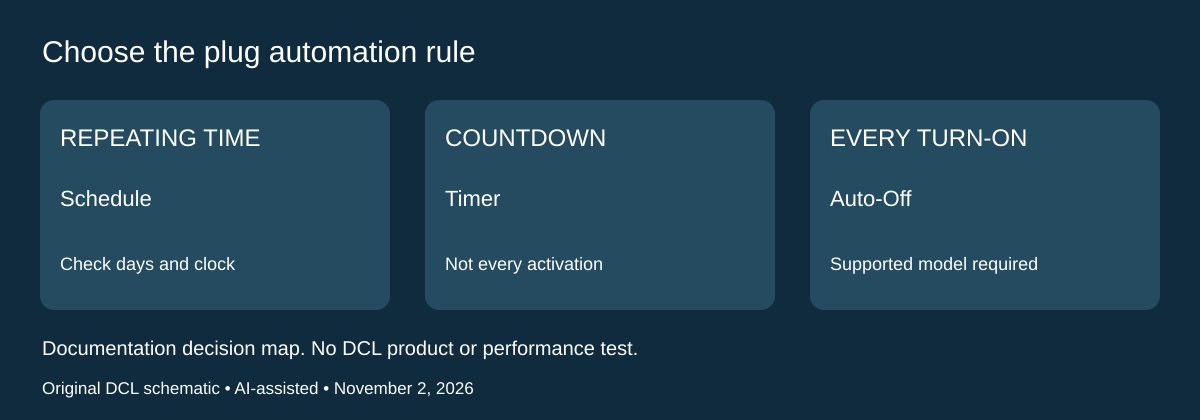
Research added November 2, 2026. An outlet turning off at the wrong moment can be a rule-selection problem before it is a hardware-purchase problem. Decide whether you want a repeating clock event, one countdown or a cutoff after every activation. Keep the electrical-load checks above; app features do not clear an unsuitable appliance.
TP-Link’s Tapo app automation guide, updated June 17, 2026, distinguishes Schedule, Timer, Away Mode and Auto-Off Timer. Its supported auto-off list includes all Tapo smart plugs and specifically Kasa KP125M. The manufacturer describes auto-off as applying after each turn-on. The ordinary Timer instead counts down to a chosen on/off action; Away Mode switches randomly within a selected window.
| Desired behavior | Rule to investigate | Drawback or check |
|---|---|---|
| Repeat a desk-lamp event at a set time | Schedule | Confirm repeat days and the device’s clock context |
| Perform one delayed on/off action | Timer | Do not assume this creates an every-activation cutoff |
| Cut power after each activation | Auto-Off Timer on a supported plug | Confirm that interruption suits the connected equipment |
| Simulate occupancy with a suitable lamp | Away Mode | Random switching is unsuitable when continuity is required |
The same guide distinguishes a single-device schedule from a multi-device Automation. It explicitly requires the devices to be online for the latter. It also says changing the phone’s time zone generally does not change the device’s schedule time zone, which is set during initial configuration. This matters when you travel while a home-office plug stays behind. Do not assume that your arrival-time phone display changes the outlet’s intended local event.
Our preparation method is to write the intended event in one sentence, identify the exact plug and app, and inspect the rules already attached to it. With a suitable noncritical load, observe the intended event before relying on it unattended. Record which rule produced it. This is a suggested owner check, not a DCL automation test or a guarantee about rule priority.
Budget and drawbacks: current plug, controller and setup totals are unknown. If the existing supported plug can express the required rule, investigate its configuration before pricing a replacement. If dependable operation without internet is essential, obtain exact-model and exact-control-path evidence first; the multi-device online requirement cannot establish an offline guarantee. This update adds no energy-saving estimate, safety-timer certification, appliance approval or new retailer mapping. DCL has not tested switching, time-zone migration or outage behavior.
Shop the researched models
These Amazon links are affiliate links. Daily Carry Lab may earn a commission from qualifying purchases. Match the model and included contents to your needs; this guide is based on manufacturer-source research, without hands-on testing.
-
Tapo P125M (US, 1-pack)
Check Tapo P125M (US, 1-pack) on Amazon -
Kasa KP125MP2 (2-pack of KP125M)
Check Kasa KP125MP2 (2-pack of KP125M) on Amazon
Sources and limits
This guide compares published specifications and source documentation. Daily Carry Lab has not performed hands-on tests of the products in this guide. Consult the dated sources and verify the exact model and current terms before buying.
- www.tp-link.com primary documentation
- static.tp-link.com primary documentation
- www.tp-link.com primary documentation
- Share the existing Matter plug before buying a second one primary documentation
- Changing the router is a network decision before a replacement-plug decision primary documentation
- A motor load needs more evidence than the headline wattage primary documentation
- TP-Link FAQ2815: feature distinctions, auto-off models, online requirements and time zones
Related guides
iPhone 18 Pro: Wrist Strap or Crossbody Strap, with the right case
Compare exact Apple Wrist and Crossbody strap packages for iPhone 18 Pro by attachment, length, complete cost and limitations.
iPhone Duo cases: Apple Case versus Folio with Kickstand
Compare exact Apple iPhone Duo Case and Folio parts by coverage, viewing support, charging arrangements, separate equipment and dated US prices.
Portable label makers: choose phone control or a built-in keyboard
Compare Brother PT-P300BT CUBE and PT-H110 by phone dependence, TZe tape widths, power and cable-label workflow.
Travel AA/AAA chargers: match the cells, slots and USB input
Compare four-slot AA/AAA charging systems by exact chemistry and USB input. Includes conditional XTAR BC4 research and explicit operating-manual limits.