
By Daily Carry Lab. Primary documentation checked October 14, 2026 (Pacific).
Affiliate disclosure: As an Amazon Associate, Daily Carry Lab earns from qualifying purchases. Retailer links may earn a commission at no extra cost to you. Manufacturer links support the documented claims.
Research disclosure: We have not tested these products. Selection is based on primary documentation and the compatibility decisions below; no DCL ratings or measured performance are claimed.
A phone gimbal is useful only if your actual phone fits and the tracking mode works in the app you intend to use. DJI Osmo Mobile 7P and Insta360 Flow 2 Pro are two documented candidates. DJI’s included Multifunctional Module offers a tracking path beyond DJI Mimo; Flow 2 Pro’s manual documents Apple DockKit tracking on supported iPhones and a separate Insta360-app path. Choose by that workflow before comparing a headline “AI” label.
We selected these models for their published fit limits and setup documentation, without testing footage, motor performance or tracking accuracy. The reviewed variants are the Osmo Mobile 7P kit with its module and Flow 2 Pro Stone Grey Standard Bundle, whose listing does not include an optional AI tracker.
Check the complete phone setup
| Manufacturer fit limit | Osmo Mobile 7P | Flow 2 Pro |
|---|---|---|
| Phone weight | 170–300 g | 130–300 g |
| Phone width | 67–84 mm | 64–84 mm |
| Phone thickness | 6.9–10 mm | 6.9–10 mm |
Sources: DJI specifications, Insta360 Flow series specifications, Flow 2 Pro column.
Measure and weigh the phone with the case and any attached lens you intend to keep. Bare-phone specifications can understate the assembled size and load. Treat the published ranges as a first screening check; a clamp must still avoid buttons and hold the phone in the specified position. Being inside the weight range does not prove clearance throughout the gimbal’s motion.
Consult the exact phone compatibility list for app features too. DJI’s FAQ lists Android 9 or later and iOS 15 or later as system requirements, while separately linking a phone compatibility list. A minimum OS version alone does not establish that every camera feature works on your handset. DJI FAQ.
Separate tracking hardware from tracking software
DJI’s FAQ describes tracking through its Multifunctional Module with other camera apps and ActiveTrack through DJI Mimo. It says the module is supplied with 7P, while the non-P Mobile 7 treats it as optional. Do not transfer the 7P kit contents to another product just because both belong to the same series. DJI tracking instructions.
Flow 2 Pro’s manual documents DockKit with an iPhone 12 or later running iOS 17 or later, and recommends iOS 18 or later for enhanced features. Its native-camera and third-party tracking instructions refer to DockKit-compatible apps. The manual also describes Deep Track through the Insta360 app. This guide does not promise tracking in every iPhone app or every Android camera app. Flow 2 Pro manual, pairing and tracking.
| Shooting requirement | Check before buying | Possible drawback |
|---|---|---|
| Native iPhone camera with Flow 2 Pro | DockKit phone/OS requirements and pairing | Supported hardware still needs the correct setup |
| Third-party video or livestream app | Exact app, mode, OS and tracking path | A gimbal’s marketing app count does not prove your workflow |
| DJI module-based tracking | Selected 7P kit includes module; follow gesture/setup instructions | Tracking and light add battery load |
| Android with Flow 2 Pro Standard Bundle | Confirm supported features in Insta360 app on the exact phone | Optional tracking accessories are not established as included |
| Manual handheld shots | Phone fits, motor movement clears the case and controls work | Tracking may add no value to this use |
Rehearse the actual shooting sequence: open the chosen app, start tracking, move through the frame and confirm recording and stop controls. This is a suggested owner check, not evidence that DCL performed a tracking test.
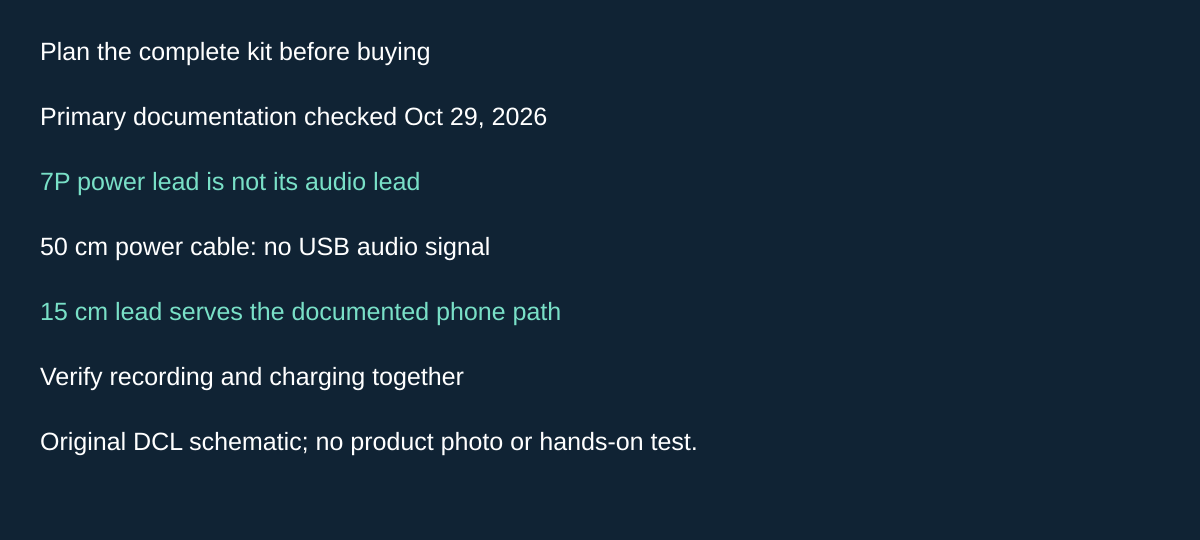
Original DCL research schematic, October 29, 2026; documented choices, not a product photograph or test.
Plan the 7P microphone and phone-power connection as one kit
If you want a wireless microphone and phone charging during the same shot, check the connection path before leaving cables at home. Osmo Mobile 7P’s ability to hold and track a phone does not by itself establish a complete audio recording kit. This matters when deciding whether its module can reduce the separate hardware you carry.
DJI’s Osmo Mobile 7 Series FAQ, checked October 29, 2026, says the included 50 cm power cable and 15 cm phone charging/audio recording cable are not interchangeable. The power cable lacks USB signal capability for audio recording. DJI also distinguishes charging through the Multifunctional Module from the handle arrangement. A matching USB-C plug is therefore not enough to select the lead for this workflow.
| Intended recording kit | What DJI documents | Buying or packing consequence |
|---|---|---|
| Gimbal power only | Separate power cable | Carrying it alone does not establish microphone audio to the phone |
| Module audio workflow | Dedicated phone charging/audio lead | Identify the correct included lead before buying a duplicate or packing a substitute |
| Wireless transmitter into the module | FAQ names DJI Mic 2 and DJI Mic Mini transmitters | Confirm the exact transmitter; module inclusion does not mean a microphone is included |
| Phone power while using module audio | Double-press M to enable phone charging; double-press again to disable | Rehearse the actual control and inspect both recording and phone-power states |
Our selection advice is to sketch the path from microphone to module to phone, then the separate power source. List each item you already own and each missing part. This can expose a transmitter or lead gap before checkout. Do not add an ordinary receiver automatically when investigating the documented module path, but do not assume the module accepts every wireless microphone either.
Before departure, record and play back a disposable sample with the actual app, phone and intended connections. A phone charging indication cannot tell you whether the saved recording contains the external microphone. This is an owner check we recommend, not a DCL test. Cable clearance throughout gimbal movement also needs attention; the connector’s electrical function does not certify mechanical freedom.
Budget and drawback: transmitter, replacement lead and complete-kit totals remain unknown. Phone charging consumes the gimbal’s energy, so the earlier stationary runtime conditions still apply. This evidence supplies no equivalent Flow 2 Pro microphone path, no universal third-party cable approval and no new retailer bundle identity.
Compare folded dimensions on the same basis
DJI lists Mobile 7P folded at 190 × 95 × 46 mm and approximately 368 g including its built-in tripod, magnetic clamp and Multifunctional Module. Insta360 lists Flow 2 Pro folded at 97.9 × 178.4 × 36.7 mm, excluding the phone clamp with the tripod unextended. It gives approximately 357 g for the gimbal and 25 g for the clamp. DJI dimensions, Insta360 dimensions.
Those envelopes use different dimension ordering and accessory inclusion. We do not declare a packing winner from them. Allow room for the detached clamp, cable and pouch, and check the bag opening. The tech pouch guide explains why exterior measurements are not usable internal clearance.
The Flow manual cautions against high-intensity motion with the magnetic clamp and instructs holding the handle or arm when unfolding or folding. Its hardware page says the gimbal is not waterproof. A phone’s water rating does not extend to its gimbal. Flow manual, Flow hardware cautions.
Battery ratings are stationary reference figures
DJI rates about 10 hours with the gimbal level, stationary and without additional accessories. It gives about 5 hours with module tracking and the light off, or about 4 hours with tracking and maximum light. Charging your phone also shortens operating time. DJI specifies USB-C charging and approximately 2.5 hours using a 10 W charger. DJI battery conditions.
Insta360 rates Flow 2 Pro at 10 hours under its 25°C, balanced, horizontal, stationary test with no AI tracking module or fill light attached and the ring light off. Its approximately two-hour charge reference uses a powered-off gimbal and the stated laboratory charger conditions. These are not measured walking, tracking or phone-charging runtimes. Insta360 battery conditions.
Flow’s manual distinguishes the handle’s USB-C IN charging port from the arm’s OUT port for phone power. Use the right connection rather than assume any USB-C socket is interchangeable. Plan for the phone’s energy use as well as the gimbal’s.
| Exact configuration | Budget status checked October 14, 2026 | Useful reason to choose | Drawback |
|---|---|---|---|
| DJI Osmo Mobile 7P, module included | Current checkout total unknown; no price ceiling | Documented module tracking plus Mimo workflow | Phone fit and accessory power use need checking |
| Flow 2 Pro Stone Grey Standard Bundle, CINSABQB | Current checkout total unknown; no price ceiling | Documented DockKit path on supported iPhones | No optional AI tracker in the verified bundle; app/OS dependencies remain |
| Keep a phone-only setup | No new gimbal purchase | Suitable if your intended recording already meets your needs | No gimbal motion control or automated tracking established |
Retailer identities checked October 14: B07FTG84SW for Mobile 7P with Multifunctional Module, and B0DPKV8LP7 for Flow 2 Pro Stone Grey Standard Bundle. Check selected bundle contents again at checkout. If a standalone waterproof recording camera better suits the activity, compare the action-camera workflow; a phone gimbal solves a different support and tracking problem.
Choose the tracking path by the subject, not just the app
DJI’s Osmo Mobile 7 Series FAQ, checked October 24, 2026, gives an important limit to the included 7P module: its tracking path follows people in native or third-party camera/live-streaming apps. DJI separately describes Mimo ActiveTrack as following people, animals and objects. It says the module’s tracking and shooting features are not supported in Mimo. These are alternative paths, not interchangeable controls.
| Intended subject and app | Documented path to examine | Purchase consequence |
|---|---|---|
| Person in native or supported third-party app | Multifunctional Module | Verify the actual app workflow |
| Pet or object | Mimo ActiveTrack | The module’s people-tracking statement does not cover this job |
| Switch among detected subjects in Mimo | Smart Capture detection boxes | Tap the intended subject rather than assume automatic selection |
| Resume module use after a pause | Trigger wakes it after its five-minute idle sleep | Rehearse wake and tracking activation before the moment matters |
DJI describes changing the Mimo subject by tapping another detection box. That establishes a selection method, not a DCL result for crowded scenes, an assurance that a particular animal will be detected, or a guarantee of uninterrupted tracking.
Our suggested buying check is to write down the subject, exact phone and recording app together. Then confirm the required tracking path and record/stop controls for that combination. A demonstration following a person in another app does not answer whether your pet-shooting workflow works. If the required app excludes the documented path, pause before paying for the gimbal or another module.
Budget and drawback: retain the included 7P module identity; an additional module purchase does not establish Mimo or animal-tracking support. Current complete totals are unknown. We have not tested detection, reacquisition, subject switching or accuracy. No equivalent Flow 2 Pro capability is inferred from DJI’s FAQ.
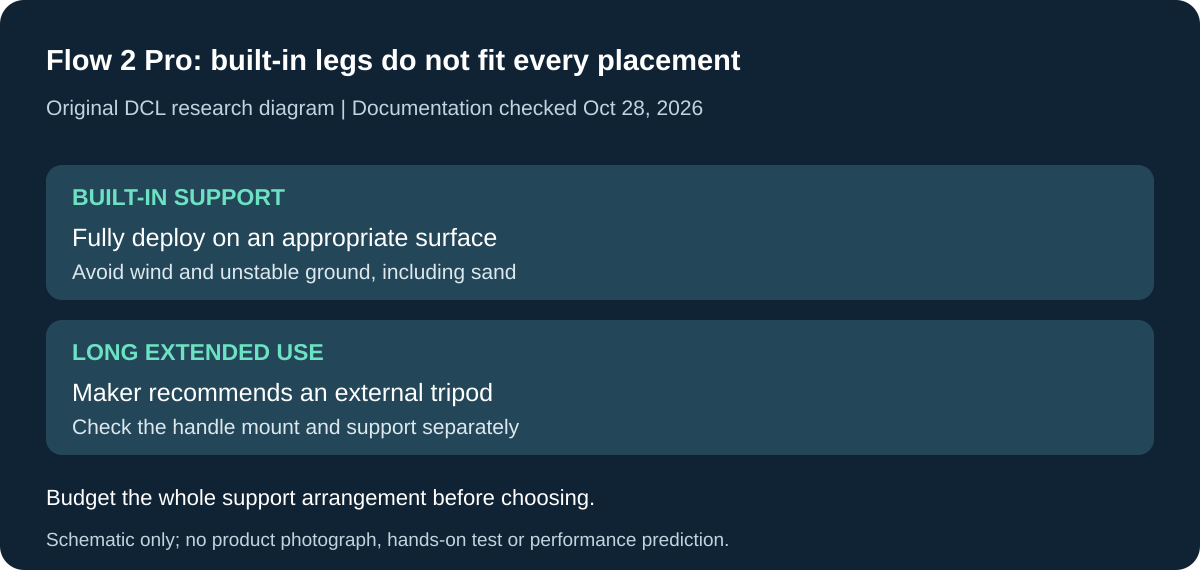
Original DCL research schematic, October 28, 2026. Documented boundaries, not a product photograph or DCL test; see the cited manual and qualifications below.
Check whether the built-in tripod can replace your separate support
Flow 2 Pro’s built-in tripod can reduce separate parts only when its documented placement limits fit the shot. Its manual, printed page 5, checked October 28, 2026, tells owners to avoid windy or unstable environments, including sand. A phone within the clamp’s published weight range does not establish stable unattended support at the chosen location.
| Planned support arrangement | Manufacturer instruction | Packing decision |
|---|---|---|
| Built-in tripod for hands-free shooting | Fully extend and unfold it; avoid wind and unstable placement | Confirm the actual surface before removing a separate support from your kit |
| Deploy the built-in legs | Pull all legs out together, not individually | Leave room to deploy the base as instructed |
| Store the legs | Fold them first, then push them in slowly with the palm | Do not plan to pack it with the legs protruding |
| Selfie stick extended for a long time | Maker recommends an external tripod through the handle’s 1/4-inch screw hole | A separate compatible support may still belong in the complete kit |
Insta360 documents five selfie-stick sections, up to 210 mm extension and a 0–90-degree adjustment range. Those are mechanical specifications, not a tested stable height, a wind rating or a guarantee that an arbitrary stand is suitable. The mounting-hole description likewise does not establish the load rating, clearance or stability of the tripod you already own. Check that accessory’s instructions separately.
This creates a practical choice before purchase. For brief hands-free framing on an appropriate surface, investigate whether the built-in support meets the documented arrangement. For prolonged extended use, budget space for the external support recommended by the maker. If all you need is a fixed phone position, compare the complete gimbal arrangement with a suitable phone support you already own before paying for tracking and motor controls.
Budget and drawback: current tripod, adapter and complete-kit totals are unknown. No external support or new retailer bundle is endorsed. DCL has not tested tip resistance, prolonged deployment, wind, sand or stand compatibility. The limits concern Flow 2 Pro and do not establish the performance of Mobile 7P’s built-in tripod. Retain the earlier phone fit, clamp and app checks: a stable base does not supply tracking compatibility.
Flow 2 Pro: subject tracking is separate from how the camera follows your hand
Research checked November 2, 2026. A gimbal can track the right person while still responding differently from the shot you intended. Flow 2 Pro’s manual, printed page 24, distinguishes its movement modes. Choose the desired framing movement before interpreting that response as a reason to replace the hardware.
| Desired response | Documented mode | Limitation for framing |
|---|---|---|
| Automatic adjustment of pan and tilt settings to movement | Auto, selected by default | The response is selected automatically |
| Have pan and tilt follow the handle | Follow | Described as more sensitive than Auto |
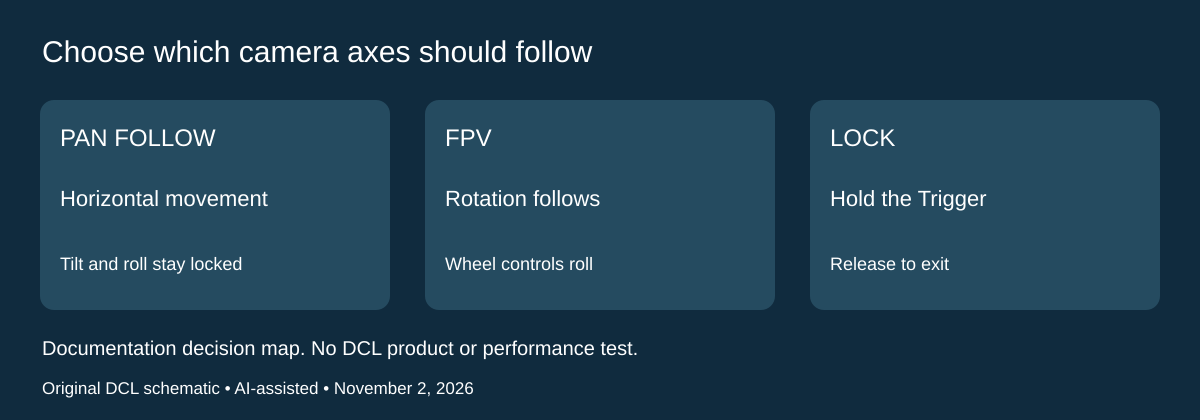
| Pan horizontally while retaining tilt and roll orientation | Pan Follow | Tilt and roll axes are locked |
| Let the camera follow handle movement in any direction | FPV | Zoom Wheel controls roll rotation |
| Hold orientation against handle rotation | Hold the Trigger for Lock; release to exit | Lock is a held control rather than a latched selection |
These instructions describe the gimbal’s camera-orientation behavior. They do not extend DockKit to an unsupported app, add subjects to a tracking system, or demonstrate stabilization quality. The earlier phone-fit, app and tracking-hardware checks remain necessary.
For selection, write a short shot description: a horizontal reveal, an upward reveal, a deliberately rotating view, or a fixed orientation while moving the handle. That makes it possible to evaluate the documented mode against your purpose. Check the recording app and phone arrangement with a disposable clip before a trip; DCL has not captured or compared footage.
Budget and drawback: current alternative-gimbal and accessory totals are unknown. Choosing the appropriate existing mode may resolve a behavior mismatch without another purchase. It cannot overcome clamp limits or establish that the gimbal will keep a subject framed through every movement. No motor-range measurement, automated-panorama promise or equivalent DJI mode mapping is inferred from this Flow manual.
Shop the researched models
These Amazon links are affiliate links. Daily Carry Lab may earn a commission from qualifying purchases. Match the model and included contents to your needs; this guide is based on manufacturer-source research, without hands-on testing.
-
DJI Osmo Mobile 7P
Check DJI Osmo Mobile 7P on Amazon -
Insta360 Flow 2 Pro (Standard Bundle)
Check Insta360 Flow 2 Pro (Standard Bundle) on Amazon
Sources and limits
This guide compares published specifications and source documentation. Daily Carry Lab has not performed hands-on tests of the products in this guide. Consult the dated sources and verify the exact model and current terms before buying.
Related guides
iPhone 18 Pro: Wrist Strap or Crossbody Strap, with the right case
Compare exact Apple Wrist and Crossbody strap packages for iPhone 18 Pro by attachment, length, complete cost and limitations.
Portable label makers: choose phone control or a built-in keyboard
Compare Brother PT-P300BT CUBE and PT-H110 by phone dependence, TZe tape widths, power and cable-label workflow.
Travel AA/AAA chargers: match the cells, slots and USB input
Compare four-slot AA/AAA charging systems by exact chemistry and USB input. Includes conditional XTAR BC4 research and explicit operating-manual limits.
USB-C bike front lights: compare modes, mounts and charging
Compare Lezyne Micro Drive 800+ and Fenix BC15R using exact modes, rated runtime, battery design and mounting limits, without road-certification claims.