By Daily Carry Lab. Primary documentation checked October 14, 2026 (Pacific).
Affiliate disclosure: As an Amazon Associate, Daily Carry Lab earns from qualifying purchases. Retailer links may earn a commission at no extra cost to you.
Research disclosure: We have not tested these products. Selection uses primary documentation and the compatibility decisions below; no DCL ratings or measured performance are claimed.
Choose an airplane Bluetooth transmitter by the seat’s audio output and your headphones, then by battery and controls. It sends audio from a wired headphone jack to Bluetooth headphones. It does not create entertainment on a seat without an audio source, and a USB charging socket is not the same thing as an audio output.
We selected Twelve South AirFly Pro 2 and Avantree Relay BTTC-218 because both document two-headphone listening from a 3.5mm source. The Pro 2 also documents a receive mode for a separate AUX-input use. We have not measured latency, sound quality, connection reliability or battery endurance.

Original DCL research schematic, October 29, 2026; documented choices, not a product photograph or DCL test.
AirFly View adds a visible pairing interface, with different battery planning
If identifying the connected headphones is your main difficulty, add AirFly View, Black to the comparison. Twelve South’s exact View page, checked October 29, 2026, documents a display that guides setup and shows connected headphone names. It supports two listeners and both transmit and receive modes. That is a different interface choice from the Pro 2’s separate pairing controls; it does not establish better sound or fewer dropouts.
| Decision | View documentation | Practical tradeoff |
|---|---|---|
| Check which headphones are connected | On-screen headphone names; Menu > Add Device for a second pair | You still need headphones in pairing mode |
| Share ordinary wired-source audio | Two headphone connections in TX mode | Verify both actual pairs before travel |
| Feed a separate AUX-input system | RX selected through the menu | Input/output direction still matters |
| Investigate broadcast listening | Auracast mode requires compatible listening devices | Ordinary Bluetooth support alone does not establish Auracast support |
Twelve South lists up to 16 hours of battery life and USB-C recharging for View. Keep that separate from the Pro 2’s 25+ hour statement above: neither is DCL endurance testing, and the page does not establish equal test conditions. A screen can be a useful selection reason without making View the longer-runtime choice. Plan a charging opportunity if the documented ceiling leaves too little margin for your itinerary.
The View page lists a travel case and international airline adapter. That is manufacturer package evidence for this model, not approval of a third-party bundle or a universal seat-jack fit. Compare the complete offer and actual flight’s audio socket before ordering; do not transfer Pro 2 Deluxe contents or Pro 2 reset controls to View.
Budget and selection: current delivered totals are unknown here. Retain a suitable transmitter if its pairing controls already work for you. Investigate View when seeing the connections addresses a specific problem, then check the complete kit and both headphone pairs. No View retailer mapping has been verified, so this addition uses primary links only. We have not tested the display, pairing, synchronization or Auracast, and do not repeat the maker’s promotional promise of perfectly synchronized audio.
Compare the exact models
| Model | Source and listening setup | Manufacturer battery statement | Main buying check |
|---|---|---|---|
| AirFly Pro 2, standard white | Standard headphone jack to two wireless headphones; TX/RX mode switch | 25+ hours; USB-C recharging | Standard package versus Deluxe/international adapter package |
| Avantree Relay BTTC-218, black single unit | 3.5mm audio output to two Bluetooth headphones | Up to 20 hours | Exact seat jack, any required adapter and both headphone models |
Sources: AirFly Pro 2 specifications, Avantree’s airplane-use explanation, and Relay’s current manual. Battery figures use the manufacturers’ different wording; they are not comparable DCL test results or a promise for a particular flight.
AirFly Pro 2: separate pairing controls and a receive mode
The Pro 2 has separate Pair 1 and Pair 2 controls, volume/mute controls and a battery indicator. Its documented receive mode allows a Bluetooth source to feed an AUX-input device, such as a suitable stereo. For the seatback-to-headphones use, select transmit mode and use an audio output jack.
The standard model and Deluxe package should not be treated as identical contents. Twelve South specifies its International Airline Adapter and a faux-suede bag with Deluxe; verify whether the standard package and any extra adapter meet your seat’s jack arrangement before ordering. A double-prong airline socket may require an appropriate adapter; a standard 3.5mm plug is not a universal fit claim.
Drawback: the long codec list does not establish that your headphones can use every codec. The product’s headline battery figure also does not establish how long two particular headphone pairs will stay connected.
Relay: follow the two-headphone sequence
Avantree’s BTTC-218 manual says to connect the first headphones, keep them connected, then hold the multifunction pairing button for two seconds and pair the second set. Both headphone indicators should become solid blue. Turning headphones on alone may not put them in pairing mode, and a nearby phone can reconnect to them first.
The same manual separates three volume settings: source, Relay and headphones. A connected indicator with silence is a reason to check all three and confirm the plug is fully seated in an AUDIO OUT/headphone jack. It is not proof that the adapter or headphones are defective.
Drawback: Avantree recommends two over-ear pairs or two identical earbud sets for its most stable dual connection. That is a manufacturer setup recommendation, not a guarantee or a result we reproduced. Check the exact headphone combination before depending on it for shared listening.
Codec and compatibility limits
Twelve South’s mode-specific codec guidance lists aptX Adaptive, aptX Low Latency, aptX HD, aptX and SBC in Pro 2 transmit mode. It lists aptX HD, aptX, AAC and SBC in receive mode. AAC appearing in the receive list does not make it a transmit-mode codec.
A low-latency codec needs support at both ends. Do not turn a transmitter’s aptX label into a promise of lag-free audio with headphones that lack that codec. We make no numeric latency claim for either model. Avantree documents aptX support for Relay, but the correct troubleshooting path still depends on the connected headphones and active mode.
| Before travel | Why it changes the choice | What to check |
|---|---|---|
| Seat has its own Bluetooth pairing | An external transmitter may be unnecessary | Aircraft/seat instructions for the actual flight |
| Single versus dual-prong audio jack | Physical adapter may be needed | Jack shape and exact package contents |
| Two listeners | Both pairs must connect and receive sound | Pair in advance using a suitable 3.5mm source |
| USB-only port | Charging alone does not establish audio capability | Use the documented audio output path |
| Airline use | Product compatibility does not grant permission | Current carrier and crew instructions |
Budget for the complete audio kit
| Setup | Include in the total; current prices unknown | Drawback |
|---|---|---|
| One headphone pair | Transmitter, charging cable and any jack adapter | Two-pair capability may add no benefit |
| Shared listening | Both charged headphones and transmitter | Pairing/codec behavior can differ between pairs |
| Dual-prong seat | Correct adapter or confirmed package | Avoid buying two adapters unintentionally |
| Carrying one small pouch | Plug protection and cable storage | Published size does not prove pouch fit |
Compare checkout totals for the exact package rather than using an unsupported budget band. Our travel headphone guide covers the separate fit-and-carry decision, and the tech pouch guide helps organize the adapter and charging cable. Neither establishes permission for use on a particular airline.
Decide whether you need a reconnect or a full memory reset
For a two-listener trip, resetting the transmitter has a different consequence from connecting a headphone pair. Twelve South’s AirFly reset guidance, checked October 22, 2026, says to power on Pro 2 and hold PAIR 1 for four seconds. This clears every remembered pairing and puts Pro 2 back into pairing mode.
| Situation | Decision before using reset | What to prepare |
|---|---|---|
| One familiar pair is not connected | Check the source, mode and normal pairing setup first | Do not assume a full memory wipe targets only that listener |
| You deliberately want to clear remembered headphones | Use the Pro 2-specific documented reset | Have both intended headphone pairs available to set up again |
| You are borrowing an older AirFly Pro | Read that exact model’s reset paragraph | The older model’s side-button instructions are not Pro 2 controls |
| Headphones reconnect but sound is delayed | Recheck the codec/mode limits above | A memory reset is not evidence of lower latency |
The practical kit implication is time to configure both listeners again. Separate Pair 1 and Pair 2 controls do not make this documented reset a selective deletion of one headphone. Do the setup with your intended headphones and an appropriate audio source before depending on it during a flight.
We have not tested reset reliability, measured setup time or established that it repairs a particular connection fault. The reset article makes no new promise of two-headphone codec behaviour. Keep the selected standard-white Pro 2 package distinct from Deluxe and older AirFly variants; no new adapter or package claim is added here. Current replacement prices remain unknown. A deliberate reset may be worth trying under the manufacturer’s instructions before buying another transmitter, but the seat-jack, charging and headphone-compatibility checks still determine whether the complete kit suits your trip.
Clear Relay’s old listeners before handing it to another traveler
Avantree’s BTTC-218 manual, version 3.1 dated September 11, 2026, checked October 24, describes a full pairing-history clear. Turn Relay on, hold + and − together for six seconds, then look for red and blue lights remaining on together for three seconds. Pair the intended headphones again. This is Relay’s procedure; AirFly’s controls above are different.
| Situation | Prepare before clearing history | Tradeoff |
|---|---|---|
| Lending Relay to another traveler | Their actual headphones and a suitable audio source | Remembered listeners must be paired again |
| Sharing with two listeners | Both pairs available for the documented setup sequence | Clearing history is broader than reconnecting one pair |
| Connected indicator but silence | Check all three volume controls first | A memory wipe does not establish a working audio source |
The manual tells users to pair headphones directly with Relay, rather than searching for Relay in a phone’s Bluetooth menu. Temporarily disabling nearby phone Bluetooth can prevent a competing reconnection during setup. These checks may avoid an unnecessary replacement; current replacement costs are unknown. We have not performed this reset or measured whether it fixes any particular fault.
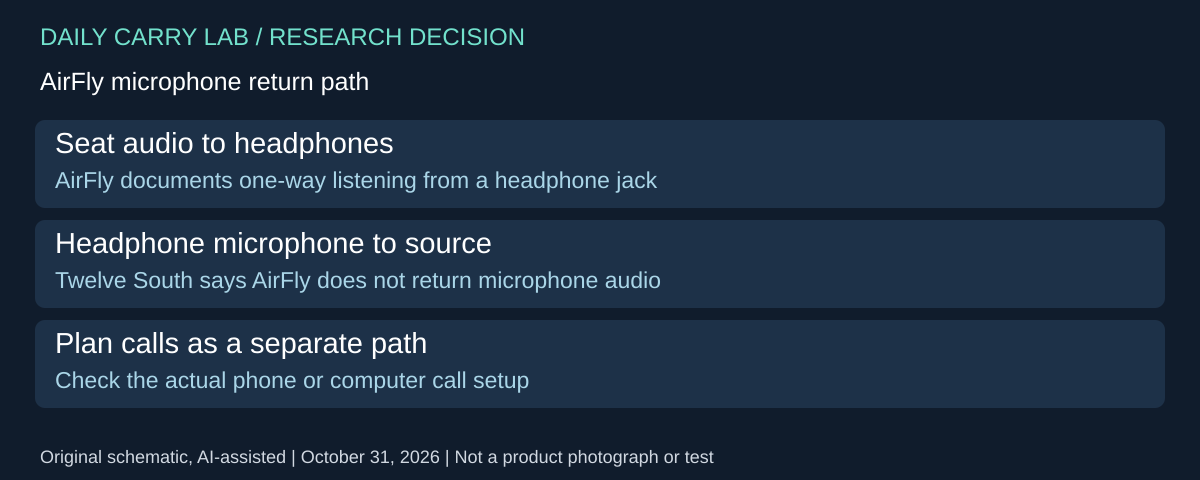
A listening transmitter does not establish a microphone return path
Before choosing AirFly to combine a flight-listening kit and a call kit, separate the two signal directions. Twelve South’s microphone and calls guidance, checked October 31, 2026, says AirFly devices do not support two-way communication or send microphone audio back to the connected source. Receiving sound in your headphones does not validate an outgoing voice path.
| Required job | What the AirFly source establishes | Purchase consequence |
|---|---|---|
| Listen from a 3.5mm headphone output | Wireless transmission to headphones | Check the seat-jack and pairing requirements above |
| Speak back through the headphone microphone | No audio-input return path | Do not buy AirFly as a microphone adapter |
| Use voice chat in a game | Maker excludes two-way chatting | A listening connection is insufficient |
| Use the same headphones for a later work call | That call needs its own verified phone/computer arrangement | Plan the host and application separately |
This also explains why the receive-mode label above is not evidence of full-duplex conversation. Changing which device supplies audio and carrying microphone audio back during a conversation are different requirements. The cited support statement is general AirFly guidance; it does not provide a new mode-by-mode certification for every newly introduced revision. Obtain explicit model evidence before assuming an exception. It does not establish Relay’s microphone behavior either.
For a useful pre-purchase check, sketch the intended source, transmitter, headphones and outgoing voice connection. Mark which part is supposed to receive speech. If that role has no documented component, resolve it before ordering. Our computer-headphone guide describes a separate Sony call-configuration example; it does not make the airplane adapter a call interface.
Budget and drawback: complete adapter and call-accessory totals are unknown. Retaining direct phone/computer calling may avoid a redundant adapter, but verify the exact application and microphone selection. We have not tested calls, game chat or audio quality, and no workaround through a charging cable or different codec is established here.
Bluetooth on a hearing aid does not establish an AirFly connection
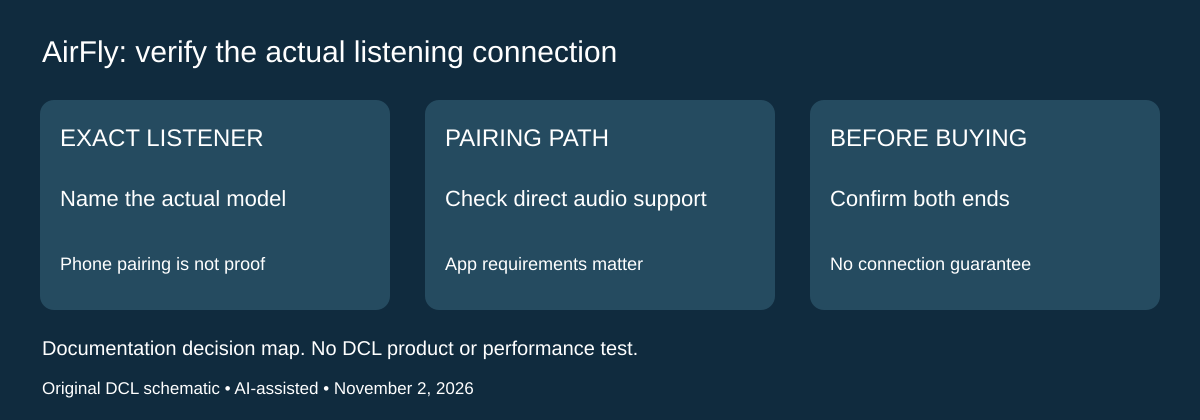
November 2, 2026 connectivity research addition: if the intended listener uses hearing aids, resolve that device’s supported audio path before buying an airplane transmitter. The Bluetooth label on a phone app or device specification does not, by itself, prove it can pair directly with the proposed transmitter. This is an accessory-connectivity check, not advice about hearing treatment or device adjustment.
Twelve South’s AirFly hearing-aid support article, checked November 2, says a connection may be possible when the aids support standard Bluetooth rather than BLE and can enter pairing mode without a smartphone app. The company explicitly does not officially support or guarantee that connection. It says aids requiring an app to pair will not work through this described route, and directs users to their hearing-aid manufacturer when compatibility is uncertain.
| What is actually established | Decision before buying | Unresolved boundary |
|---|---|---|
| The aids pair with a smartphone | Ask their maker about direct transmitter audio for the exact model | Phone connectivity does not prove this path |
| Pairing requires a phone application | The cited AirFly support route excludes app-required pairing | Buying another jack adapter does not remove that requirement |
| The device documentation only says BLE | Do not treat that label as the standard-Bluetooth route described by this article | Obtain exact transmitter and listening-device confirmation |
| Maker confirms a direct pairing mode | Rehearse the exact connection with the selected transmitter | AirFly’s support article still gives no general guarantee |
The support page describes a TX-mode pairing attempt using the hearing aid’s own manual. It does not provide a validated compatibility list for all AirFly revisions or hearing-aid models. Its general wording also does not resolve AirFly View’s separately advertised Auracast mode above. Do not turn this older family support statement into either approval or rejection of every possible newer broadcast-audio arrangement. That would need its own exact-device evidence.
For planning, write down the aid model, proposed transmitter model and the audio output on the actual entertainment source. Ask the listening-device maker which direct audio methods that combination supports before purchasing on a family-name promise. If a separate accessory is required, establish its identity and power needs rather than treating a Bluetooth transmitter as an automatic replacement. We have not qualified such an accessory here.
Budget and drawback: current complete-kit prices are unknown. Confirm the connection before paying for a transmitter, adapter or additional charging lead. A functioning seat jack settles only the wired source side; it says nothing about the listening device’s pairing requirements. We have not tested hearing-aid audio, pairing, listening quality or any medical function, and this section approves no specific hearing aid or retailer package.
Shop the researched models
These Amazon links are affiliate links. Daily Carry Lab may earn a commission from qualifying purchases. Match the model and included contents to your needs; this guide is based on manufacturer-source research, without hands-on testing.
-
Twelve South AirFly Pro 2 (white, standard)
Check Twelve South AirFly Pro 2 (white, standard) on Amazon -
Avantree Relay BTTC-218 (black)
Check Avantree Relay BTTC-218 (black) on Amazon
Sources and limits
This guide compares published specifications and source documentation. Daily Carry Lab has not performed hands-on tests of the products in this guide. Consult the dated sources and verify the exact model and current terms before buying.
- airfly-pro2 primary documentation
- airfly-codecs primary documentation
- relay-overview primary documentation
- relay-guide primary documentation
- airfly primary documentation
- October 29 editorial-airplane-bluetooth-transmitter primary documentation
- A listening transmitter does not establish a microphone return path primary documentation
- TwelveSouth AirFlywithHearingAids support:conditionalstandardBluetooth/noapp/noguarantee
Related guides
iPhone 18 Pro: Wrist Strap or Crossbody Strap, with the right case
Compare exact Apple Wrist and Crossbody strap packages for iPhone 18 Pro by attachment, length, complete cost and limitations.
Portable label makers: choose phone control or a built-in keyboard
Compare Brother PT-P300BT CUBE and PT-H110 by phone dependence, TZe tape widths, power and cable-label workflow.
Travel AA/AAA chargers: match the cells, slots and USB input
Compare four-slot AA/AAA charging systems by exact chemistry and USB input. Includes conditional XTAR BC4 research and explicit operating-manual limits.
USB-C bike front lights: compare modes, mounts and charging
Compare Lezyne Micro Drive 800+ and Fenix BC15R using exact modes, rated runtime, battery design and mounting limits, without road-certification claims.