
By Daily Carry Lab. Primary documentation checked October 15, 2026 (Pacific).
Affiliate disclosure: As an Amazon Associate, Daily Carry Lab earns from qualifying purchases. Retailer links may earn a commission at no extra cost to you.
Research disclosure: We have not tested these products. We select exact models using manufacturer documentation, documented compatibility and the practical decisions below. No DCL ratings, measured results or health outcomes are claimed.
For a laptop call, choose the light’s power source and mounting arrangement before its headline brightness. A USB-powered panel avoids a separate battery to charge, while a rechargeable clip light can work without occupying the laptop’s power connection. Neither design guarantees a better picture in your room; webcam exposure, placement and other lighting still matter.
We selected Logitech Litra Glow, model VU0061 / part946-000001, and Lume Cube Video Conference & Creator Lighting Kit, LC-VC2 as identified in the product imagery, because the manufacturers document different power and mounting approaches. They are LED panels rather than literal circular ring lights. The shape matters less here than usable placement for a laptop call. We have not tested either product’s brightness, runtime, mounting stability or camera results.
Compatibility, power and mounting
Scroll horizontally to read all comparison columns →
| Exact product | Published color-temperature evidence | Power approach | Mount included or documented | Main constraint |
|---|---|---|---|---|
| Logitech Litra Glow VU0061 | 2700–6500K | USB powered;Logitech recommends USB3.0 supplying5V/1A | Monitor mount with height/reach adjustment;removable to expose1/4-20 thread | Maximum output can vary on alternate power sources |
| Lume Cube Video Conference & Creator Kit LC-VC2 | Current kit page confirms adjustable color temperature;numeric range not confirmed for this exact current kit | Rechargeable battery;manufacturer also describes external USB power | Spring-loaded laptop clip;Panel Mini light and softening diffuser listed | Verify exact kit revision,temperature range and cable/charging connector before ordering |
The Litra Glow specification lists250lumens maximum, a USB-C-to-USB-A cable and the monitor mount. Logitech’s power guidance recommends a direct USB3.0 connection for maximum brightness and software control. A connector adapter alone does not establish sufficient USB power.
The Lume Cube kit page lists the light,clip,diffuser,USB cable and USB-C adapter. An included USB-C adapter is not proof that the light itself has a USB-C charging socket. Check that detail for the unit offered. We do not infer a measured runtime from its battery or repeat a maximum runtime without the operating brightness and conditions.
Do not mix revisions or substitute a discontinued light
Lume Cube’s original2020 Panel Mini announcement documents3200–5600K and a USB Type-C charging cable. That is useful historical identification, but it does not independently establish the exact specification or bundle of every later kit. The current kit page identifies a Panel Mini light without supplying the numeric temperature range in the reviewed specification text. We leave that range unknown for the current kit rather than silently transferring it.
We also checked Elgato Key Light Mini. Its official product page explicitly marks it discontinued with no direct replacement. It is excluded from our current purchase shortlist. Existing owners can still use its support documentation; that is different from treating it as a readily available new purchase.
Which power setup fits the call?
Consider Litra Glow if the laptop or dock has a suitable spare USB connection and the monitor mount fits your screen. Logitech’s documented mount can telescope,extend and swivel. Check that it does not cover the webcam,press on a fragile panel or obstruct the lid. DCL has not verified its fit on your laptop.
Consider the Lume Cube kit if you value a rechargeable light and the supplied spring clip. Confirm the exact revision and cable needs before buying. Battery operation adds a charging task and a runtime limit that depends on brightness. External USB power still requires a compatible supply; the current page does not justify assuming any low-power laptop socket will support every operating mode.
Will the light fit your host connection and screen?
Separate three requirements before buying Litra Glow: electrical power, a computer data connection for software control, and physical placement. A phone power adapter can supply electricity without connecting the light to G HUB. Logitech’s power-source guidance, rechecked October 20, says to use the computer’s USB 3.0 port or a Mac Thunderbolt dock for G HUB configuration. It lists banks, phone adapters, monitor ports and PC-connected hubs as alternatives, with variable maximum brightness and a recommendation against those alternatives for maximum output.
Scroll horizontally to read all comparison columns →
| Planned setup | What to establish before purchase | Reason to reconsider the setup |
|---|---|---|
| Laptop with a suitable spare USB port | Power at the specified 5V/1A and a host connection | A physically fitting adapter alone answers neither the power nor software question |
| Phone adapter or bank at a temporary desk | Accept the alternate-source brightness limitation | Electricity alone does not provide the computer connection needed for G HUB |
| Monitor USB port or ordinary hub | Check the actual upstream connection and available power | Do not treat every monitor port as equivalent to Logitech’s recommended connection |
| Separate tripod behind the display | Match the exposed 1/4-20 thread and an appropriate support | The supplied monitor mount and a separately chosen tripod solve different fit problems |
There is also a measurable placement envelope to check. Logitech’s specification lists 4 inches (101.6mm) of vertical telescoping, 2 inches (50.8mm) of horizontal extension and a 360-degree swivel top. The supplied cable is 1.5m USB-C to USB-A. These dimensions describe adjustment and reach; they do not establish a maximum screen thickness or safe fit on every lid.
Measure the cable route from the intended port with enough slack to open the laptop. Check whether the required light position falls within the mount’s adjustment, and whether the camera remains clear. If those checks fail, compare a suitable separate support before buying a brighter panel. This is a fit-planning method, not a DCL mounting test. It does not resolve the Lume Cube kit’s separate revision and connector uncertainties.
Budget and drawbacks
Scroll horizontally to read all comparison columns →
| Setup | Budget evidence checked October15 | Additional items to price | Buying drawback |
|---|---|---|---|
| Litra Glow at the laptop or dock | Current exact-part checkout total unknown | Suitable USB port or supply;optional tripod if preferred | USB-powered arrangement adds a cable;alternate power may reduce maximum output |
| LC-VC2 battery/clip kit | Current exact-revision checkout total unknown | Any missing charging cable or supply | Current numeric color range and connector need confirmation;do not use historical kit photos as proof |
| Existing room light or window | No new light purchase required | Placement and a way to manage changing light | Ambient conditions may vary across calls;no product-free result is guaranteed |
Start with a low comfortable setting,place the light where the webcam view benefits,and check the actual call preview. These are setup suggestions,not measurements or eye-health claims. For the camera side of the kit, see our travel webcam guide.
Compare the packed light with the mounted light
The light you can fit above a screen is not necessarily the easiest kit to carry. Logitech’s Litra Glow specification, rechecked October 24, 2026, separates the light without its monitor mount from the assembly at full extension. Use those configurations separately when comparing a flat panel with a larger desk light.
Scroll horizontally to read all comparison columns →
| Published Litra Glow configuration | Dimensions | Published weight | Packing implication |
|---|---|---|---|
| Without monitor mount | 90.5 × 90.5 × 27.5 mm | 99 g | Describes the light body; another support may still be needed |
| With monitor mount, fully extended | 365.9 × 90.5 × 43.5 mm | 177 g | Describes an extended assembly, not a confirmed folded travel envelope |
| Your complete call kit | Measure after choosing the support and cable route | Add the actual cable, case and any supply | Neither published weight is the whole packed kit |
The difference between the two published weights is 78 g by subtraction. That is a comparison of Logitech’s listed configurations, not a DCL weighing of the removable mount. Similarly, do not use the full-extension height as evidence that the assembly collapses to a particular travel dimension; the source does not establish that packed shape.
If your bag has a shallow accessories pocket, compare the bare light’s thickness with the remaining space, then account for its connector and protection separately. If you remove the monitor mount, the documented quarter-inch thread allows a different support arrangement, but that support adds its own size, mass and purchase cost. A lighter bare panel is not automatically a lighter usable kit.
Budget and drawback: retain the supplied mount if it already fits the intended display and luggage. Compare a separate support only when placement requires one; current complete-kit prices remain unknown. Keep the earlier USB-power and software-connection checks. This section adds a packing comparison, not a measured durability, screen-fit or lighting-quality result. We have not weighed a complete Litra Glow kit or established a numeric mass comparison with the LC-VC2 kit.
Key Light Neo brightness depends on the supplied power path
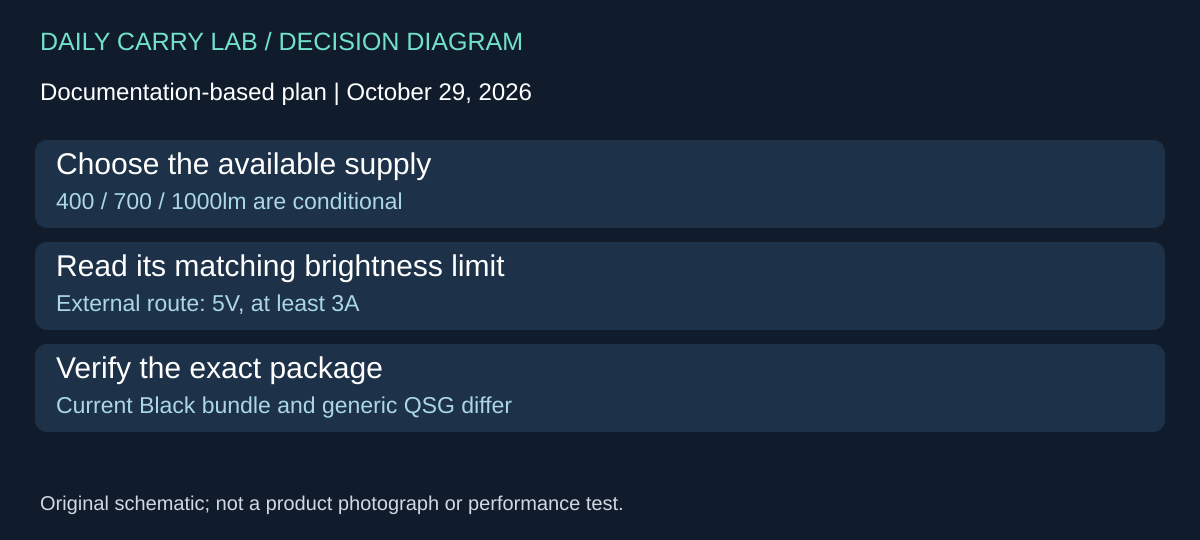
A larger brightness headline may justify a different light only if the rest of the call kit can provide its required power. Key Light Neo Black, 10LAJ9911, adds a documented alternative to the Litra Glow and LC-VC2 discussion above. Elgato’s exact Black page, checked October 29, 2026, lists three different output levels according to source. The 1,000-lumen figure is not the light’s guaranteed output from every laptop socket.
Scroll horizontally to read all comparison columns →
| Neo supply listed by Elgato | Manufacturer brightness figure | What to budget or check | Drawback |
|---|---|---|---|
| USB-A, 4.5W | 400 lumens | A suitable port and cable route | Lower ceiling than the headline |
| USB-C, 7.5W | 700 lumens | The actual source’s available power | Connector shape alone does not prove that allocation |
| External 3A supply, maximum 12W in the brightness table | 1,000 lumens | Appropriate supply and another outlet/cable arrangement | More kit than a single laptop connection |
Elgato’s Neo Quick Start Guide, page 4, specifies 5V and at least 3A for that external-supply arrangement. Its hardware instructions also describe changing brightness and color temperature with the dial and saving a preset with a three-second button hold. Those controls offer a route to investigate when installing another lighting app is undesirable. They do not certify that the mount fits your screen or that a particular brightness is comfortable or useful.
Package evidence needs its own check: the generic QSG labels the USB-C computer cable and external supply as not included, while the current Black page lists a cable, USB extension and USB adapter. Do not transfer the QSG’s package exclusions into a blanket claim about this newer color bundle. Verify the exact offered configuration before buying missing accessories. The external supply’s inclusion in an unreviewed retailer offer is unknown.
For a travel desk, first decide whether the existing Litra arrangement already supplies enough usable light in your actual call preview. If so, a higher ceiling alone is a weak reason to replace it. If investigating Neo, choose the power path before comparing the hardware price, then measure its placement and cable route. DCL has not compared illumination, webcam exposure, screen fit or eye comfort between these products.
Budget and drawback: full Neo, supply and support totals remain unknown; no exact retailer purchase is admitted. A documented lumen rating is not a head-to-head lighting result. Compare the actual port arrangement and required accessories, and preserve the Litra power limits and LC-VC2 revision uncertainties above. This source-based alternative makes no battery-runtime or hands-on performance claim.
Shop the researched models
These Amazon links are affiliate links. Daily Carry Lab may earn a commission from qualifying purchases. Match the model and included contents to your needs; this guide is based on manufacturer-source research, without hands-on testing.
-
Logitech Litra Glow
Graphite · 946-000001
View Logitech Litra Glow — Graphite · 946-000001 on Amazon
Sources and limits
This guide compares published specifications and source documentation. Daily Carry Lab has not performed hands-on tests of the products in this guide. Consult the dated sources and verify the exact model and current terms before buying.
Related guides
iPhone 18 Pro: Wrist Strap or Crossbody Strap, with the right case
Compare exact Apple Wrist and Crossbody strap packages for iPhone 18 Pro by attachment, length, complete cost and limitations.
Portable label makers: choose phone control or a built-in keyboard
Compare Brother PT-P300BT CUBE and PT-H110 by phone dependence, TZe tape widths, power and cable-label workflow.
Travel AA/AAA chargers: match the cells, slots and USB input
Compare four-slot AA/AAA charging systems by exact chemistry and USB input. Includes conditional XTAR BC4 research and explicit operating-manual limits.
USB-C bike front lights: compare modes, mounts and charging
Compare Lezyne Micro Drive 800+ and Fenix BC15R using exact modes, rated runtime, battery design and mounting limits, without road-certification claims.