By Daily Carry Lab. Manufacturer research checked October 13, 2026 (Pacific).
October 28, 2026 research update: For Apple MagSafe 3, a steady amber light and repeated amber flashing call for different checks. Resolve the documented charging issue before buying another cable; this advice does not apply to an unverified proprietary magnetic tip.
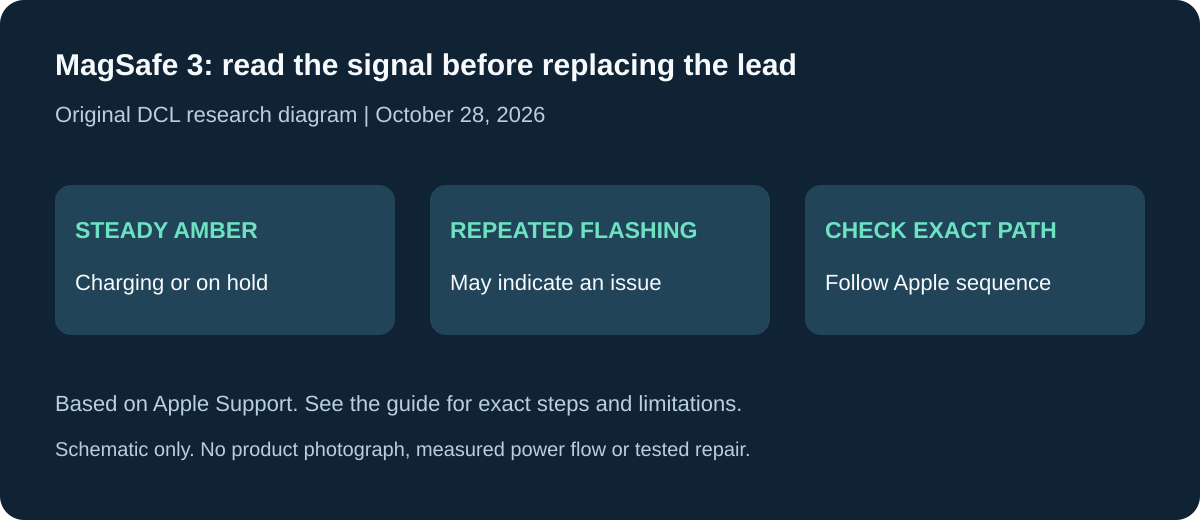
Original DCL research diagram, October 28, 2026. Schematic only; no product photograph, measured power flow or tested repair.
Affiliate disclosure: As an Amazon Associate, Daily Carry Lab earns from qualifying purchases. Retailer links may earn a commission at no extra cost to you. Manufacturer links here document our sources.
First find where the magnets are. A detachable tip changes the mating connection, a magnetic jacket helps coil an ordinary cable, and MagSafe 3 is a dedicated Apple charging connection. These are three different decisions even when a retailer calls all of them magnetic cables.
We selected documented storage and ecosystem examples to explain the distinction. We have not tested retention force, wear, charging safety or data performance. We do not recommend a proprietary detachable-tip model without exact electrical and function evidence.
Three designs, three checks
| Design | What the magnet does | Main compatibility check |
|---|---|---|
| Detachable proprietary tip | Holds a replaceable connector to the cable head | Exact tip, cable and supported power/data protocol |
| Magnetic storage jacket | Keeps a conventional cable coiled | Ordinary connector endpoints and electrical specification |
| Apple MagSafe 3 | Attaches a charging lead to a compatible Mac | Exact Mac’s MagSafe 3 compatibility and required adapter |
A tidy coil does not establish a high charging rate. A connector that fits mechanically does not establish data or video. Separate the packing benefit from the electrical task before comparing cost.
Storage example: Scosche MagStack SCABM3
Scosche documents SCABM3 as a three-foot USB-A to USB-C cable with a magnetic sleeve for coiling. It is a design example for keeping a cable together, not evidence for the historical Statik USB-C-to-C products or their claimed wattages. Scosche SCABM3.
The USB-A endpoint matters if your travel charger offers only USB-C sockets. Check the charger first; do not buy this example merely because your phone has USB-C. The source reviewed here does not establish a maximum charging profile, data rate or display function. We therefore make no fast-charging, SSD or monitor recommendation for it.
A storage cable may be worth considering when coiling and retrieving a lead is your actual inconvenience. Compare its endpoint compatibility and packed arrangement with an ordinary cable held by a strap. We have not measured whether either packs smaller, tangles less or lasts longer.
Ecosystem example: Apple MagSafe 3
Apple’s two-metre USB-C to MagSafe 3 cable, represented by the Space Gray MW623AM/A product page, is for compatible Mac charging. It is not a universal magnetic USB-C tip for phones. Check your Mac’s port and charging requirements rather than treating “MagSafe” as a single interchangeable connector family. Apple MagSafe 3 cable.
The useful comparison is whether your laptop can use this dedicated charging connection while leaving its other ports available. This guide does not establish an exact delivered wattage for every Mac and adapter combination. Choose the adapter and cable as a documented chain.
Detachable tips need model evidence
For a proprietary tip, ask for the complete model number, connector configuration, negotiation method and supported functions. Do not infer USB Power Delivery from a wattage printed in a listing. Do not infer video from a USB-C-shaped tip. A family name may cover several electrically different variants.
USB-IF’s compliance guidance sets requirements for its Type-C certification program, including certified connectors and restrictions on proprietary power negotiation. That policy is not a certificate for any model pictured in an advertisement, nor an individual safety test. USB-IF compliance updates.
Without model-specific evidence, we cannot say a detachable cable preserves the functions of your original cable. If your kit needs a defined charging or data capability now, compare documented conventional cables in our USB-C cable guide.
Budget and drawbacks
| Choice | Budget evidence | Buyer benefit to evaluate | Limitation |
|---|---|---|---|
| Magnetic storage sleeve | Current US price not retained | Easier organization for your particular kit | Does not add electrical capability |
| MagSafe 3 lead | Current US price not retained; include adapter cost | Dedicated charging for a compatible Mac | Ecosystem-specific connection |
| Detachable tip system | Exact verified model and cost unknown here | Fewer plug insertions, if supported by your setup | No buying recommendation without exact function evidence |
Price comparisons should include spare tips or the required adapter where relevant. No savings or durability advantage is assumed. Keep the number of cable standards in your kit manageable, and carry a documented fallback when an unverified accessory would otherwise be your only connection.
For packing space, compare your actual lead and charger measurements with the tech-pouch checklist. This is one magnetic-design guide; separate phone, desk or travel versions would repeat the same core decision.
MagSafe 3: distinguish a charging state from a reason to replace the cable
A magnetic lead is not automatically faulty because its light is amber. Apple’s MagSafe charging guidance, rechecked October 28, 2026, says an amber glow can mean the battery is charging or charging is on hold. It separately identifies repeated amber flashing on a MagSafe 3 connector as a possible charging issue. Check which signal you have before spending on another lead.
| Observation | Manufacturer distinction | Buying consequence |
|---|---|---|
| Amber glow | Charging or charging on hold | Colour alone does not establish a failed cable |
| Repeated amber flashing on MagSafe 3 | May indicate a charging issue | Follow the exact recovery sequence before deciding what to replace |
| Another charging method works | Apple still identifies possible software incompatibility when the original keeps blinking | A working alternate path alone does not prove the original cable is physically broken |
| A proprietary detachable USB-C tip behaves differently | This Apple procedure does not document that product | Obtain its own exact instructions; do not transfer MagSafe controls or signals |
For the MagSafe 3 flashing case, Apple gives this sequence: disconnect the cable from the Mac and adapter, and disconnect the USB-C adapter from the wall. Wipe the MagSafe 3 port and connector with a dry cloth; ensure they are dry and free of debris. Also check the adapter’s USB-C port and USB-C connector for debris. Restart the Mac, reconnect the adapter to the wall and the cable to both adapter and Mac, then try charging again. This is the manufacturer’s procedure, not a repair that DCL has tested.
If flashing continues, Apple says to try another MagSafe 3 cable or USB-C cable. It also directs readers to possible software incompatibility when another method works but the original continues blinking. Follow that support path rather than using the comparison as an automatic diagnosis that the first cable must be replaced. USB-C charging remains conditional on the exact Mac supporting it; this guide does not establish every model’s alternative input or fastest charging mode.
Apple additionally explains that a magnetic power port can attract metal objects. Its dry-cloth and disconnect instructions should not be reinterpreted as permission to probe contacts with a tool, use liquid cleaners or disassemble a connector. A nonworking path that remains unresolved belongs with the maker’s support guidance; buying a higher-wattage adapter does not identify the cause.
Budget and drawback: a replacement lead, another supply and service have different costs, all unknown here. First distinguish the state and follow the documented checks with equipment whose compatibility is established. A magnetic storage sleeve still only changes packing, and a proprietary tip still needs its own electrical evidence. No new product ranking, tested repair, charging-speed promise or retailer mapping is added.
Sources and limits
This guide compares published specifications and source documentation. Daily Carry Lab has not performed hands-on tests of the products in this guide. Consult the dated sources and verify the exact model and current terms before buying.
Related guides
iPhone Duo wired charging kit: adapter, included cable and complete cost
Build a complete iPhone Duo wired kit using the included cable; understand Apple A3351/MGKN4AM/A, dated cost and fast-charge test conditions.
Ethernet wiremap testers: what PASS does and does not tell you
Use an RJ45 wiremap tester to investigate wiring faults while keeping network speed, PoE and cable certification separate.
Action-camera microSD cards: match class, capacity and exact revision
Compare exact 256GB SanDisk Extreme and Samsung PRO Plus revisions by camera requirements, speed classes and offload limits, without speed-test claims.
USB-C cable testers: wiring checks, e-markers and their limits
Compare Bit Trade One Checker 3 and Lite by cable wiring, e-marker readout and port diagnosis. Learn what neither establishes about throughput or sustained power.