By Daily Carry Lab. Primary documentation checked October 13, 2026 (Pacific).
Affiliate disclosure: As an Amazon Associate, Daily Carry Lab earns from qualifying purchases. Retailer links may earn a commission at no extra cost to you. The manufacturer links here are evidence sources.
Research disclosure: This is a primary-documentation guide, not hands-on testing. Specifications and battery figures come from manufacturers. We assign no DCL rating, fit-test result or performance score.
An angled USB-C connector can route a cable along the edge of a desk, but its shape tells you nothing about video support. First establish a working display connection. Then decide whether an angled cable improves the layout without blocking another port or pushing against the stand. A high charging wattage does not establish a video path.
We selected Cable Matters’ 20Gbps 90 Degree Angled USB-C Cable, product ID 201345, because its own page explicitly addresses DisplayPort Alt Mode. The second option below is its flat right-angle adapter: an accessory for an existing cable, not another cable pick. The former article’s magnetic and retractable charging products are excluded because their portable-monitor video capability was not substantiated here. This is a connection guide, not a ranking of picture quality or durability.
Separate 60W power, higher power and video
USB-IF compliance guidance identifies 60W and 240W cable power labels. These labels describe power capability; they do not promise that your charger and device negotiate the cable ceiling. A 240W cable does not force a phone to take 240W, and buying a higher-capacity cable cannot raise a low-power charger’s output.
A USB 2.0 charging cable and a video-capable cable can have similar plugs and power labels. Confirm the exact data and video specification separately. USB-IF’s power-logo guide treats USB 2.0 power logos separately from combined data/power markings. Neither a wattage nor an electronic marker is a substitute for checking the documented video path. We did not inspect the electronic markers inside these products or establish their USB-IF certification; ask for exact-model documentation rather than assuming compliance from a retailer photograph.
If your device and charger need no more than 60W and the connection is only for charging, a documented suitable 60W cable may be sufficient. For higher-power devices, verify the required cable capability against the charger and device specifications. The 201345 candidate below is a manufacturer-described 240W cable, not a claimed 60W-only product. Its relevance is its independently documented angle and video support.
Establish compatibility in this order
| Check | What must be true | What an angle cannot solve |
|---|---|---|
| Laptop output | The selected USB-C port must support the monitor’s video path | A charging-only port does not gain video support |
| Monitor input | Its USB-C input must accept video; a separate power-only socket is not interchangeable | A connector fitting the socket is insufficient |
| Cable capability | The exact cable must document video support | A 240W label establishes neither video nor guaranteed display mode |
| Power | The monitor must receive its required power through the documented input arrangement | An angled cable cannot increase the host’s available power |
| Physical clearance | The connector must fit beside the case, stand and neighboring sockets | Reversing the plug may change cable direction; measure both orientations |
If your monitor uses HDMI for video and USB-C only for power, follow that documented two-cable arrangement. Do not replace it with an arbitrary USB-C cable expecting a picture. The portable-monitor guide covers the display and host decision; this article focuses on the connection geometry after that decision.
Compare the documented angled options
| Option | Manufacturer capability | Useful reason to compare | Drawback or unresolved detail |
|---|---|---|---|
| Cable Matters 201345 20Gbps angled cable | USB 3.2 Gen 2x2 up to 20Gbps; up to 240W PD; video possible with DP Alt Mode at both devices | One integrated cable avoids adding a separate angle joint | Its FAQ does not specify display resolutions; it does not provide Thunderbolt/USB4 40Gbps data rates |
| Cable Matters flat 40Gbps right-angle adapter, 2-pack | Advertised up to 40Gbps, 240W and video with compatible devices and cable | Keep an already suitable cable if an adapter solves the geometry | Adds a joint and rigid projection; whole-chain compatibility and mechanical fit remain untested |
Sources: 201345 manufacturer page and flat adapter documentation. Cable Matters advertises the adapter for Thunderbolt 3/4 and USB4; that claim does not upgrade the attached cable or host. We do not assign the adapter’s maximum video mode to the 201345 cable.
The 201345 page offers 3- and 6-foot selections. Confirm the exact ordered length and connector photos. A longer cable is not automatically better for a portable display: measure the actual route from laptop to monitor, including the slack needed to move the stand. Choose enough slack to avoid tugging without creating a loop that catches your bag.
Check the geometry before adding a rigid adapter
Place the monitor in its intended landscape or portrait position. Identify which side of the port the cable must follow and whether the stand folds into that space. Check the laptop separately; an angle that works at the monitor may cover the laptop’s neighboring connector. The plug can be reversible while its molded elbow still interferes with the case in one orientation.
Avoid treating an adapter as a handle or carrying the monitor with a cable pulling on its port. Disconnect before packing if the rigid projection catches on the sleeve. These are practical fit checks for the buyer, not DCL stress-test results. Neither the cable’s bend reduction claim nor an adapter’s metal shell proves long-term port protection.
For troubleshooting, first reproduce a working picture with the monitor’s supplied or otherwise documented cable. Then introduce only the angled component. Check the operating system’s display settings and the monitor input selection if the screen stays blank. If power is insufficient, use the monitor’s specified power arrangement rather than assuming a higher-wattage cable will create power at the host. See the USB-C cable guide for the difference between charging and data specifications.
Budget and selection
| Approach | Dated price evidence, October 13, 2026 | Added cost to check | When it makes sense |
|---|---|---|---|
| Keep the working supplied cable | No replacement purchase if owned | No new angled component | Prefer this if routing is already comfortable |
| Buy the exact 201345 angled cable | Current exact checkout price not established | Chosen length and shipping | Compare when a single integrated video cable solves clearance |
| Add the flat adapter | Current exact checkout price not established | Adapter plus any unsuitable cable replacement | Compare only after checking the full chain and rigid fit |
There is no supported price ceiling or cheapest-product claim. Choose the simplest working connection that fits your actual monitor and laptop. If the supplied cable already works and does not obstruct the stand, changing it may bring little benefit.
An angled USB4 label does not promise a 40Gbps connection
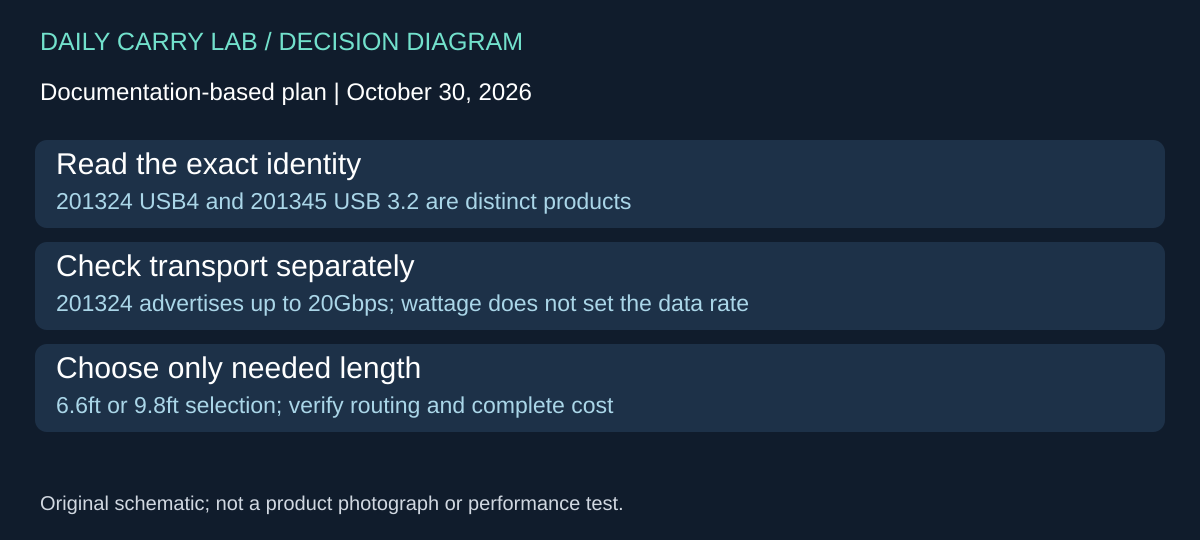
Cable Matters’ 201324 Right Angle USB4 Cable is distinct from the 201345 USB 3.2 Gen 2x2 cable above. Its exact product page, checked October 30, 2026, lists up to 20Gbps, up to 240W and conditional video support. “USB4” in the name is not a 40Gbps or 80Gbps promise.
| Choice | Documented distinction | Buyer check |
|---|---|---|
| 201324 | USB4; listed 20Gbps ceiling; 6.6ft and 9.8ft selections | Match exact length and required host/device mode |
| 201345 | USB 3.2 Gen 2x2, also listed up to 20Gbps | Same headline number does not establish identical transport support |
| Existing suitable cable | No new purchase if it already works | Keep it unless angle or reach solves an actual problem |
For a dock or SSD, write down the required data mode before choosing by elbow shape. For a screen, retain the host/video/power checks above; the cable’s advertised maximum is not a guaranteed display mode. Choose the shortest suitable offered length that reaches comfortably. Current exact delivered totals are unknown. We have not measured either cable’s throughput, fit or durability, and no new retailer identity is approved.
Sources and limits
This guide compares published specifications and source documentation. Daily Carry Lab has not performed hands-on tests of the products in this guide. Consult the dated sources and verify the exact model and current terms before buying.
Related guides
iPhone Duo wired charging kit: adapter, included cable and complete cost
Build a complete iPhone Duo wired kit using the included cable; understand Apple A3351/MGKN4AM/A, dated cost and fast-charge test conditions.
Ethernet wiremap testers: what PASS does and does not tell you
Use an RJ45 wiremap tester to investigate wiring faults while keeping network speed, PoE and cable certification separate.
Action-camera microSD cards: match class, capacity and exact revision
Compare exact 256GB SanDisk Extreme and Samsung PRO Plus revisions by camera requirements, speed classes and offload limits, without speed-test claims.
USB-C cable testers: wiring checks, e-markers and their limits
Compare Bit Trade One Checker 3 and Lite by cable wiring, e-marker readout and port diagnosis. Learn what neither establishes about throughput or sustained power.